
The MSI GeForce RTX 5060 Ti 16G Shadow 2X OC Plus is a dual-fan desktop graphics card using NVIDIA’s Blackwell-based RTX 5060 Ti with 16GB of GDDR7 memory, a factory boost clock of 2,602 MHz and support for DLSS 4 Multi Frame Generation. It is a strong fit for 1080p gaming and for 1440p gaming with DLSS, and the 16GB version avoids the memory limit that Notebookcheck warns about on the 8GB model.
This article covers the exact Amazon.in listing for the 16GB model (ASIN B0F8BR2H6Z, MSI part number V535-003R). It is based on NVIDIA’s official RTX 5060 family page, NVIDIA’s DLSS page, MSI’s official product page, the Amazon.in listing data, TechSpot’s specification database and Notebookcheck’s review of a sister MSI card, all checked on 17 October 2026. It is not based on hands-on testing. MSI’s separate specification page could not be opened during research because the site returned a rate-limit error, so a few card-specific figures are attributed to the Amazon.in listing.
Short verdict: if you want a modern mid-range NVIDIA card with plenty of VRAM, a single 8-pin power connector and Frame Generation support, this is a sensible choice. If you have a PCIe 3.0 motherboard, a power supply below NVIDIA’s 600W guidance, or you play mainly at 4K, read the caveats below first.
Key specifications
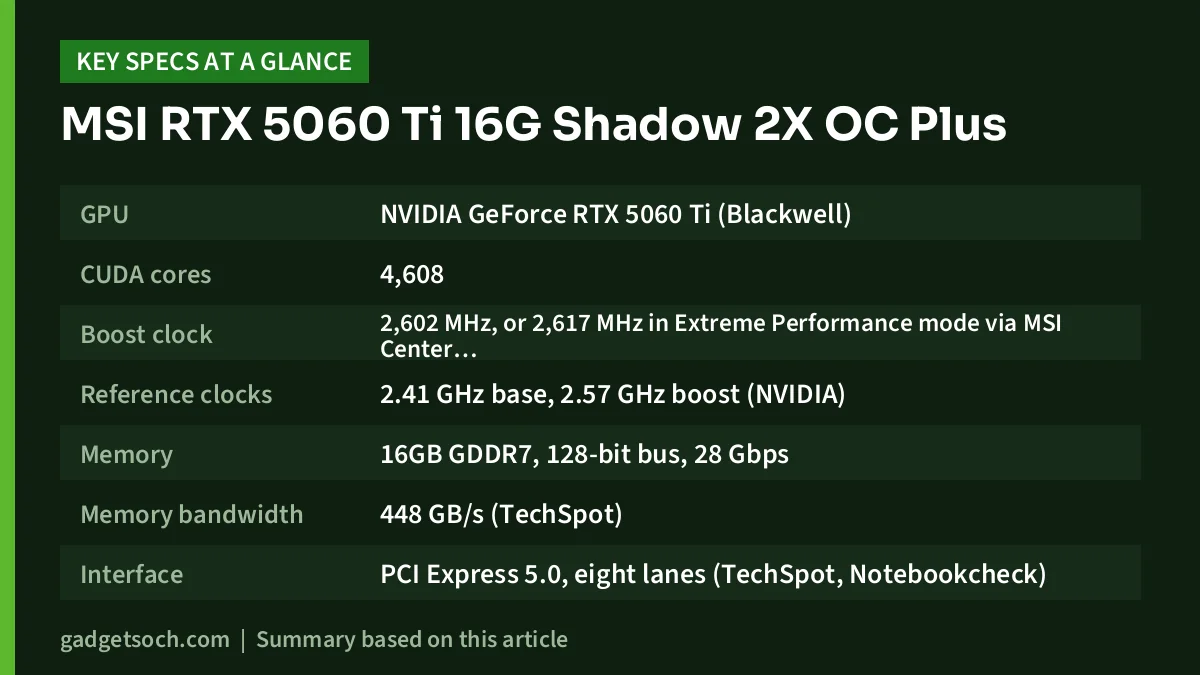
| Specification | MSI RTX 5060 Ti 16G Shadow 2X OC Plus |
|---|---|
| GPU | NVIDIA GeForce RTX 5060 Ti (Blackwell) |
| CUDA cores | 4,608 |
| Boost clock | 2,602 MHz, or 2,617 MHz in Extreme Performance mode via MSI Center (MSI) |
| Reference clocks | 2.41 GHz base, 2.57 GHz boost (NVIDIA) |
| Memory | 16GB GDDR7, 128-bit bus, 28 Gbps |
| Memory bandwidth | 448 GB/s (TechSpot) |
| Interface | PCI Express 5.0, eight lanes (TechSpot, Notebookcheck) |
| Outputs | 3x DisplayPort 2.1b, 1x HDMI 2.1b (Amazon.in listing) |
| AI and RT | 759 AI TOPS, 4th-gen RT cores at 72 TFLOPS (NVIDIA) |
| Video engines | 1x 9th-gen NVENC, 1x 6th-gen NVDEC (NVIDIA) |
| Total graphics power | 180W (NVIDIA) |
| Required system power | 600W (NVIDIA) |
| Power connector | 1x 8-pin (TechSpot), NVIDIA also allows a 300W+ PCIe Gen 5 cable |
| Cooling | 2x STORMFORCE fans, heat pipes, nickel-plated copper baseplate, metal backplate, Zero Frozr (MSI and listing) |
| Box contents | Graphics card and quick setup guide (listing) |
| Warranty | 3 years, manufacturer (listing) |
Check the current price of the MSI RTX 5060 Ti 16G Shadow 2X OC Plus on Amazon.in
Quick verdict
- Best for: 1080p and 1440p gamers, plus creators who want 16GB of VRAM and NVIDIA’s newer encoder
- Skip if: you game mainly at 4K, are on an older PCIe 3.0 platform (see the PCIe section below), or your power supply falls short of NVIDIA’s 600W guidance
- Key strengths: 16GB GDDR7, DLSS 4 with Multi Frame Generation, a single 8-pin connector and three DisplayPort 2.1b outputs
- Key limitations: a 128-bit memory bus, a PCIe x8 link, and an RTX 5070 that Notebookcheck measured as clearly faster
Why the 16GB version is the one to buy
NVIDIA sells the RTX 5060 Ti with either 8GB or 16GB of GDDR7. Both use the same 128-bit interface, so the difference is capacity, not speed. Capacity matters because modern games at high texture settings, plus ray tracing and Frame Generation, all consume video memory. When a card runs out, performance can fall sharply.
Notebookcheck’s review of the MSI RTX 5060 Ti 16G Ventus 2X Plus listed the 8GB variant as “best avoided” among its cons and counted the 16GB of VRAM as a strength. The Shadow 2X OC Plus on this listing is the 16GB model, so confirm “16G” in the title and the part number V535-003R before you order, and do not assume an 8GB listing is the same card.
Performance, according to published reviews
Notebookcheck tested the MSI RTX 5060 Ti 16G Ventus 2X Plus, a different MSI cooler on the same GPU, so its results are a reasonable guide to the chip but not to this card’s fan noise or temperatures. The reviewer called the RTX 5060 Ti “an excellent choice for gamers focused on 1080p” and said it handles 1440p well at high settings, either natively or with DLSS, even with ray tracing turned up.
In Notebookcheck’s cumulative synthetic tests, the RTX 5060 Ti was about 26% faster than an Inno3D RTX 4060 Ti Twin X2, while the RTX 5070 was about 42% faster than the RTX 5060 Ti. Those are synthetic results, not game averages, but they show where this card sits: a clear step above the previous generation’s 60 Ti class and a clear step below the RTX 5070.
The Shadow 2X OC Plus has a modest factory overclock. MSI lists a 2,602 MHz boost clock (2,617 MHz with MSI Center’s Extreme Performance mode) against NVIDIA’s 2.57 GHz reference boost. Expect performance very close to any other RTX 5060 Ti 16GB, not a different tier.
DLSS 4 and Multi Frame Generation
NVIDIA lists DLSS 4 for the RTX 5060 Ti, including Super Resolution, DLAA, Ray Reconstruction, Frame Generation and Multi Frame Generation. NVIDIA’s DLSS page also shows Dynamic Multi Frame Generation as an RTX 50-series feature. Frame Generation creates extra frames between rendered ones, which can make motion look much smoother in supported games, while upscaling raises the base frame rate. Notebookcheck listed 1440p Ultra with DLSS 4 and Multi Frame Generation among the card’s strengths.
Generated frames improve smoothness but do not raise native performance, so responsiveness still depends on the base frame rate.
The PCIe x8 question
The listing title mentions a PCI Express Gen 5 x16 interface, which describes the slot the card fits. Electrically, TechSpot’s database lists the RTX 5060 Ti as PCIe 5.0 x8, and Notebookcheck confirmed the card runs at x8 rather than x16, adding that this “shouldn’t have any impact on the card’s performance itself”.
On older PCIe 4.0 or 3.0 boards, the link runs at that older generation’s speed across those eight lanes, so total bandwidth is lower, and the drop is largest on PCIe 3.0. If you are upgrading an older system, check your motherboard’s PCIe generation and consider whether a platform upgrade belongs in your plan.
Cooling and build
MSI describes a STORMFORCE dual-fan cooler with seven claw-textured blades and a circular arc design, heat pipes, a nickel-plated copper baseplate according to the listing, and a reinforced metal backplate with airflow vents. Zero Frozr stops the fans at lower temperatures, so the card can stay silent during desktop use and light work. MSI also mentions DrMOS power stages, thermal pads and extra fuses on its custom PCB.
MSI’s page title mentions a triple-fan design, but its body text, the “2X” name and the Amazon.in listing all describe two fans.
The listing gives an item size of 22.6 x 12.6 cm and a weight of 578 grams, without stating whether these are card or package figures. Check the exact card length and slot thickness on MSI’s specification page and compare them with your cabinet before ordering.
Power supply and connectors
NVIDIA lists 180W total graphics power and a 600W required system power for the RTX 5060 Ti, with either one PCIe 8-pin cable or a 300W-or-higher PCIe Gen 5 cable. TechSpot lists a single 8-pin connector. Notebookcheck noted the RTX 5060 Ti it tested was capped at 180W because MSI did not allow a higher power limit on that model, and praised its low heat output and efficiency.
For Indian buyers upgrading an older prebuilt desktop, the 600W figure is the key check. Some prebuilt systems ship with lower-rated supplies, so read the label on yours and budget for a quality replacement if it falls short.
Display outputs
According to the listing, you get three DisplayPort 2.1b ports and one HDMI 2.1b port. NVIDIA lists support for up to four monitors, up to 4K at 480Hz or 8K at 165Hz with DSC, and HDCP 2.3. The listing instead claims 8K at 120Hz, and its technical details list a 3840 x 2160 maximum resolution, so NVIDIA’s figures are the more reliable reference.
Who should buy it, and who should skip it
- Buy it if you play at 1080p or 1440p and want Frame Generation support with 16GB of VRAM
- Buy it if you stream or edit video and want NVIDIA’s ninth-generation NVENC encoder
- Buy it if you want a mid-range card that runs from a single 8-pin cable
- Skip it if you mainly play at 4K with high settings, where the RTX 5070 or higher makes more sense
- Skip it if your PSU is below NVIDIA’s 600W guidance and you do not want to replace it
- Skip it if you already own an RTX 4060 Ti and are happy with it, since Notebookcheck measured about a 26% synthetic gain, a solid step rather than a new class
Alternatives to compare
Gigabyte GeForce RTX 5060 Windforce OC 8G: NVIDIA lists the RTX 5060 with 3,840 CUDA cores, 8GB of GDDR7, 145W total graphics power and a 550W system requirement. It is a lower-tier option, and its 8GB of memory is the main compromise.
Radeon RX 9060 XT 16GB (ASUS Prime OC or Gigabyte Gaming OC): AMD’s 16GB competitor in this class, listed on Amazon.in with 16GB of GDDR6 and PCIe 5.0. The ASUS Prime OC listing mentions a 2.5-slot design, a dual BIOS switch and 0dB fan stop. It suits buyers who do not need NVIDIA-specific features such as DLSS.
Gigabyte GeForce RTX 5070 Windforce OC SFF 12G: a step up with 12GB of GDDR7 and PCIe 5.0, and the listing says it is NVIDIA SFF-ready. Notebookcheck measured the RTX 5070 about 42% faster than the RTX 5060 Ti in synthetic tests, at the cost of 4GB less VRAM.
Before you order

- Variant: the listing title should say RTX 5060 Ti 16G Shadow 2X OC Plus, and the part number should read V535-003R
- Power supply: NVIDIA asks for 600W system power and one 8-pin PCIe cable
- Cabinet: check card length and thickness on MSI’s specification page
- Motherboard: a PCIe 4.0 or 5.0 x16 slot is ideal because the card uses eight lanes
- Monitor cable: use DisplayPort for high-refresh monitors and HDMI 2.1 for TVs
- Warranty: the listing states a 3-year manufacturer warranty. Keep the invoice and buy from an authorised seller
- Software: install the current GeForce driver, and MSI Center if you want the 2,617 MHz Extreme Performance mode
See the RTX 5060 Ti 16G Shadow 2X OC Plus (16GB) on Amazon.in
Pairing it with a CPU? Our Intel Core i5-12400F review covers a popular six-core gaming processor. If you are weighing a bigger card, our MSI RTX 4070 Ti Gaming X Trio review explains what a higher tier offers.
Frequently asked questions
Is the RTX 5060 Ti 16GB good for 1440p gaming?
Yes, according to Notebookcheck, which found the RTX 5060 Ti handles 1440p well at high settings natively or with DLSS. For 4K, look at faster cards.
Does the MSI RTX 5060 Ti Shadow 2X OC Plus use GDDR7 or GDDR6X?
GDDR7. NVIDIA’s specifications and the listing title both say 16GB GDDR7 on a 128-bit bus. The GDDR6X entry in the listing’s technical details appears to be an error.
What power supply do I need?
NVIDIA lists 600W required system power and 180W total graphics power. The card uses a single 8-pin connector, according to TechSpot’s database.
Bottom line
The MSI RTX 5060 Ti 16G Shadow 2X OC Plus pairs NVIDIA’s mid-range Blackwell GPU with 16GB of GDDR7, a quiet-at-idle dual-fan cooler and modest power needs. It suits 1080p and 1440p gamers well, as long as you account for the x8 link on older boards and the 600W PSU guidance. Check the current price of the MSI RTX 5060 Ti 16G Shadow 2X OC Plus on Amazon.in.
Related reading on GadgetSoch: ASRock Arc B570 Challenger 10GB OC Review: 10GB for 1080p, If Your PC Passes Three Checks, Gigabyte RTX 5070 WINDFORCE OC SFF 12G Review: Specs, Fit and Power Explained and Gigabyte RTX 5060 WINDFORCE OC 8G Review: A Compact 1080p Card With an 8 GB Catch.
Sources
- NVIDIA GeForce RTX 5060 family official page (checked 17 October 2026)
- NVIDIA DLSS page (checked 17 October 2026)
- MSI RTX 5060 Ti 16G Shadow 2X OC Plus official product page (checked 17 October 2026)
- TechSpot GPU specs: GeForce RTX 5060 Ti 16GB (checked 17 October 2026)
- Notebookcheck: MSI GeForce RTX 5060 Ti 16G Ventus 2X Plus review (checked 17 October 2026)
- Amazon.in listing for ASIN B0F8BR2H6Z, plus Amazon.in listings for the alternative cards named above (captured 17 October 2026)




