

The ASRock Intel Arc B570 Challenger 10GB OC is a dual-fan, two-slot graphics card built on Intel’s Xe2-HPG architecture, with 10GB of GDDR6 memory on a 160-bit bus. It suits 1080p gaming and budget content creation, especially if you want more video memory than the usual 8GB at this level. Before buying, check that your motherboard supports Resizable BAR. The card’s PCIe 4.0 x8 interface also means it gets less bandwidth on older PCIe 3.0 boards.
ASRock’s OC version runs a 2600 MHz engine clock, compared with the 2500 MHz graphics clock Intel lists for the B570. It adds 0dB fan stop and a metal backplate, and offers three DisplayPort 2.1 outputs plus one HDMI 2.1a. Intel’s own spec page lists hardware AV1 encoding and decoding, which matters if you stream or edit video.
About this article: it is built from ASRock’s official product page, Intel’s B570 specification and support pages, and the Amazon.in listing, all checked on 17 October 2026. We have not tested the card ourselves and do not quote performance figures.
The short answer
- Buy it if: you game at 1080p, want 10GB of VRAM rather than 8GB, and your PC is a recent platform with Resizable BAR available in the BIOS
- Skip it if: your motherboard is old, has no Resizable BAR option, or only offers PCIe 3.0, or if you rely on software that only accelerates on NVIDIA CUDA
- What stands out: 10GB GDDR6 on a 160-bit bus, XeSS 2 upscaling, AV1 encode and decode, fan stop, a metal backplate, and four outputs
- What holds it back: a PCIe 4.0 x8 link, a 600W PSU recommendation, a 249 mm length, and a GPU driver ecosystem that is younger than NVIDIA’s or AMD’s
Specifications
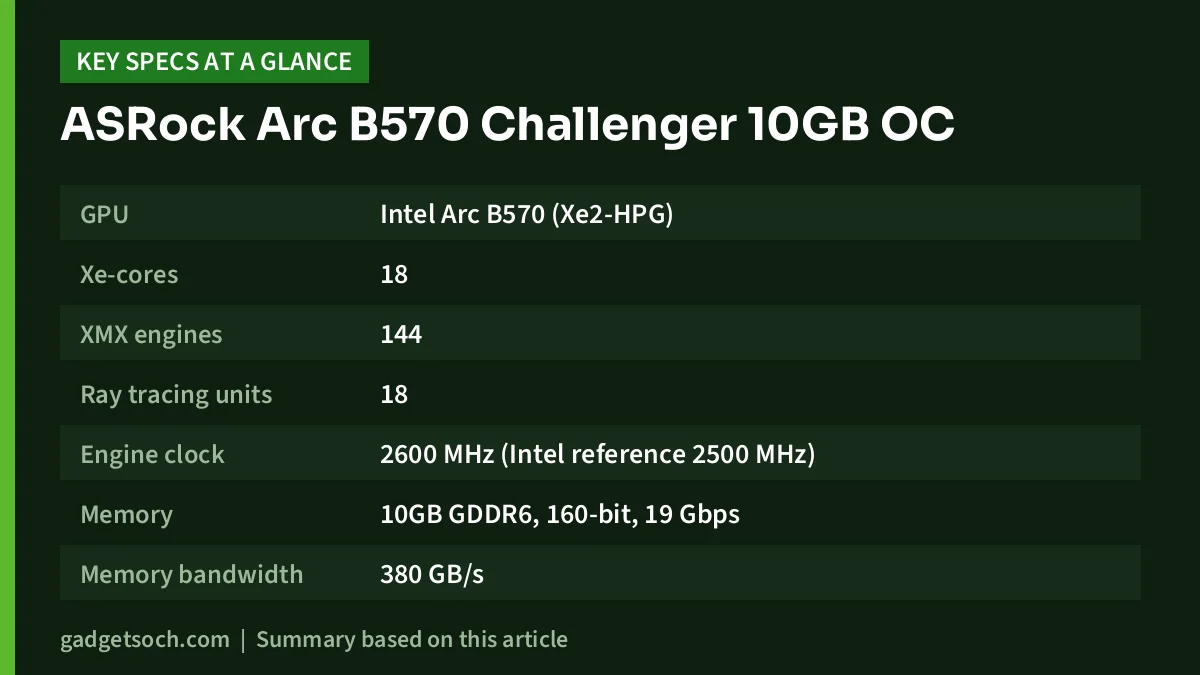
| Spec | ASRock Arc B570 Challenger 10GB OC | Where it comes from |
|---|---|---|
| GPU | Intel Arc B570 (Xe2-HPG) | ASRock, Intel |
| Xe-cores | 18 | Intel |
| XMX engines | 144 | ASRock, Intel |
| Ray tracing units | 18 | Intel |
| Engine clock | 2600 MHz (Intel reference 2500 MHz) | ASRock, Intel |
| Memory | 10GB GDDR6, 160-bit, 19 Gbps | ASRock, Intel |
| Memory bandwidth | 380 GB/s | Intel |
| Bus interface | PCI Express 4.0 x8 | ASRock, Intel |
| Outputs | 3x DisplayPort 2.1, 1x HDMI 2.1a | ASRock |
| Max displays | 4 | ASRock, Intel |
| Max resolution | 7680 x 4320 | ASRock, Intel |
| Total board power | 150W (B570 spec) | Intel |
| Power connector | 1x 8-pin | ASRock |
| Recommended PSU | 600W | ASRock |
| Size | 249 x 132 x 41 mm, 2-slot | ASRock |
| Net weight | 720 g | ASRock |
| Media | AV1, H.265 and H.264 encode and decode | Intel |
| APIs | DirectX 12 Ultimate, OpenGL 4.6, XeSS 2 | ASRock |
| In the box | Quick installation guide | ASRock, listing |
Check the current price of the ASRock Arc B570 Challenger 10GB OC on Amazon.in
Three checks to make before buying an Arc card
Arc cards ask a little more of your platform than most NVIDIA or AMD cards do. These three checks decide whether the B570 is a good buy for your PC.
1. Resizable BAR
Intel’s support article on Resizable BAR says enabling the feature “can result in a performance improvement”. Turning it on usually means updating to the latest BIOS, disabling CSM (Legacy mode) so the PC boots in UEFI mode, and setting Above 4G Decoding and Re-Size BAR Support to Enabled. Intel notes that the option may also be called Smart Access Memory or Clever Access Memory. If your board has no such option, look at the alternatives below instead. One caution: disabling CSM on a Windows installation that was set up in legacy (MBR) mode can stop it booting, so check your disk’s partition style first.
2. PCIe generation
Intel and ASRock both list the B570’s interface as PCI Express 4.0 x8. In a PCIe 4.0 or 5.0 slot it gets its full intended bandwidth. In a PCIe 3.0 slot, the eight lanes run at PCIe 3.0 speed, which is half the bandwidth of PCIe 4.0 x8. The card still works, but if your platform is PCIe 3.0, look for independent tests of the B570 on PCIe 3.0 before you commit.
3. Power supply and space
ASRock recommends a 600W PSU, and the card uses one 8-pin PCIe connector. Intel lists the B570’s total board power as 150W. The card is 249 mm long, 132 mm tall, and 41 mm thick, which ASRock calls 2-slot. Most mid-towers take that length easily, but some compact micro-ATX cases do not.
What the B570 offers for gaming
The headline feature is 10GB of GDDR6 on a 160-bit bus. Intel lists 19 Gbps memory and 380 GB/s of bandwidth. Many cards at this level stop at 8GB on a 128-bit bus. The extra memory gives more headroom for high-resolution textures in recent games and makes the card a little more future-proof as games demand more VRAM.
The Amazon.in listing describes the card as delivering “excellent 1440p gaming”. That is the seller’s claim, and we have not verified it. A cautious reading of the specs puts the B570 as a strong 1080p card that can run some games at 1440p with tuned settings or upscaling. How well it does depends heavily on the game and on Intel’s driver support for that title.
Intel’s XeSS 2 upscaling, which ASRock lists, uses the card’s 144 XMX matrix engines. It does the same job as NVIDIA DLSS or AMD FSR: rendering at a lower resolution and reconstructing a sharper image to raise frame rates. As with any upscaler, XeSS only helps in games that support it.
Creators and streamers
Intel’s spec page lists AV1, H.265 (HEVC) and H.264 hardware encode and decode. AV1 encoding is useful for creators who stream to platforms that accept AV1 or who want smaller recordings at good quality. The 10GB memory also helps in video editing timelines and in local AI tools that support Intel GPUs. If your editing or 3D software only accelerates on NVIDIA’s CUDA, however, an Arc card will not help with those tasks.
ASRock Challenger build and cooling
According to ASRock, the Challenger cooler uses two striped axial fans with a polished bottom surface, ultra-fit heatpipes, and nano thermal paste. Its 0dB silent cooling stops the fans when temperatures are low, so the card can be silent during web browsing or video playback. A metal backplate with a thermal pad on the back adds rigidity and some extra heat dissipation, and a multi-colour LED indicator can be switched off.
On the board, ASRock lists Japanese SP-Cap capacitors, smart power stages, premium chokes, and a 2oz copper PCB. These are reliability-focused component choices rather than features you will notice day to day.
Variant and listing details
- Exact model: the affiliate link is for the ASRock Intel Arc B570 Challenger 10GB OC, model B570 CL 10GO, manufacturer part number VGB570CL10GO. Confirm these on the listing. Make sure you are not looking at a different Arc model with a similar name.
- Listing quirks: the listing gives “Memory Clock Speed” as 2600 MHz, which is actually the GPU engine clock. ASRock lists the memory at 19 Gbps. The listing’s 0.99 kg weight is higher than ASRock’s 720 g net weight, which probably includes packaging.
- Box contents: one quick installation guide, per both ASRock and the listing.
- Warranty and service: the captured listing does not state warranty terms. Confirm the warranty period and ASRock’s India service route with the seller before you buy, and keep the invoice.
Who it suits, and who should skip it

- Good fit: 1080p gamers with a recent PC whose BIOS offers Resizable BAR
- Good fit: streamers and editors who want AV1 encoding on a budget
- Good fit: buyers who value 10GB of VRAM over a brand name
- Skip: owners of older PCs without Resizable BAR or with PCIe 3.0 only
- Skip: anyone whose key software needs NVIDIA CUDA
- Skip: users who play mostly older or niche games and would rather avoid any driver-maturity risk
For CPU pairing, a six-core desktop chip is a sensible match. Our Intel Core i5-12400F review covers one common budget option that needs a dedicated graphics card.
Alternatives worth comparing
- GIGABYTE GeForce RTX 5050 WINDFORCE OC 8G: per Gigabyte and NVIDIA, it has 2560 CUDA cores, 8GB of GDDR6 on a 128-bit bus, PCIe 5.0, DLSS 4 with Multi Frame Generation, a 550W system power requirement, and one 8-pin connector. It has less VRAM, but it adds CUDA and DLSS support.
- GIGABYTE GeForce RTX 5060 WINDFORCE OC 8G: according to its Amazon.in listing, it has 3840 CUDA cores, 8GB of GDDR7 on a 128-bit bus, PCIe 5.0, and three DisplayPort plus one HDMI. It is the stronger NVIDIA option if your budget stretches, though still 8GB.
- GIGABYTE GeForce RTX 3060 WINDFORCE OC 12G: according to its listing, it has 12GB of GDDR6 on a 192-bit bus, 3584 CUDA cores, PCIe 4.0 x16, a 550W recommended PSU, and one 8-pin. It is an older generation, but it has more VRAM and a full x16 link for PCIe 3.0 boards.
Before ordering, open the listing and confirm the model number and seller. See the ASRock Arc B570 Challenger 10GB OC (B570 CL 10GO) on Amazon.in.
Frequently asked questions
Is the Intel Arc B570 good for 1080p gaming?
Yes, that is its natural target. With 18 Xe-cores and 10GB of GDDR6 (per Intel), it has the memory and features for 1080p gaming. Results vary by game, and we have not tested it ourselves.
Does the ASRock B570 Challenger need Resizable BAR?
Intel’s support article says enabling Resizable BAR can improve performance and explains how to turn it on. For an Arc card, treat it as an essential setting to check in your BIOS before buying.
Will it work on a PCIe 3.0 motherboard?
It will work, but its PCIe 4.0 x8 link runs at PCIe 3.0 speed, which is half the bandwidth. Check independent PCIe 3.0 tests if this applies to you.
What PSU does it need?
ASRock recommends 600W and one 8-pin PCIe power connector. Intel lists the B570’s total board power as 150W.
How many monitors can it drive?
Up to four, using three DisplayPort 2.1 outputs and one HDMI 2.1a output, according to ASRock.
Are the fans silent at idle?
ASRock’s 0dB silent cooling stops the fans at low temperatures, so light desktop use should be fan-free.
Verdict
The ASRock Intel Arc B570 Challenger 10GB OC gives you more video memory than most rivals at its level, along with modern outputs, AV1 encoding, and a quiet fan-stop cooler. It is a smart buy for a modern PC with Resizable BAR enabled. It is a risky one for an older PCIe 3.0 system, or if you depend on CUDA. If your platform passes the three checks above, it deserves a place on your shortlist.
Check the current price of the ASRock Intel Arc B570 Challenger 10GB OC on Amazon.in
Related reading on GadgetSoch: MSI RTX 5060 Ti 16G Shadow 2X OC Plus Review: A 16GB Card for 1080p and 1440p and GEONIX GT 730LP 4GB DDR3 Review: A Basic Display Card, and What the Listing Leaves Unclear.
Sources
- ASRock: Intel Arc B570 Challenger 10GB OC product and specification page (checked 17 October 2026)
- Intel: Arc B570 Graphics specifications (checked 17 October 2026)
- Intel: Resizable BAR support article (checked 17 October 2026)
- GIGABYTE India: RTX 5050 WINDFORCE OC 8G specifications (checked 17 October 2026)
- NVIDIA: GeForce RTX 5050 (checked 17 October 2026)
- Amazon.in listings for B0DQYM2MHX, B0F6NLT7M4 (RTX 5060 WINDFORCE) and B0BNP2CMXM (RTX 3060 WINDFORCE 12G), captured 17 October 2026




