
The Acer USB-C Hub 7-in-1 (model ODK360, grey) turns one USB-C port into seven: an HDMI output rated at 4K 30Hz, two USB-A ports and one USB-C data port at 5Gbps, a USB-C Power Delivery charging port, and SD and microSD card slots. Its strength is fast data ports, three of them at 5Gbps. Its limits are a 30Hz ceiling at 4K, no Ethernet and no audio jack.
It suits laptop users who move files between drives, cameras and phones and want one external screen, especially at Full HD. It is not the right pick if you need wired internet or smooth 4K at 60Hz.
This article is based on the Amazon.in listing data (checked 17 October 2026) and a specification sheet for the same ODK360 model on KaBuM!, a Brazilian electronics retailer. We could not find the ODK360 on Acer India’s accessories pages. We have not tested the hub hands-on and found no independent review to cite, so every spec below is attributed to the listing it comes from.
At a glance
- Best for: laptops, MacBooks and USB-C handhelds that need extra fast USB ports, a card reader and one display
- Skip if: you need Ethernet, a headphone jack on the hub, 4K at 60Hz, or two external screens
- Strengths: three 5Gbps data ports including USB-C, PD charging port, SD and microSD slots, aluminium body, indicator light
- Limitations: HDMI at 4K 30Hz, PD rating differs between listings (100W vs 90W), the Amazon.in listing says it does not work with USB-C 2.0 ports or the Acer Aspire 7, 12-month warranty
Specifications from two listings
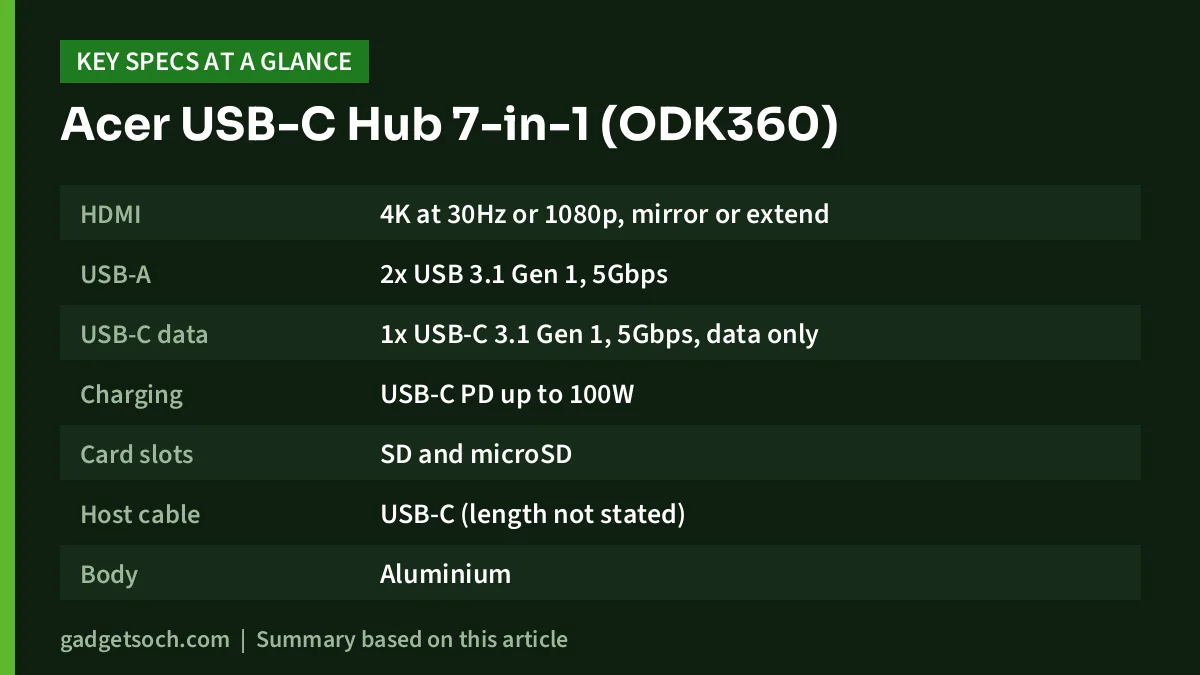
| Spec | Amazon.in listing | KaBuM! listing (ODK360) |
|---|---|---|
| HDMI | 4K at 30Hz or 1080p, mirror or extend | HDMI 1.4 |
| USB-A | 2x USB 3.1 Gen 1, 5Gbps | 2x USB-A 3.1 Gen 1, 5Gbps |
| USB-C data | 1x USB-C 3.1 Gen 1, 5Gbps, data only | 1x USB-C 3.1 Gen 1, 5Gbps |
| Charging | USB-C PD up to 100W | Power Delivery up to 90W |
| Card slots | SD and microSD | SD and microSD |
| Host cable | USB-C (length not stated) | Built-in USB-C, about 15cm |
| Body | Aluminium | Aluminium with plastic cable |
| Size | 17.6 x 9.3 x 1.9cm | 176 x 93 x 19mm |
| Weight | 99.79g | 99g |
| OS listed | Chrome OS, Linux, Windows 10, macOS 10.15 Catalina | Windows 11/10/8.1/8/7, Linux, macOS, Android, iPadOS |
| Warranty | 12-month manufacturer warranty | 12 months |
The Amazon.in listing also names the colour as grey and gives the model number as ODK360. Both listings were checked on 17 October 2026.
Check the current price of the Acer USB-C Hub 7-in-1 (ODK360) on Amazon.in
Three fast data ports: the main reason to buy it
Many budget hubs pair one fast USB port with slower USB 2.0 ports. According to the Amazon.in listing, all three of the ODK360’s data ports, two USB-A and one USB-C, run at USB 3.1 Gen 1 speed, which is 5Gbps. The listing describes this as 10 times faster than USB 2.0, which matches the gap between the two standards’ ratings (5Gbps vs 480Mbps).
In practice, this means you can connect a portable SSD, a pen drive and a USB-C phone or camera at the same time without any of them being stuck on a slow port. The USB-C data port is especially useful now that many phones, portable SSDs and card readers use USB-C cables.
There is one important note from the listing: the USB-C port marked 5Gbps is for data only. It does not output video and does not charge. Only the port marked PD 100W accepts your charger. Plugging the charger into the wrong USB-C port is a common mistake with hubs that have two USB-C ports, so check the markings before you connect anything.
HDMI output: fine for Full HD, limited at 4K
The Amazon.in listing rates the HDMI port at 4K 30Hz or Full HD 1080p, with mirror and extend modes. KaBuM! lists the port as HDMI 1.4, a standard that is generally limited to 30Hz at 4K, so the two sources agree on the practical ceiling.
What this means for you depends on your screen. On a Full HD monitor, TV or projector, the hub covers normal office, study and streaming use. On a 4K monitor, 30Hz makes cursor movement and scrolling visibly less smooth than 60Hz, which can be tiring during long work sessions. Video playback and presentations are less affected.
As with any USB-C hub, the HDMI port only works if your laptop’s USB-C port supports video output, usually called DisplayPort Alt Mode. Look for a display icon or a Thunderbolt or USB4 logo next to the port, or check your laptop’s manual.
Charging: 100W or 90W?
The Amazon.in listing says the hub supports PD charging up to 100W. The KaBuM! listing for the same ODK360 model says up to 90W. We cannot confirm which figure is correct, and the difference could reflect regional versions or a listing error. The Amazon.in bullet also writes the rating as “5V 20A”, which does not match how USB-C PD normally reaches 100W (20V at 5A), so treat the exact number with some caution.
For most thin-and-light laptops that ship with 45W or 65W USB-C chargers, either figure leaves enough headroom. If your laptop came with a 90W or 100W charger, expect slower charging under heavy load. The KaBuM! listing also notes that no power supply is included, so you will use your existing laptop charger. Our guide to charger wattage explains how to read PD ratings.
Compatibility: read the fine print
The Amazon.in listing is more specific than most about what does and does not work. It says the hub works with most Acer Swift, Aspire and Spin laptops, but not the Aspire 7. It also lists the iPhone 17 and iPhone 16 Pro and Pro Max, MacBook Pro and Air, Dell XPS and the Steam Deck, along with game consoles such as the Switch and ROG Ally in its compatible devices field.
The listing also warns that the hub is not compatible with USB-C 2.0 ports, car navigation systems or Lightning port devices. A USB-C 2.0 port uses the USB-C shape but only carries USB 2.0 data, which some budget laptops and phones still have. If your device’s USB-C port is listed as USB 2.0 in its specifications, this hub is not the right choice.
- Check that your laptop or phone’s USB-C port supports USB 3.x data, not USB 2.0
- Check for video output support if you need the HDMI port
- If you own an Acer Aspire 7, look elsewhere, per the listing
- For phones and consoles, confirm on the device maker’s page that external display output over USB-C is supported
Card slots, build and heat
The SD and microSD slots handle camera cards and cards from phones, drones and dashcams. The listing’s compatible devices field names SD, SDHC, SDXC, microSD, microSDHC and microSDXC cards, which covers the common card types. Read and write speeds are not stated.
The body is aluminium, which the listing says helps with heat dissipation, and it mentions an indicator light. Hubs can get warm when charging and running several ports at once, so keep it on a hard surface rather than on a bed or sofa. Both listings give a size of 17.6 x 9.3 x 1.9cm and a weight of about 99g, and KaBuM! gives a built-in cable of about 15cm.
Who it suits, and who should look elsewhere
Choose the Acer ODK360 if you regularly move photos and files between cards, drives and phones, use a Full HD external screen, and want charging through the hub. Students and creators with thin laptops or MacBooks get the most out of its three fast ports.
Look elsewhere if you need wired internet, plug wired headphones into the hub, work on a 4K monitor all day, or your device has a USB-C 2.0 port. If you are setting up a full home workstation, our work from home desk setup guide covers the rest of the desk.
Alternatives worth comparing
Portronics Mport One (POR 2349): the official Portronics page lists 4K at 60Hz HDMI with an on/off button, 100W PD pass-through, SD and microSD slots and an AUX port, but only one USB 3.0 port alongside two USB 2.0 ports. Choose it if smooth 4K matters more than fast data ports.
Amazon Basics USB-C Hub Dock 9-in-1: its Amazon.in listing lists 1000Mbps Ethernet, three USB 3.0 ports, HDMI at 4K 30Hz, USB-C Power Delivery, SD and TF slots and a 3.5mm audio jack, in an aluminium body. Choose it if you need wired internet. Its listing does not state a PD wattage.
Before you order
- Confirm the listing title reads Acer USB C Hub 7-in-1 and the model number is ODK360
- Check whether your device’s USB-C port supports USB 3.x data and video output
- Check your charger’s wattage against the 100W (Amazon.in) or 90W (KaBuM!) rating
- Plug your charger only into the port marked PD
- Keep your invoice for the 12-month manufacturer warranty, and test every port soon after delivery
The Amazon.in listing gives China as the country of origin and names a manufacturer in Dongguan. Ask the seller how warranty claims are handled in India before you buy, since we could not find this model on Acer India’s website.
See the Acer USB-C Hub 7-in-1 (ODK360, Grey) on Amazon.in
Verdict
The Acer USB-C Hub 7-in-1 is a data-first hub. Three 5Gbps ports, including a USB-C data port, plus SD and microSD slots make it a practical companion for people who handle a lot of files. Its HDMI output is fine for Full HD but limited at 4K, and it lacks Ethernet and audio. Check the PD rating against your charger and confirm your device is not on the listing’s exclusion list.
Check the current price of the Acer 7-in-1 USB-C hub on Amazon.in
Frequently asked questions
Does the Acer ODK360 support 4K at 60Hz?
No. The Amazon.in listing rates the HDMI port at 4K 30Hz or 1080p, and KaBuM! lists it as HDMI 1.4.
Can the USB-C data port charge my phone or output video?
No. The listing says the USB-C port marked 5Gbps is for data only. Charging input goes through the port marked PD, and video goes through HDMI.
Does it work with the Acer Aspire 7?
The Amazon.in listing specifically excludes the Aspire 7 while saying it works with most Acer Swift, Aspire and Spin models.
Is it 100W or 90W?
The Amazon.in listing says 100W, while KaBuM!’s listing for the ODK360 says 90W. Either is enough for most 45W and 65W laptop chargers.
Does it have Ethernet or a headphone jack?
No. Its seven ports are HDMI, two USB-A, one USB-C data, one USB-C PD, SD and microSD.
Related reading on GadgetSoch: UGREEN Revodok 5-in-1 USB-C Hub Review (CM478): 4K HDMI, 100W PD, Specs and Limits and Amazon Basics Pro Series 6-in-1 USB-C Hub Review: 4K 60Hz HDMI, Mute Button and the Missing Specs.
Sources
- Amazon.in listing for the Acer USB C Hub 7-in-1, ASIN B0DB5TSG7T (title, feature bullets and technical details, checked 17 October 2026)
- KaBuM! product listing for the Acer ODK360 hub (HDMI 1.4, 90W PD, cable length, dimensions, checked 17 October 2026)
- Acer India accessories page (checked 17 October 2026, ODK360 not listed)
- Portronics Mport One official product page (alternative, checked 17 October 2026)
- Amazon.in listing for the Amazon Basics USB-C Hub Dock 9-in-1, ASIN B0BSZY8W19 (alternative, checked 17 October 2026)




