
The Crucial 32GB DDR5-5600 SODIMM (CT32G56C46S5) is a single 32GB laptop memory stick rated at 5600 MT/s with CAS latency 46 and a 1.1V operating voltage. It is a good upgrade for laptops and mini PCs that have a free or replaceable DDR5 SODIMM slot, but it is useless in machines with DDR4 slots or with memory soldered to the motherboard, so compatibility matters more than the spec sheet.
The short answer: if your laptop uses DDR5 SODIMM slots and you multitask heavily, edit photos or video, run virtual machines or keep dozens of browser tabs open, one 32GB module (or two for 64GB) is a sensible way to add headroom. If your laptop’s processor supports a lower DDR5 speed, the module is expected to run at that lower speed rather than at 5600.
This guide is based on published specifications from distributor and retailer spec sheets, the Amazon.in listing data and Micron’s own announcement, checked on 17 October 2026. Crucial’s official product pages did not load for us, so we cross-checked specs across sources. It is not based on hands-on testing, and we make no benchmark claims.
Quick verdict
- Best for: DDR5 laptops, handhelds and mini PCs with user-accessible SODIMM slots that need 32GB or more
- Skip if: your laptop has DDR4 slots, soldered LPDDR5 memory, or you only need 16GB
- Key strengths: 32GB in one slot, standard 1.1V DDR5, broad JEDEC speed, Micron-made module
- Key limitations: CL46 is a standard (not low) latency, speed is capped by your CPU, warranty term differs between sources, and Micron has exited the Crucial consumer business
Specifications at a glance
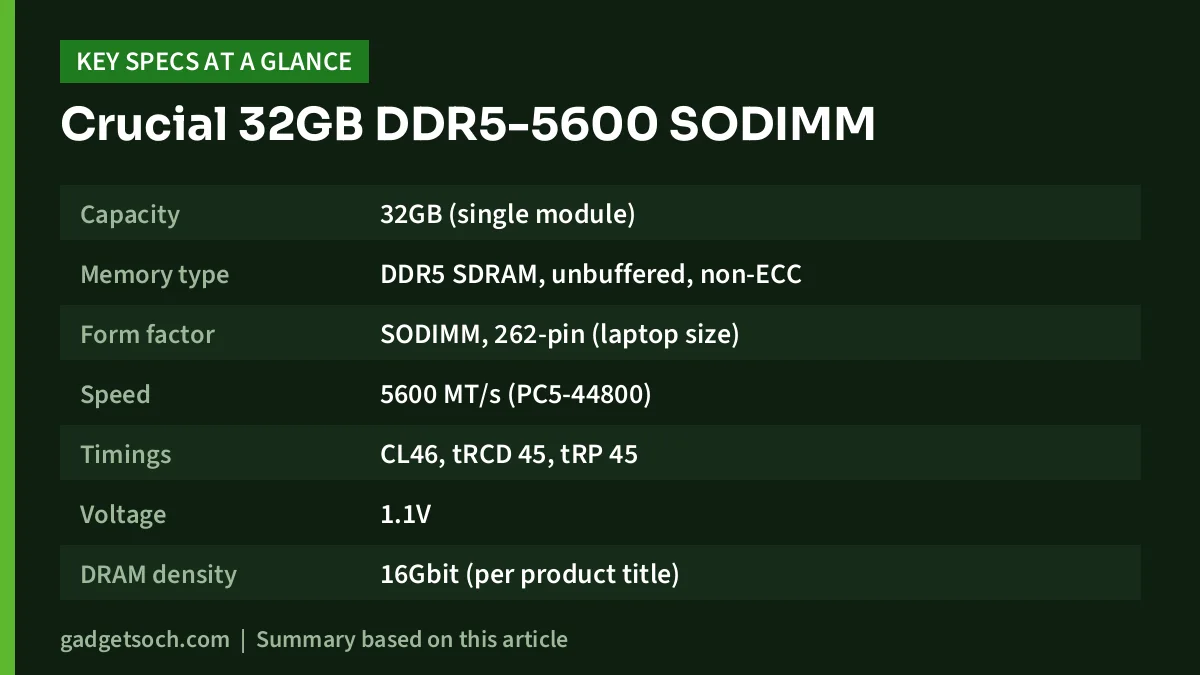
| Specification | Crucial CT32G56C46S5 |
|---|---|
| Capacity | 32GB (single module) |
| Memory type | DDR5 SDRAM, unbuffered, non-ECC |
| Form factor | SODIMM, 262-pin (laptop size) |
| Speed | 5600 MT/s (PC5-44800) |
| Timings | CL46, tRCD 45, tRP 45 |
| Voltage | 1.1V |
| DRAM density | 16Gbit (per product title) |
| Rank | 2Rx8 (Amazon.in listing claim) |
| Downclocking | 5600, 5200 or 4800 MT/s depending on system (listing claim) |
| XMP 3.0 and AMD EXPO | Listed as supported on Amazon.in, not stated on the distributor pages we checked |
| Weight | 9.4 g (listing) |
| Warranty | Lifetime (distributor listing) vs 3 years (Amazon.in listing) |
The linked Amazon.in listing (ASIN B0BLTDTD86) is the single 32GB module, part number CT32G56C46S5, not a two-stick kit. Check the current price of the Crucial 32GB DDR5-5600 SODIMM on Amazon.in.
Step one: will it fit your laptop?
Most failed RAM upgrades come from skipping this step. Run through these checks before ordering:
- Is it DDR5? DDR5 and DDR4 laptop sticks look similar, but Kingston notes the key notch sits in a different position, so a DDR5 module physically will not go into a DDR4 slot. Check your laptop’s spec sheet or service manual
- Is there a slot at all? Many thin laptops use LPDDR5 or LPDDR5X soldered to the board, which cannot be upgraded. If the spec sheet says “soldered” or “onboard”, this module will not help
- How many slots, and what is in them? If you have two slots and one is empty, you can add this stick. If both are filled, you will be replacing a module
- What is the maximum memory? Your laptop maker lists a maximum supported capacity. Make sure 32GB per slot is within it
- What speed does your processor support? Check Intel’s or AMD’s spec page for your CPU’s maximum DDR5 speed
Windows users can also open Task Manager, go to Performance and then Memory, to see the slots used, the total installed and the current speed. A free tool such as CPU-Z shows the memory type and the module in each slot.
Speed, CL46 and what the numbers mean
5600 MT/s is the module’s rated data rate, also written as PC5-44800. According to the Amazon.in listing, the module operates at 5600, 5200 or 4800 MT/s, which matches the common behaviour of standard DDR5 modules: they fall back to the highest speed the platform supports. In practice, this means a laptop whose processor tops out at DDR5-4800 will run this stick at 4800, and you do not gain anything from the higher rating there, though you also lose nothing.
CL46 is the CAS latency in clock cycles. At 5600 MT/s, 46 cycles works out to roughly 16.4 nanoseconds, which is typical for standard JEDEC laptop DDR5. Gaming-focused modules with lower CL ratings exist, but most laptops do not let you change memory timings, so the standard profile is what you will actually run.
The Amazon.in listing also says Intel XMP 3.0 and AMD EXPO are supported on the same module. The distributor and retailer spec sheets we checked do not list XMP or EXPO, and laptop BIOS menus rarely expose memory profiles, so do not buy this module expecting to overclock it in a laptop.
Why 32GB in one stick matters
A single 32GB module gives you three practical options. You can install one stick for 32GB, pair it with an identical stick for 64GB in dual-channel mode, or add it next to an existing module. DDR5 already splits each module into two independent 32-bit subchannels, according to Kingston’s DDR5 overview, but two matched sticks in two slots still give the platform two full memory channels to work with, which usually helps integrated graphics and memory-heavy work most.
Mixing this stick with a different-sized module (for example, a factory 8GB or 16GB stick) generally works on modern platforms, but part of the memory may run in single-channel mode. If performance matters, two identical modules are the cleaner choice.
DDR5 features you get by default
Kingston’s DDR5 overview explains three features that apply to DDR5 modules like this one. DDR5 runs at 1.1V, down from 1.2V on DDR4. Each module carries its own power management IC (PMIC) to regulate voltage on the stick. And DDR5 chips include on-die ECC, which corrects bit errors inside the chip. On-die ECC is not the same as full ECC memory: this Crucial module is listed as non-ECC, and it is meant for regular laptops, not workstations that require ECC.
The Crucial brand situation
On 3 December 2025, Micron announced it was exiting the Crucial consumer business, with consumer shipments continuing until the end of its fiscal second quarter (February 2026). Micron’s announcement says it will provide continued warranty service and support for Crucial products. Stock you find on Amazon.in in late 2026 is therefore existing inventory, so buy from a reputable seller and keep the invoice.
The warranty term is unclear. The distributor listing we checked describes a lifetime warranty, while the Amazon.in listing states three years. Confirm the warranty with the seller before ordering.
How to install it
- Shut down the laptop fully and unplug the charger. Avoid installing while the laptop is only sleeping
- Touch a grounded metal object, or use an anti-static strap, before handling the module
- Remove the bottom panel. Check the maker’s service manual, as some panels have clips or hidden screws
- If your laptop has an internal battery connector, the manual may ask you to disconnect it first
- Insert the stick at an angle into the slot, notch aligned, then press down until the side clips lock
- Refit the panel and power on. The first boot can take longer than usual while the system trains the new memory
- Confirm the new capacity and speed in Task Manager or your system information page
Who should buy it
Buy the CT32G56C46S5 if you have a DDR5 SODIMM laptop or mini PC and regularly run out of memory with large spreadsheets, Lightroom catalogues, video timelines, Android emulators, Docker containers or virtual machines. It is also the cleaner path to 64GB in two-slot laptops. Gamers on 16GB laptops can benefit too, but a matched pair usually makes more sense than a single large stick.
Who should skip it
Skip it if your laptop uses DDR4, has soldered memory, or officially supports less than 32GB per slot. If your work fits comfortably in 16GB, a 16GB module or a matched pair of smaller sticks may be the better value. Anyone who needs ECC memory should look at workstation-grade modules instead.
Alternatives to compare
Crucial 16GB DDR5-5600 SODIMM (CT16G56C46S5): the same family at half the capacity, with the same CL46, tRCD/tRP 45 and 1.1V specification on the distributor listing. Two of these make a 32GB dual-channel pair. Our Crucial 16GB DDR5-5600 SODIMM review covers that model in detail.
Kingston FURY Impact DDR5 SODIMM: Kingston lists single modules up to 32GB, speeds from 4800 to 6400 MT/s, CL38 and CL40 options, 1.1V and 1.35V versions, Intel XMP 3.0 certification and a lifetime warranty. Kingston’s comparison table marks AMD EXPO as not supported, and higher-speed versions only help if your laptop’s platform can run them.
For help matching parts to specific laptops, our laptop RAM and SSD upgrade guide explains how to check slots and supported memory.
Before you order
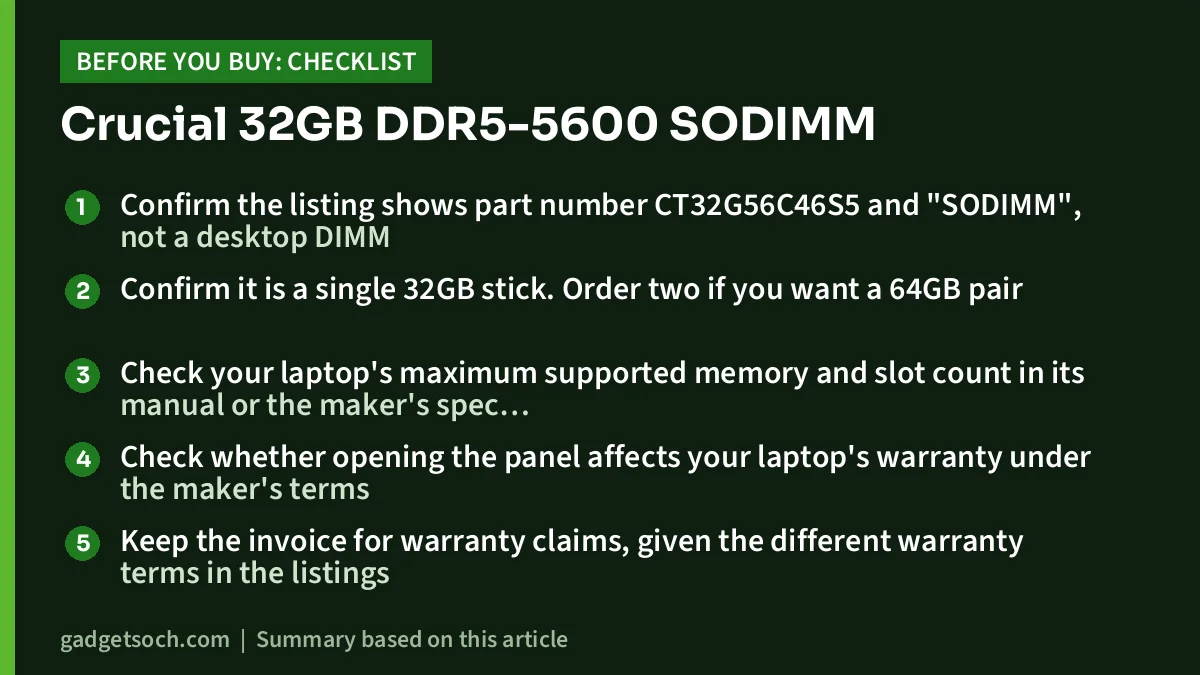
- Confirm the listing shows part number CT32G56C46S5 and “SODIMM”, not a desktop DIMM
- Confirm it is a single 32GB stick. Order two if you want a 64GB pair
- Check your laptop’s maximum supported memory and slot count in its manual or the maker’s spec page
- Check whether opening the panel affects your laptop’s warranty under the maker’s terms
- Keep the invoice for warranty claims, given the different warranty terms in the listings
See the Crucial 32GB DDR5-5600 SODIMM (CT32G56C46S5) on Amazon.in and confirm the part number before you pay.
Frequently asked questions
Will the Crucial 32GB DDR5-5600 work in a laptop that supports DDR5-4800?
It is designed for that case. The Amazon.in listing says it runs at 5600, 5200 or 4800 MT/s, so it should run at your platform’s supported speed. Always confirm your laptop has DDR5 SODIMM slots.
Can I use it in a desktop PC?
No. It is a 262-pin SODIMM for laptops and small systems. Desktop DDR5 uses longer 288-pin DIMMs.
Can I mix it with my existing 8GB or 16GB stick?
Usually yes on modern platforms, but mixed capacities may run partly in single-channel mode. Matching two identical modules is the safer option for best performance.
Does it support XMP or EXPO?
The Amazon.in listing says it supports both, but the distributor spec sheets we checked do not mention them, and most laptops do not expose memory profiles. Treat it as a standard 5600 MT/s module.
Is it still covered by warranty after Micron’s exit from Crucial?
Micron says it will provide continued warranty service and support for Crucial products. The listed warranty term differs (lifetime vs three years), so confirm it with the seller.
Bottom line
The Crucial CT32G56C46S5 is a plain, standard-spec way to put 32GB into one DDR5 laptop slot. Its CL46 timing and 1.1V voltage are typical JEDEC values, and its real speed will be whatever your processor supports. Check for DDR5 SODIMM slots before anything else. Check the current price of the Crucial 32GB DDR5-5600 SODIMM on Amazon.in.
Related reading on GadgetSoch: Kreo Owl Full HD Webcam Review: 1080p at 60 fps, Autofocus and the Caveats and ZEBRONICS Companion 301 Review: Retro Wireless Keyboard and Mouse Combo With Rupee Key.
Sources
- ASBIS catalogue: Crucial CT32G56C46S5, checked 17 October 2026
- CDW: Crucial 32GB DDR5-5600 SO-DIMM, checked 17 October 2026
- Amazon.in listing for ASIN B0BLTDTD86 (title, feature bullets and technical details), captured 17 October 2026
- Micron: announcement of exit from the Crucial consumer business, checked 17 October 2026
- Kingston: DDR5 overview, checked 17 October 2026
- ASBIS catalogue: Crucial CT16G56C46S5, checked 17 October 2026
- Kingston FURY Impact DDR5 memory, checked 17 October 2026




