

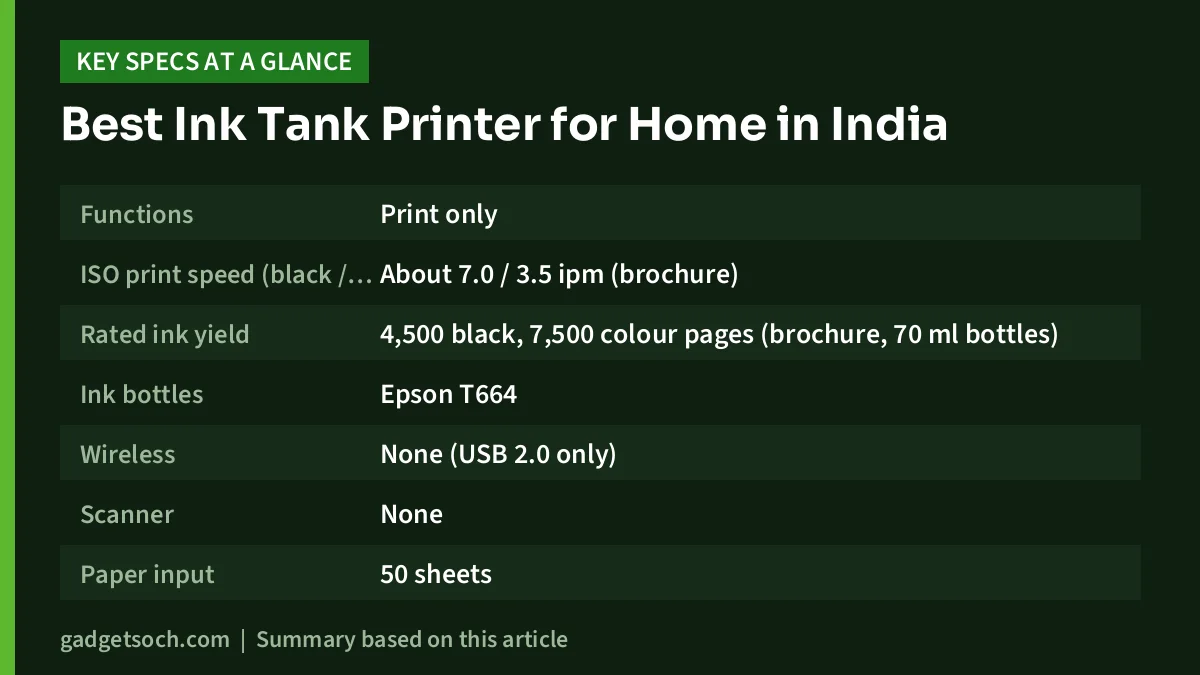
For most Indian homes, the best ink tank printer is an all-in-one Wi-Fi model such as the Epson EcoTank L3250 or the HP Smart Tank 589. Both print, scan and copy, work with phones over Wi-Fi, and use refillable ink bottles with high rated page yields. If you only ever print from one computer and never need to scan or photocopy, the print-only Epson EcoTank L130 is the simpler choice.
The right pick comes down to three questions: do you need scanning and copying, do you want to print from a phone, and how much colour do you print? This guide answers those questions using the printers we have already covered in detail on gadgetsoch.
A note on method: our picks are based on official specifications and published reviews summarised in our individual reviews, not hands-on testing. Availability and prices on Amazon.in change often, so check the listing before you order.
Best Ink Tank Printer: quick picks by use case
- Best all-in-one for families and students: Epson EcoTank L3250
- Best for app and iPhone printing with sharper scans: HP Smart Tank 589
- Best print-only printer for a single PC: Epson EcoTank L130
- Already own an HP LaserJet P1007, P1108 or M1136? See the HP 88A toner section below
Ink tank printers compared
The table below only includes figures confirmed in our reviews. Where a figure was not confirmed, we say so instead of guessing.
| Feature | Epson EcoTank L130 | Epson EcoTank L3250 | HP Smart Tank 589 |
|---|---|---|---|
| Functions | Print only | Print, scan, copy | Print, scan, copy |
| ISO print speed (black / colour) | About 7.0 / 3.5 ipm (brochure) | Up to 10.0 / 5.0 ipm | Up to 12 / 5 ppm |
| Rated ink yield | 4,500 black, 7,500 colour pages (brochure, 70 ml bottles) | 4,500 black, 7,500 colour pages | Up to 4,000 black, 6,000 colour prints (listing claim) |
| Ink bottles | Epson T664 | Epson 003 | HP GT53 black, GT52 colour |
| Wireless | None (USB 2.0 only) | Wi-Fi, Wi-Fi Direct | Wi-Fi 2.4 GHz, Wi-Fi Direct |
| Scanner | None | Flatbed, 1200 x 2400 dpi | Flatbed, 1200 x 1200 dpi |
| Paper input | 50 sheets | 100 sheets | 100 sheets |
| Auto two-sided printing | No (manual) | No (manual) | No (manual) |
| Screen | None | None | Small icon display |
| Weight | 2.7 kg | 3.9 kg | 5.03 kg |
| Warranty in India | 1 year or 15,000 prints | Up to 1 year or 30,000 prints (Epson India) | 12 months carry-in (retail listing) |
Speed figures are best-case numbers from standard test pages. Ink yields are measured with test patterns, and pages with photos or coloured backgrounds use much more ink.
How we picked
We only considered printers that gadgetsoch has already reviewed and that were listed in stock on Amazon.in when checked on 17 Oct 2026. We did not test these printers ourselves. Each pick is based on what the manufacturers’ specifications and the published reviews we cited actually say.
For home use we looked at five things: whether the printer can scan and copy, how easily phones can print to it, rated ink yields and the type of refill bottle, everyday limitations such as manual duplex and tray size, and the warranty terms listed for India. We did not rank the printers with scores, because the best choice depends on how you print.
Epson EcoTank L3250: best all-in-one for most homes
The Epson EcoTank L3250 suits families with school-going children, college students and people working from home who print several pages a week and also need to scan or copy documents. It prints, scans and copies, and connects over Wi-Fi and Wi-Fi Direct, so up to eight devices can print to it even without a router.
Its main strength is the ink system. Epson rates a replacement black 003 bottle at up to 4,500 pages and the colour bottles at up to 7,500 pages, and borderless printing goes up to 4 x 6 inches for passport-size sheets and small photos. Canaltech, in its June 2023 review, described text quality as good and photo colours as accurate.
The main limitations are no automatic two-sided printing, no document feeder and no screen. Canaltech also warned that ink tank printers can clog if left unused for long periods. Note that Epson’s speed figures vary between regional pages, so treat them as a guide.
Read our Epson EcoTank L3250 review for the full details. Check the current price on Amazon.in.
HP Smart Tank 589: best for app printing and sharper scans
The HP Smart Tank 589 is a Wi-Fi colour ink tank all-in-one for homes, students and small offices that print regularly. Compared with the L3250, it has a slightly higher rated black speed (up to 12 ppm ISO), a 1200 x 1200 dpi flatbed scanner and broad phone support through the HP Smart app, Apple AirPrint, Mopria and the HP Print Service Plugin. HP also lists an ID copy function that puts both sides of an ID card on one page, which is handy for KYC paperwork.
The Amazon.in listing claims up to 4,000 black and 6,000 colour prints from the supplied ink, and HP rates the duty cycle at up to 3,000 pages a month, recommending 400 to 800 pages a month.
The limitations are slow colour printing (up to 5 ppm ISO), manual duplex, no document feeder and no Ethernet. It is also the heaviest of the three at 5.03 kg and needs about 58 cm of depth with the trays open. One caution: HP’s India product page did not load during our research, so our review relies on HP’s spec sheet for the Smart Tank 580-590 family, cross-checked with a retailer listing for the 589.
Read our HP Smart Tank 589 review for the full details. Check the current price on Amazon.in.
Epson EcoTank L130: best print-only printer for one computer
The Epson EcoTank L130 suits students, tuition centres and small shops that print mostly text documents from a single Windows or Mac computer and never need to scan or copy. It uses refillable T664 ink bottles, draws only about 9 W while printing, and weighs just 2.7 kg.
Epson’s brochure rates the black bottle at 4,500 pages and the colour set at 7,500 pages. However, the current Epson India page says the box includes 40 ml starter bottles, while the older brochure lists 70 ml bottles, so the first fill may not last as long as those figures suggest.
The limitations are significant. There is no scanner, no Wi-Fi and no phone printing, only a USB 2.0 connection. Two-sided printing is manual, the tray takes 50 sheets and colour printing is slow. We could not confirm official Windows 11 driver support on Epson India’s support page, so check it before buying.
Read our Epson EcoTank L130 review for the full details. Check the current price on Amazon.in.
If you already own a LaserJet: HP 88A toner
If you are not replacing your printer yet and own an HP LaserJet P1007, P1008, P1106, P1108, M1136 MFP or another listed model, the genuine HP 88A (CC388A) toner is the cartridge to keep it running. It is rated at about 1,500 pages under ISO/IEC 19752. Confirm the number on your existing cartridge first, and buy from a trusted seller, because popular cartridges attract counterfeits. An ink tank printer is only worth considering if you are replacing the laser printer anyway.
Read our HP 88A toner guide. Check the current price on Amazon.in.
What to check before you buy an ink tank printer
The exact model and variant
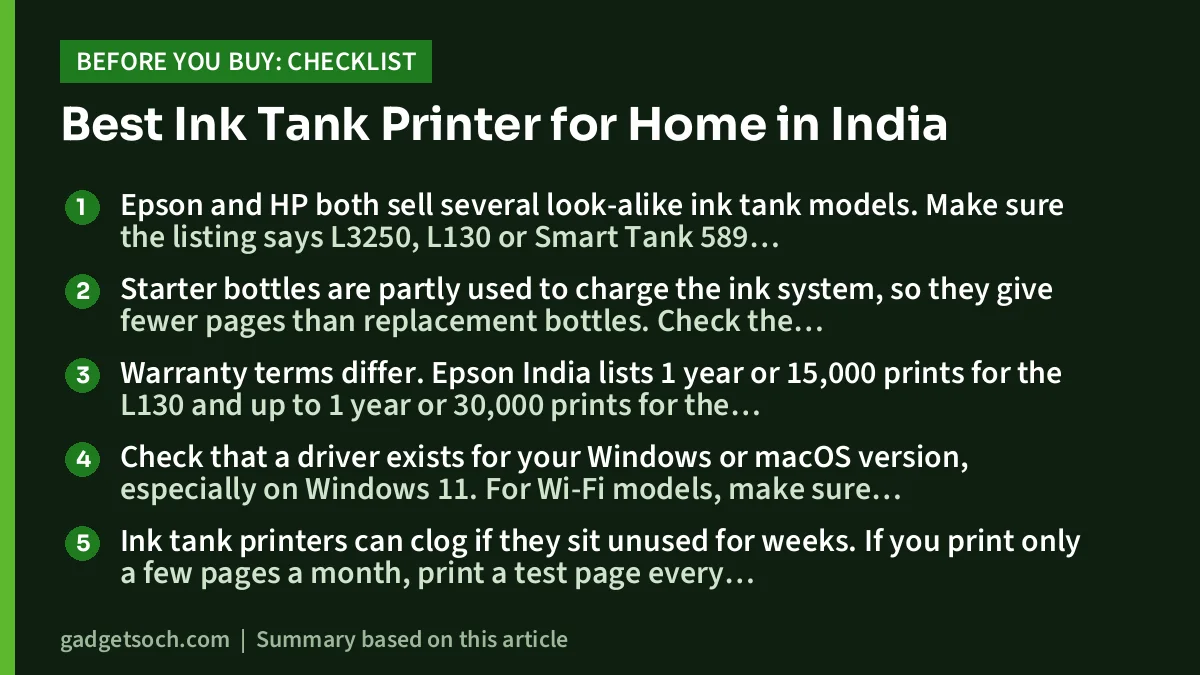
Epson and HP both sell several look-alike ink tank models. Make sure the listing says L3250, L130 or Smart Tank 589 exactly. For the HP, the product code 4A8D9A should match if it is shown. For the L130, Epson India lists more than one model code, so match the code on the box with Epson’s support page.
Box contents and starter ink
Starter bottles are partly used to charge the ink system, so they give fewer pages than replacement bottles. Check the bottle sizes in the box, and whether a USB cable is included, because a USB cable is not listed in HP’s family box contents.
Warranty and service in India
Warranty terms differ. Epson India lists 1 year or 15,000 prints for the L130 and up to 1 year or 30,000 prints for the L3250. A retail listing shows 12 months carry-in for the HP 589, while HP’s family sheet adds a 30,000-page limit. Register the printer, keep the invoice and find the nearest service centre in your city.
Compatibility with your devices
Check that a driver exists for your Windows or macOS version, especially on Windows 11. For Wi-Fi models, make sure your router broadcasts a 2.4 GHz network, which both the L3250 and the Smart Tank 589 use.
How often you print
Ink tank printers can clog if they sit unused for weeks. If you print only a few pages a month, print a test page every week or two to keep the nozzles healthy.
Frequently asked questions
Which ink tank printer is best for home use in India?
For most homes, an all-in-one Wi-Fi model such as the Epson EcoTank L3250 or HP Smart Tank 589 is the most useful, because it can print, scan and copy, and phones can print to it. The Epson EcoTank L130 suits homes that only print from one computer.
Do any of these printers print on both sides automatically?
No. The L130, L3250 and Smart Tank 589 all support only manual two-sided printing, where you flip and reload the paper yourself.
Can I print from my phone?
Yes on the Epson L3250 (Epson Smart Panel and Epson iPrint) and the HP Smart Tank 589 (HP Smart app, AirPrint and Mopria). The Epson L130 has no Wi-Fi, so it cannot print directly from a phone.
Which has the higher rated ink yield, Epson or HP?
Epson rates its L3250 bottles at up to 4,500 black and 7,500 colour pages. The HP Smart Tank 589 listing claims up to 4,000 black and 6,000 colour prints. The figures come from different sources and methods, and real yields depend on what you print.
Is an ink tank printer good if I print rarely?
Not ideally. Ink tank printers can clog when left unused for long periods. If you print only occasionally, print something every week or two.
Can I use the HP 88A in an ink tank printer?
No. The HP 88A is a laser toner cartridge for specific HP LaserJet models such as the P1007, P1108 and M1136 MFP. Ink tank printers use ink bottles instead.
Our full reviews
- Epson EcoTank L3250 review
- HP Smart Tank 589 review
- Epson EcoTank L130 review
- HP 88A toner (CC388A) guide
Related reading on GadgetSoch: Work From Home Desk Setup in India: Keyboard, Mouse, Monitor and Cooling Picks and Epson EcoTank L3250 vs HP Smart Tank 589: Which Ink Tank Printer Should You Buy?.




