

The HP Laser 303dw is a black-and-white, print-only laser printer with automatic two-sided printing, Wi-Fi and USB, rated by HP at up to 30 pages per minute on A4. It suits homes, students and small offices that print a lot of text documents and want crisp, smudge-resistant pages without the slow speed of an ink tank. It does not scan, copy or print in colour, and HP lists no Ethernet port, so it is the wrong pick if you need any of those.
The Amazon.in link here is for the HP 303dw (product number A58WFA) in black, listed as a new launch with 256 MB memory. This article is based on HP India’s official specification page and the Amazon.in listing data, both checked on 17 October 2026. We have not tested the printer, so there are no print-quality or speed claims beyond what HP publishes.
Quick verdict
- Best for: home offices, students, tuition centres and small teams (HP says up to 5 users) printing mostly A4 text in moderate to high volume
- Skip if: you need to scan or copy, print in colour, connect over Ethernet, or use a Mac with a full HP driver
- Key strengths: up to 30 ppm, automatic duplex, Wi-Fi with Wi-Fi Direct, AirPrint and Mopria support, 250-sheet cassette, 30,000-page monthly duty cycle
- Key limitations: print only, 2.4 GHz Wi-Fi only, simple four-light control panel with no screen, separate toner and drum to budget for, HP lists Windows and Linux as supported but not macOS
HP Laser 303dw specifications
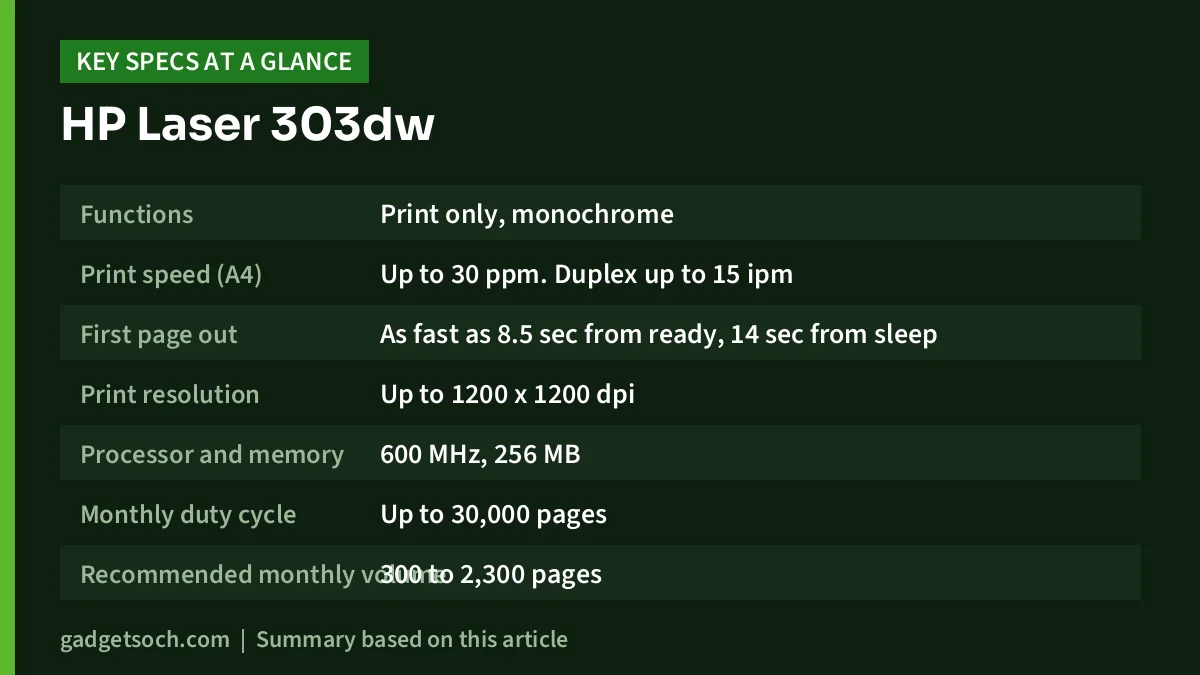
| Specification | HP Laser 303dw (A58WFA) |
|---|---|
| Functions | Print only, monochrome |
| Print speed (A4) | Up to 30 ppm. Duplex up to 15 ipm |
| First page out | As fast as 8.5 sec from ready, 14 sec from sleep |
| Print resolution | Up to 1200 x 1200 dpi |
| Processor and memory | 600 MHz, 256 MB |
| Monthly duty cycle | Up to 30,000 pages |
| Recommended monthly volume | 300 to 2,300 pages |
| Duplex | Automatic (A4 and Oficio) |
| Paper input | 250-sheet cassette plus 1-sheet priority slot |
| Paper output | 100 sheets |
| Paper weight | 60 to 163 gsm (cassette), 60 to 220 gsm (priority slot) |
| Connectivity | Wi-Fi 802.11b/g/n 2.4 GHz, Wi-Fi Direct, Hi-Speed USB 2.0 |
| Mobile printing | HP app, Apple AirPrint, Mopria, Wi-Fi Direct |
| Control panel | 4 status lights, 3 buttons |
| Toner | HP W1810A (1,500 pages) and W1810X (3,000 pages) |
| Starter toner | About 1,500 pages, imaging drum included |
| Size and weight | 368 x 334.5 x 202 mm, 7.4 kg |
| Power | 445 W printing, 42 W ready, 0.743 W sleep |
| Supported OS | Windows 11, Windows 10, Linux |
| Warranty | One-year limited |
All figures in the table come from HP India’s 303dw specification page. Yields are HP’s declared averages under the ISO/IEC 19752 standard, and real yields vary with what you print. Check the current price of the HP 303dw laser printer on Amazon.in.
Laser or ink tank: why this matters first
Many Indian homes compare a printer like the 303dw with an ink tank all-in-one. The two solve different problems. A mono laser fuses toner powder onto paper with heat, so text comes out sharp and dry, does not smudge with a highlighter, and the printer does not suffer from dried-up ink if it sits unused for weeks. Laser printers are also generally much faster on text, which is why HP quotes 30 ppm here.
An ink tank, by contrast, offers colour, usually includes a scanner and copier, and can print photos. If your household needs colour school projects or scanned documents, an all-in-one ink tank will be more useful, even if it is slower. If you mostly print assignments, invoices, notes and forms, the 303dw is the more focused tool. We cover the ink tank side in our guide to the best ink tank printers for home in India.
Speed and print quality
HP rates the 303dw at up to 30 ppm on A4 in single-sided mode and up to 15 images per minute in automatic duplex. Two-sided output is slower because each sheet has to pass through twice. The first page appears in about 8.5 seconds if the printer is ready, or about 14 seconds from sleep, according to HP.
Resolution goes up to 1200 x 1200 dpi in HP’s high-quality mode and 600 x 600 dpi in normal mode. For text, 600 dpi is typically enough; the higher setting helps with small fonts, fine lines and greyscale graphics. A mono laser is not intended for photos, so do not judge it on that.
Automatic duplex and paper handling
Automatic two-sided printing is the headline feature of the 303dw. It roughly halves paper use for long documents and spares you the error-prone job of flipping stacks by hand. HP lists duplex support for A4 and Oficio sizes, and recommends 60 to 105 gsm paper for duplex. Standard 70 to 80 gsm office paper falls inside that range.
The main cassette holds 250 sheets, and a single-sheet priority slot takes one sheet or one envelope at a time for thicker media up to 220 gsm. HP lists envelopes including DL, C5, C6, No. 10 and Monarch. The output tray holds 100 sheets. For a small office, 250 sheets means about half a ream between refills.
Connectivity, apps and the Mac question
Connections are Wi-Fi (802.11b/g/n, 2.4 GHz only), Wi-Fi Direct and Hi-Speed USB 2.0. There is no Ethernet port listed, so in an office it has to join the network over Wi-Fi. The 2.4 GHz-only radio is normal for printers but worth knowing: if your router uses one combined network name for both bands, setup usually still works, while a 5 GHz-only network will not.
For phones and tablets, HP lists the HP app, Apple AirPrint, Mopria certification and Wi-Fi Direct printing. AirPrint lets iPhones and iPads print without installing a driver, and Mopria does the same for many Android devices.
Computers are a different matter. HP’s specification page lists Windows 11, Windows 10 and Linux as supported and explicitly says the printer is not Mac compatible, even though AirPrint is listed. If you use a MacBook, confirm with HP support or the HP driver site before buying rather than assuming AirPrint will cover everything you need.
HP also lists security features such as Secure Boot, code signing, IPPS, IPsec and WPA3 support, which are useful on a shared office network.
Toner, drum and running costs
The Amazon.in listing says the 303dw uses the HP 181A black toner. HP’s spec page lists the replacement cartridges as W1810A (about 1,500 pages) and W1810X (high yield, about 3,000 pages). The cartridge in the box is rated at about 1,500 pages.
One important detail: HP lists a separate black imaging drum in the box, alongside the toner cartridge. A separate drum means you replace toner more often and the drum less often. HP’s spec page does not state the drum’s rated life, so check the current toner and drum prices on Amazon.in or HP’s store and work out your cost per page before you commit. For anyone printing hundreds of pages a month, the high-yield W1810X is usually the cartridge to compare.
Size, noise and power
At 368 x 334.5 x 202 mm and 7.4 kg (HP’s figures), it is compact enough for a desk corner but heavy to move often. The Amazon.in listing gives 10.2 kg, which is closer to HP’s 9.66 kg package weight than to the printer itself. HP references acoustic values but does not publish them on the page, so we cannot comment on noise.
Laser printers draw a lot of power while fusing toner: HP lists 445 W when printing, 42 W in ready mode and 0.743 W in sleep, with HP Auto-Off to cut idle power. If your home has frequent power cuts, plug it into a surge protector. Many small UPS units are not rated for a laser printer’s startup load, so check with the UPS maker before connecting it.
Who should buy it, and who should skip it
Buy the HP 303dw if you print several hundred pages a month, want double-sided output without manual flipping, share the printer across a few phones and laptops over Wi-Fi, and only need black text and graphics.
Skip it if you need scanning or copying, any colour output, a wired Ethernet connection, a touchscreen, or official macOS driver support. Very light users who print a handful of pages a month may also find a basic inkjet or ink tank more flexible.
Alternatives worth comparing
- HP Laser 335dw: a step up in the same family, rated by HP at up to 33 ppm, with auto duplex, 2.4 GHz Wi-Fi, Wi-Fi Direct, AirPrint and Mopria, and the same 30,000-page duty cycle
- HP Smart Tank 589: an ink tank all-in-one with print, scan and copy plus colour, Wi-Fi and Wi-Fi Direct, but much slower colour speed and manual duplex only. See our HP Smart Tank 589 review
- Epson EcoTank L3250: a Wi-Fi ink tank all-in-one with a flatbed scanner and high rated ink yields, but no automatic two-sided printing
Before you order: a checklist

- Model: confirm the listing says HP 303dw, product A58WFA. HP sells several similar Laser 300-series models with different features
- Function: remember it prints only. There is no scanner or copier
- Box contents: HP’s page lists the power cord, toner, drum and guides, but not a USB cable, while some retailer listings mention one. If you plan to use USB, keep a USB-A to USB-B printer cable ready
- Computer OS: Windows and Linux are listed. Check Mac support with HP first
- Wi-Fi: make sure your router broadcasts a 2.4 GHz network
- Warranty: HP lists a one-year limited warranty. Keep the invoice and register the printer with HP India
See the HP 303dw Auto Duplex WiFi Laser Printer on Amazon.in
Frequently asked questions
Can the HP 303dw scan or photocopy?
No. It is a print-only, black-and-white laser printer. The Amazon.in listing also lists its function as print only.
Does the HP 303dw print on both sides automatically?
Yes. HP lists automatic two-sided printing for A4 and Oficio paper, at up to 15 images per minute.
Which toner does the HP 303dw use?
HP lists the W1810A (about 1,500 pages) and the high-yield W1810X (about 3,000 pages). The Amazon.in listing refers to it as the HP 181A toner.
Can I print from my phone?
Yes. HP lists the HP app, Apple AirPrint, Mopria and Wi-Fi Direct printing, so most iPhones and Android phones can print to it over Wi-Fi.
Does it support 5 GHz Wi-Fi or Ethernet?
No. HP lists 2.4 GHz 802.11b/g/n Wi-Fi only and no Ethernet port.
Final take
The HP Laser 303dw is a focused document printer: fast mono printing, automatic duplex, a 250-sheet cassette and wireless printing from phones and Windows PCs. Its limits are equally clear. It is print-only, mono-only, Wi-Fi-only on the network side, and HP does not list macOS support. If those fit, check the current price of the HP 303dw on Amazon.in and compare toner costs before you order.
Related reading on GadgetSoch: Crucial 16GB DDR5-5600 CL46 Desktop RAM Review (CT16G56C46U5): Compatibility, Dual Channel and Who It Suits, Frontech FT-1603AW Review: 78-Key Rechargeable Bluetooth Mini Keyboard, Explained and HP 303d Review (A58WCA): USB Auto-Duplex Mono Laser Printer, Specs and Limits.
Sources
- HP India: HP Laser 303dw Printer (A58WFA#ACJ) specifications, checked 17 October 2026
- Amazon.in listing for the HP 303dw, ASIN B0FMDX774Y (title, 181A toner reference, trays, media sizes, weight, box contents), captured 17 October 2026
- HP: HP Laser 335dw Printer (A58WMA) specifications, checked 17 October 2026
- Croma listing for the HP 303dw (box contents cross-check), checked 17 October 2026




