
The Crucial 16GB DDR5-5600 CL46 desktop memory (CT16G56C46U5) is a single 16GB DDR5 UDIMM for desktop PCs whose motherboards take DDR5, rated at 5600 MT/s with CL46 timings, 1.1V and both Intel XMP 3.0 and AMD EXPO profiles on the same stick. It is a sensible, no-frills choice for building or upgrading a DDR5 desktop, but it will not fit laptops or any DDR4 motherboard, and one stick alone runs in single-channel mode.
In short: buy it if your desktop board has DDR5 slots and you want plain, standard-speed memory from a memory maker; buy two (or the matching two-stick kit) if you want dual-channel performance; skip it if you need laptop RAM or very tight gaming timings.
This guide is based on the Amazon.in listing, Crucial’s published specifications as reproduced by a distributor catalogue, and a published technical review of the matching two-module kit, all checked on 17 October 2026. Crucial’s own website did not load for us, and we have not tested this module hands-on, so there are no first-hand benchmark figures here.
Quick verdict
- Best for: new or existing desktop PCs with DDR5 UDIMM slots, such as Intel 13th Gen and AMD Ryzen 7000 systems the listing names
- Key strengths: 5600 MT/s rating, 1.1V, XMP 3.0 and EXPO on one module, automatic downclocking to 5200 or 4800 on slower platforms (per the listing), single-rank 16Gbit design
- Key limitations: CL46 is a loose timing compared with enthusiast kits, single module means single-channel unless you add a second, no RGB or styling if that matters to you
- Skip if: you have a laptop (you need a SODIMM), a DDR4 motherboard, or you want low-latency memory for competitive gaming
Specifications
The table combines the Amazon.in listing with Crucial’s specifications as published by distributor ASBIS and by OCinside’s review of the two-module kit (CT2K16G56C46U5), which uses the same 16GB modules. Where sources differ, it is noted.
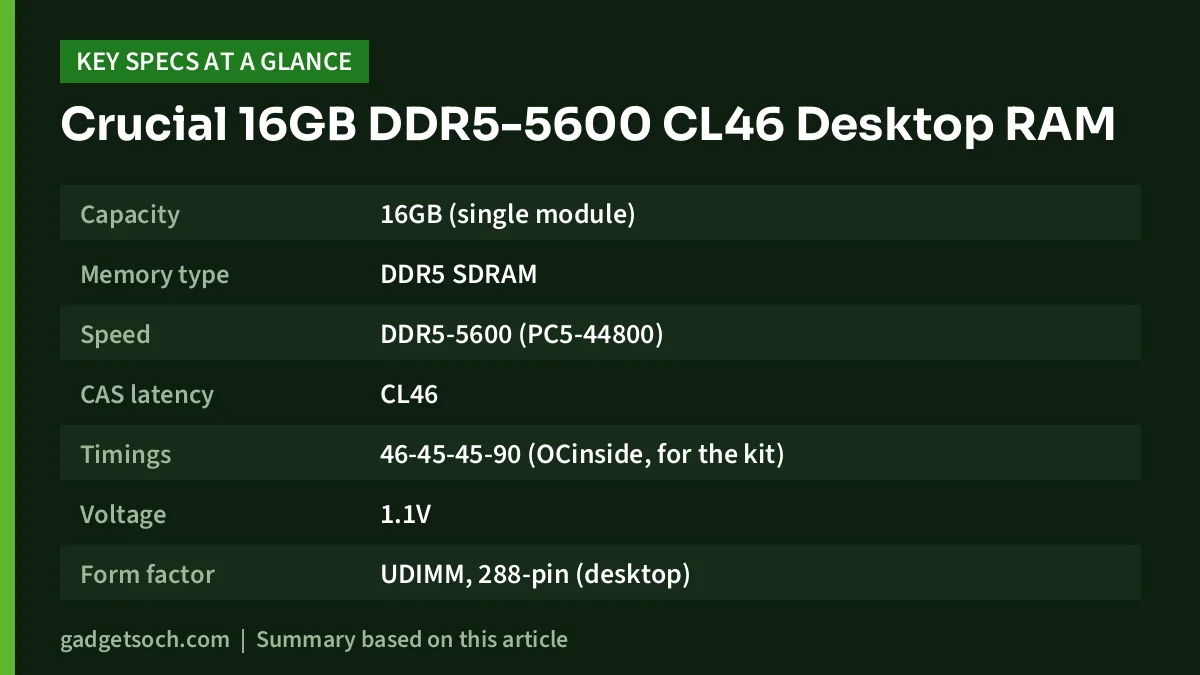
| Specification | Crucial CT16G56C46U5 |
|---|---|
| Capacity | 16GB (single module) |
| Memory type | DDR5 SDRAM |
| Speed | DDR5-5600 (PC5-44800) |
| CAS latency | CL46 |
| Timings | 46-45-45-90 (OCinside, for the kit) |
| Voltage | 1.1V |
| Form factor | UDIMM, 288-pin (desktop) |
| Rank and organisation | Single rank, 1Rx8 |
| DRAM density | 16Gbit |
| Error correction | Non-ECC (OCinside notes on-die ECC) |
| Buffering | Unbuffered |
| Profiles | Intel XMP 3.0 and AMD EXPO |
| Fallback speeds | 5200 or 4800 MT/s on slower platforms (listing) |
| Warranty | 5 years per Amazon.in listing; limited lifetime per OCinside and ASBIS |
| Weight | 16.6 g (listing) |
Check the current price of the Crucial 16GB DDR5-5600 desktop memory (CT16G56C46U5) on Amazon.in
First, check that it fits your PC
Compatibility is the most common reason RAM gets returned, so start here before thinking about speed.
Desktop UDIMM, not laptop SODIMM
CT16G56C46U5 is a full-length 288-pin desktop module. Laptops and most mini PCs use the shorter SODIMM format, and the two are not interchangeable. If you are upgrading a laptop, the matching laptop part is the Crucial CT16G56C46S5, which we cover in our Crucial 16GB DDR5-5600 SODIMM review.
DDR5 only
DDR5 and DDR4 modules are keyed differently and will not fit each other’s slots. This matters especially for Intel 12th, 13th and 14th Gen desktops, because motherboards for those chips were sold in both DDR4 and DDR5 versions. Check your motherboard’s model name and manual, or look at an existing stick’s label, before ordering. AMD Ryzen 7000 and later desktop platforms (AM5) use DDR5.
Speed your platform supports
According to the listing, this 5600 module can run at 5200 or 4800 if your system supports only those speeds. That is normal DDR5 behaviour: memory runs at the speed the processor and motherboard can handle, so a 5600 stick in a 4800-limited system simply runs at 4800. You do not lose compatibility, you just do not gain the extra speed.
Motherboard support list
Most motherboard makers publish a memory support list (often called a QVL) on the board’s support page. Finding CT16G56C46U5 on it is the surest sign of trouble-free operation, though modules that are not listed often work too.
What 5600 MT/s and CL46 mean in practice
The listing says 5600 MHz, but the more accurate unit for DDR memory is MT/s (megatransfers per second), since data moves twice per clock. Higher MT/s means more bandwidth, which helps integrated graphics, large file work and some games.
CAS latency (CL46) is the number of clock cycles the memory takes to respond to a request. On its own a high number looks bad, but real-world latency depends on both CL and speed. Compared with enthusiast DDR5 kits sold with lower CL values at similar speeds, CL46 is a relaxed timing. For office work, study, browsing and most everyday use, that difference is unlikely to be noticeable. Gamers chasing every frame and overclockers are the audience for tighter, more expensive kits.
The 1.1V rating is the standard DDR5 voltage. It means the module does not depend on raised voltage to hit its rated speed, which keeps things simple and avoids extra heat.
XMP 3.0 and EXPO: do you need to touch the BIOS?
The listing says both Intel XMP 3.0 and AMD EXPO profiles live on the same module, so the stick is not tied to one CPU brand. These profiles store the module’s rated settings so the motherboard can apply them in one step.
After installing, open your BIOS or check Task Manager (Performance, then Memory) in Windows to see the running speed. If it shows less than 5600 on a platform that supports 5600, enable the XMP or EXPO profile in the BIOS. If your processor’s supported memory speed is lower, leave it; the module will work at that speed.
Single stick or two? Why dual channel matters
Desktop processors on these platforms support dual-channel memory, which means two modules can work in parallel for more bandwidth. A single 16GB stick runs in single-channel mode. For many office tasks that is fine, but it can hold back integrated graphics noticeably and can limit performance in some games.
- Building a new PC: consider two modules, or the matching 32GB kit, rather than one 16GB stick
- Adding to an existing 16GB stick: matching capacity and speed helps; identical part numbers are the safest way to avoid instability
- Mixing brands or speeds: it can work, but the system will run at the slowest module’s settings and may need manual tuning
- Slot placement: on four-slot boards, check the manual for which two slots to use for dual channel (often the second and fourth from the CPU)
Is 16GB enough?
For a desktop used for office work, study, browsing and light creative tasks, a 16GB total is a reasonable baseline. Heavy multitasking, large photo or video projects, virtual machines and many modern games benefit from 32GB. Because this is one 16GB module, the cleanest route to 32GB in dual channel is two of these or the two-module kit.
Who should buy it

- Builders of a DDR5 desktop who want standard-speed, low-fuss memory from Crucial, a Micron brand
- Owners of an Intel 13th Gen or AMD Ryzen 7000 desktop (the platforms the listing names) adding or replacing memory
- Users with a DDR5 system limited to 4800 or 5200 who want a module that also runs faster if they upgrade the CPU later
Who should skip it
- Laptop and mini PC owners, who need a SODIMM
- Anyone with a DDR4 motherboard
- Competitive gamers and overclockers who want lower CL timings
- Buyers who want RGB lighting or a styled heat spreader for a showcase build
Alternatives worth comparing
Crucial CT2K16G56C46U5 (32GB kit, 2 x 16GB): According to OCinside’s review, this kit pairs two single-rank 16GB DDR5-5600 UDIMMs at 46-45-45-90 timings and 1.1V, with XMP 3.0 and EXPO. It is the simplest way to get dual-channel 32GB with matched modules.
Crucial CT16G56C46S5 (16GB DDR5-5600 SODIMM): The laptop version, at the same capacity and rated speed, in the shorter SODIMM format. Pick this only if your laptop or mini PC uses DDR5 SODIMM slots.
Buying tips before you order

- Confirm the variant: the link here is for a single 16GB module, part number CT16G56C46U5; check the part number on the listing and on the module’s label after delivery
- Check your motherboard: DDR5 UDIMM slots, maximum supported speed, and ideally the memory support list
- Warranty: the Amazon.in listing says 5 years, while Crucial’s published terms reported by OCinside and ASBIS say limited lifetime; check the warranty terms on the listing and Crucial’s India support before you rely on either, and keep your invoice
- Handling: switch off and unplug the PC, touch a grounded metal part to discharge static, and hold the module by its edges
- Installation: line up the notch, press until both clips lock, then check the BIOS reports 16GB
See the Crucial CT16G56C46U5 16GB DDR5 module on Amazon.in
Frequently asked questions
Will the Crucial CT16G56C46U5 work in my laptop?
No. It is a 288-pin desktop UDIMM. Laptops use SODIMM modules; the matching Crucial laptop part is CT16G56C46S5.
Will it work with an Intel 12th Gen CPU?
The listing names 13th Gen Intel and Ryzen 7000 as best fits. Any desktop with DDR5 UDIMM slots should accept it, but your board must be the DDR5 version, and the memory will run at the highest speed your CPU and board support.
Does it support both XMP and EXPO?
Yes. According to the listing, Intel XMP 3.0 and AMD EXPO are both on the same module.
Can I mix it with my existing DDR5 stick?
Often yes, if both are DDR5 UDIMMs. The system runs at the slower module’s settings, and mismatched modules can occasionally be unstable. Identical part numbers are the safest choice.
Is it ECC memory?
No. It is non-ECC unbuffered memory. OCinside notes on-die ECC, which is a DDR5 feature inside the chips and is not the same as full ECC support for workstations.
Final word
The Crucial CT16G56C46U5 is straightforward DDR5 desktop memory: 5600 MT/s, CL46, 1.1V, and both XMP and EXPO on one stick. It is a sound pick for everyday DDR5 builds and upgrades, provided you confirm DDR5 UDIMM slots and plan for two modules if you want dual-channel speed. Enthusiasts after low latency should look at tighter-timed kits instead.
Check the current price of the Crucial 16GB DDR5-5600 CL46 desktop memory on Amazon.in
Related reading on GadgetSoch: Portronics My Buddy K9 Review: Rotating Carbon Steel Laptop Stand, Specs and Caveats and HP Laser 303dw Review: 30 ppm Auto Duplex Wi-Fi Laser Printer, Specs and Limits.
Sources
- Amazon.in listing for Crucial RAM 16GB DDR5 5600 MHz CL46 (16Gbit) Desktop Memory CT16G56C46U5, ASIN B0BLTH3KWV: capacity, speed, CL46, 1.1V, UDIMM 288-pin, 1Rx8, non-ECC, XMP 3.0 and EXPO, fallback speeds, named platforms, 5-year warranty statement, weight, checked 17 October 2026
- ASBIS catalogue: Crucial 16GB DDR5-5600 UDIMM CL46 (16Gbit) (CL46, tRCD 45, tRP 45, 1.1V, non-ECC, unbuffered, lifetime warranty), checked 17 October 2026
- OCinside: Crucial 2x16GB DDR5-5600 review, technical data (46-45-45-90, single rank, unbuffered, on-die ECC, XMP 3.0 and EXPO, limited lifetime warranty), checked 17 October 2026




