
The SEZNIK Mini Printer (Blue) is a pocket-sized, inkless thermal printer that connects to an Android phone or iPhone over Bluetooth and prints black-and-white notes, labels, lists, QR codes and simple photos on narrow 57 mm thermal paper rolls. It is a fun, low-maintenance tool for students who like to paste short notes, formulas or diagrams into notebooks, and for anyone who wants quick labels at home. It is not a replacement for a regular printer: it cannot print A4 pages, colour or long-lasting photos.
Our short verdict: buy it if you understand what thermal printing can and cannot do and want a small gadget for study notes, journaling and labels. Skip it if you expect sharp photos, colour or archival prints.
An important note on how this article was written: SEZNIK does not appear to publish an official specification page that we could find, so every product detail below comes from the Amazon.in listing (seller-provided, captured on 17 October 2026) and is labelled as the listing’s claim. We have not tested this SEZNIK Mini Printer. Where the listing contradicts itself, we say so.
Quick verdict
- Best for: students making study notes and flashcards, bullet journals, kids’ craft projects, and simple home or kitchen labels
- Skip if: you need A4 printing, colour, real photo quality, or prints that must last for years
- Key strengths (per listing): no ink or cartridges, Bluetooth printing from Android and iOS, compact 12 x 10 x 8 cm body, 8 spare paper rolls plus one loaded in the box
- Key limitations: monochrome thermal output on 57 mm rolls, no official spec sheet, app name, battery life and warranty term not stated, some listing details are inconsistent
What the Amazon.in listing says
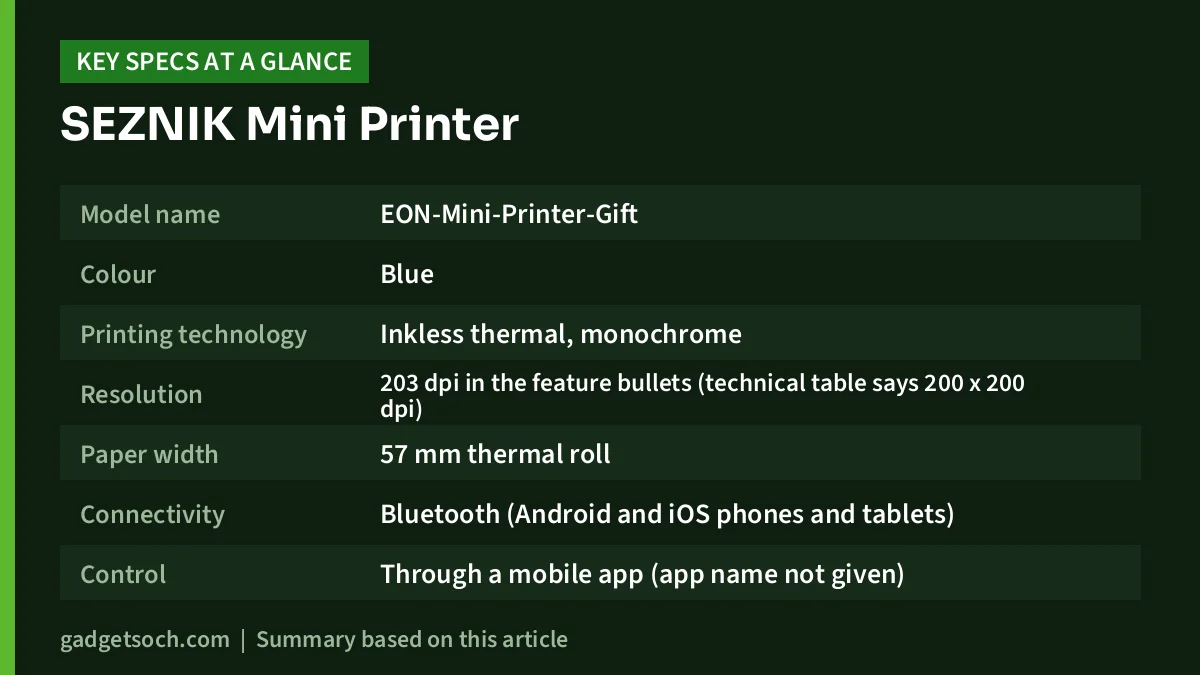
| Item | Listing claim (Amazon.in, 17 Oct 2026) |
|---|---|
| Model name | EON-Mini-Printer-Gift |
| Colour | Blue |
| Printing technology | Inkless thermal, monochrome |
| Resolution | 203 dpi in the feature bullets (technical table says 200 x 200 dpi) |
| Paper width | 57 mm thermal roll |
| Connectivity | Bluetooth (Android and iOS phones and tablets) |
| Control | Through a mobile app (app name not given) |
| Battery | 800 mAh (charging time and print count not stated) |
| Dimensions | 12 x 10 x 8 cm |
| Weight | 200 g in the bullets, 180 g in the technical table |
| In the box | 1 printer, 8 thermal paper rolls plus 1 inside the printer, USB charging cable, instruction manual |
| Warranty | Listed as “Limited”, term not stated |
Check the current price of the SEZNIK Mini Printer (Blue) on Amazon.in
How an inkless thermal printer works
A thermal printer does not use ink at all. Its print head is a row of tiny heating elements. When the special thermal paper passes over the head, the heated spots react with a coating on the paper and turn dark. That is why the listing can promise “no ink, no cartridge”: the only consumable is the paper roll.
This design has real advantages for a gadget like this. There is nothing to dry out, refill or clog, the mechanism is small, and printing is close to silent. The trade-offs are just as real. Output is one colour, normally black on white. Ordinary paper will not work; you must buy thermal rolls of the right width. And because the image is made by a heat-reactive coating, thermal prints can fade or darken over time when exposed to heat, sunlight, plastic sleeves or chemicals. Think of the prints like a shop receipt: good for daily use, not for keepsakes.
What 203 dpi means for notes and photos
The listing claims 203 dpi, which works out to about 8 dots per millimetre. That is a common resolution for small thermal printers and is enough for clear text, bold headings, simple diagrams, checklists and QR codes. It is far below what an inkjet or laser printer can do, and every grey shade in a photo has to be faked with a pattern of black dots. Photos will look grainy and newspaper-like rather than photographic, which is fine for a scrapbook doodle but not for a family portrait.
The paper width also limits what fits on a print. On a 57 mm roll, a long paragraph becomes a narrow strip. For study notes, the best results usually come from short, high-contrast content: a formula, a mind-map, a key definition, a vocabulary list or a cropped diagram. Increase the font size in the app and use bold text for anything you want to read easily.
Features the listing promises
According to the Amazon.in listing, the companion app can print photos, labels, lists, records, QR codes and web pages, and it offers OCR text recognition, which means the app can try to read text from an image so you can edit and print it. The listing also mentions a choice of fonts and themes. The app is not named on the listing, so you will find out which app to install from the instruction manual or packaging.
The listing also says the SEZNIK Mini Printer can print labels and stickers. Keep in mind that sticker output depends on the paper: standard thermal rolls are plain paper, and you need thermal sticker rolls of the same width to make peel-off labels. Check that any sticker rolls you buy are listed as compatible with 57 mm mini printers.
Phone compatibility and setup tips
The SEZNIK Mini Printer connects over Bluetooth and the listing says it supports both iOS and Android phones and tablets. It does not list Windows or macOS computer support, so treat it as a phone accessory. A typical setup looks like this: charge the printer with the supplied USB cable, install the app named in the manual, turn on Bluetooth, and pair the printer from inside the app. Many such printers pair through the app rather than the phone’s Bluetooth settings, so check the manual if it does not appear.
Before pairing, check what permissions the app asks for. Apps for budget printers sometimes request access to location, storage or contacts. Bluetooth scanning on Android can legitimately need location permission, but you should only grant what is required to print.
Battery, paper and running cost
The listing claims an 800 mAh battery but does not say how long a charge lasts, how many rolls it can print per charge or how long charging takes. It also does not name the charging port type. Since the box includes a USB charging cable, keep that cable handy until you know which connector the SEZNIK Mini Printer uses.
Running cost is only paper. The box includes 8 spare rolls plus 1 already loaded, according to the listing. When you buy more, match the width (57 mm), check the roll diameter fits the compartment, and choose a reputable brand. Some thermal papers use chemical developers such as BPA or BPS; if your child will handle a lot of prints, look for paper sold as BPA-free.
Inconsistencies in the listing you should know about
Because this article relies on the seller’s listing, it is worth flagging what does not add up. The weight is given as 200 g in one place and 180 g in another. The resolution is 203 dpi in the bullets but 200 x 200 dpi in the technical table. The technical table also lists one Ethernet port, one USB 2.0 port and a “portable” scanner type, which do not match a Bluetooth-only, print-only thermal printer, and a print speed of “1.00” pages per minute, which has little meaning for a roll printer. These look like template errors rather than real features, so do not buy the SEZNIK Mini Printer expecting a scanner or wired network printing.
Who should buy it, and who should skip it
A good fit if you are a student who wants to print short notes, formulas and diagrams into notebooks, you keep a journal or scrapbook, you want quick labels for jars, files or cables, or you are looking for a gift for a curious teenager. The no-ink design keeps maintenance close to zero.
Not a good fit if you need to print assignments, forms or anything A4, you want colour or realistic photos, you need prints to last for years without fading, or you want a printer with a clear official spec sheet and a defined warranty term.
Alternatives worth comparing
These are not mini printers, but they solve the jobs a mini printer cannot. All facts below are from the manufacturers’ India product pages.
- Canon PIXMA G570: a six-colour, print-only ink tank photo printer with Wi-Fi and USB, rated at about 3.9 ipm on A4. Choose it if you want real colour photos and A4 pages.
- Canon PIXMA G670: the same six-ink GI-73 system with a flatbed scanner and copier added, for photo printing plus scanning.
- Brother HL-L2440DW: a print-only mono laser rated at up to 30 ppm on A4 with auto duplex and dual-band Wi-Fi. Choose it if most of your study material is full A4 text.
What to check before you order
- Variant: the linked listing is the blue SEZNIK Mini Printer. Confirm the colour and the model name (EON-Mini-Printer-Gift) on the listing.
- Box contents: on delivery, check for the printer, 8 spare rolls plus 1 inside, the USB cable and the manual, as the listing describes.
- App: confirm which app the manual names and that it is available on your phone’s app store before the return window closes.
- Warranty and seller: the warranty is only listed as “Limited”. Ask the seller for the term and how claims work, and keep your invoice.
- Paper: buy spare 57 mm thermal rolls that are sold as compatible with mini printers, and sticker rolls separately if you need labels.
- Return window: test pairing, printing and charging soon after delivery.
See the SEZNIK Mini Printer (Blue) on Amazon.in and confirm the details above before ordering.
Frequently asked questions
Does the SEZNIK Mini Printer need ink?
No. According to the Amazon.in listing, it uses thermal printing, so it needs only thermal paper rolls. There are no ink bottles or cartridges.
Can it print colour photos?
No. The listing describes it as a monochrome printer. Photos print in black dot patterns on thermal paper and will look grainy compared with an inkjet print.
Can I connect it to a laptop?
The listing describes Bluetooth printing from phones and tablets on Android and iOS through an app. It does not list Windows or macOS support, so treat it as a phone printer.
What paper size does it use?
The listing gives a paper width of 57 mm. Buy thermal rolls of that width and check the roll fits the compartment.
Do thermal prints fade?
Thermal prints can fade or discolour with heat, sunlight and time, like shop receipts. Keep important notes away from heat and direct sun, or photocopy them if you need a permanent record.
What comes in the box?
According to the listing: one mini printer, 8 thermal paper rolls plus one inside the printer, a USB charging cable and an instruction manual.
Bottom line
The SEZNIK Mini Printer is a simple, ink-free Bluetooth thermal printer for short notes, labels and fun prints from your phone. Its limits are set by the technology: black-only output, narrow 57 mm paper and prints that can fade. The listing also leaves out battery life, the app name and the warranty term, so check those after delivery. If those trade-offs suit you, check the current price of the SEZNIK Mini Printer on Amazon.in.
Related reading on GadgetSoch: SEZNIK Eon Mini Printer Review: Inkless 203 DPI Thermal Printer for Phones and UTECTION by VOOK Wireless Mic Review: Two Clip Mics for iPhone and Android, Explained.
Sources
- Amazon.in listing data for ASIN B0DVT7284B (SEZNIK Mini Printer, Blue), captured 17 October 2026
- Canon India: PIXMA G570 specifications (checked 17 October 2026)
- Canon India: PIXMA G670 specifications (checked 17 October 2026)
- Brother India: HL-L2440DW specifications (checked 17 October 2026)




