The TP-Link Archer BE400 is a dual-band Wi-Fi 7 router rated BE6500: up to 5,764 Mbps on 5 GHz and 688 Mbps on 2.4 GHz, with Multi-Link Operation (MLO), six external antennas, two 2.5 Gbps Ethernet ports and a USB 3.0 port. It is a strong fit for homes with gigabit-class fibre and a mix of new and old devices, as long as you understand that it has no 6 GHz band, so it skips the widest 320 MHz Wi-Fi 7 channels.
This article covers the black Archer BE400 sold on Amazon.in under ASIN B0DJFPX6BW. It is based on TP-Link India’s official product page, the Amazon.in listing data and Expert Reviews’ published test, all checked on 17 October 2026. We have not tested the router ourselves, so any real-world performance mentioned below is attributed to the publication that measured it.
Quick verdict
- Best for: 2BHK and 3BHK homes on 300 Mbps to 1 Gbps (or faster) fibre plans, households with a Wi-Fi 7 or Wi-Fi 6 laptop or phone, and anyone who wants a 2.5G port for a NAS or PC
- Skip if: you want 6 GHz Wi-Fi, your plan is 100 Mbps or less, or you need whole-home mesh out of the box in a large multi-floor house
- Key strengths: 5,764 Mbps-rated 5 GHz radio, MLO, 4K-QAM, 2.5G WAN plus 2.5G LAN, USB 3.0, WPA3, VPN server and client including WireGuard, EasyMesh, free HomeShield basics
- Key limitations: dual-band only, large footprint, CPU and channel width not listed on TP-Link India’s page, some HomeShield features need a paid plan
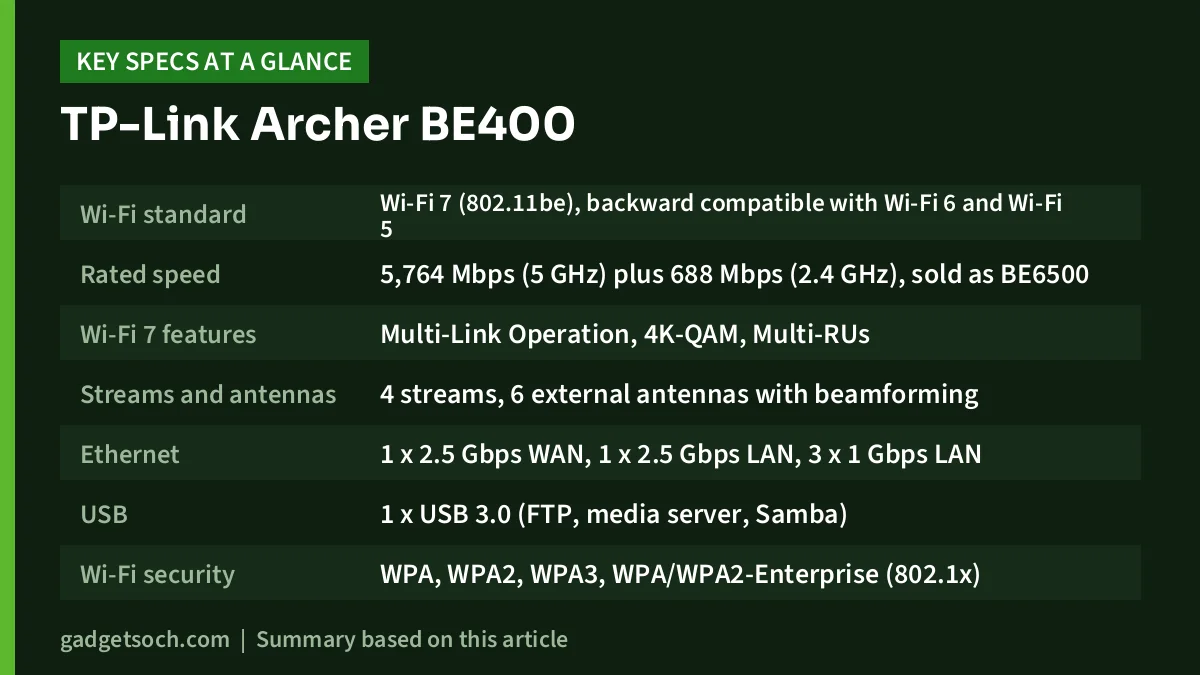
Archer BE400 specifications at a glance
| Specification | TP-Link Archer BE400 (TP-Link India page unless noted) |
|---|---|
| Wi-Fi standard | Wi-Fi 7 (802.11be), backward compatible with Wi-Fi 6 and Wi-Fi 5 |
| Rated speed | 5,764 Mbps (5 GHz) plus 688 Mbps (2.4 GHz), sold as BE6500 |
| Wi-Fi 7 features | Multi-Link Operation, 4K-QAM, Multi-RUs |
| Streams and antennas | 4 streams, 6 external antennas with beamforming |
| Ethernet | 1 x 2.5 Gbps WAN, 1 x 2.5 Gbps LAN, 3 x 1 Gbps LAN |
| USB | 1 x USB 3.0 (FTP, media server, Samba) |
| Wi-Fi security | WPA, WPA2, WPA3, WPA/WPA2-Enterprise (802.1x) |
| VPN | Server and client: OpenVPN, PPTP, L2TP, WireGuard |
| Mesh | EasyMesh compatible |
| Modes | Router and access point |
| Smart home | Works with Alexa and Google Assistant, IoT network |
| Management | Tether app and web interface |
| Power | 12 V / 2.5 A |
| Coverage claim | 3-bedroom houses |
| Size and weight (Amazon listing) | 15.3 x 26.8 x 4.8 cm, 0.58 kg |
| Box contents (Amazon listing) | Router, power adapter, RJ45 Ethernet cable, quick installation guide |
| Warranty (Amazon listing) | 3 years manufacturer |
Check the current price of the TP-Link Archer BE400 on Amazon.in, and confirm the listing title still reads Archer BE400, BE6500, dual-band.
What Wi-Fi 7 on two bands actually gives you
Wi-Fi 7 brings three upgrades that matter on the BE400. 4K-QAM packs more data into each transmission than Wi-Fi 6’s 1024-QAM, which helps when a device is close to the router with a strong signal. Multi-Link Operation lets a Wi-Fi 7 phone or laptop use the 2.4 GHz and 5 GHz bands together, which TP-Link says improves throughput, latency and reliability. Multi-RUs let the router allocate airtime more flexibly when many devices are active.
The headline Wi-Fi 7 feature you do not get is 320 MHz channels. Those are only allowed on the 6 GHz band, and the BE400 is a 2.4 GHz plus 5 GHz router. TP-Link India’s page does not state the maximum channel width it uses on 5 GHz. For most homes this is a reasonable trade: 5 GHz signals reach through walls better than 6 GHz, every Wi-Fi 5 and Wi-Fi 6 device can use them, and gigabit internet does not need 320 MHz to be delivered in full.
MLO and 4K-QAM only work with Wi-Fi 7 clients. If your devices are Wi-Fi 6, they still connect normally and benefit from the six antennas, beamforming, OFDMA and MU-MIMO, but not from the Wi-Fi 7-specific features. Think of the BE400 as a router that serves today’s Wi-Fi 6 devices well and is ready for Wi-Fi 7 phones and laptops as you replace them.
What the published test found
Expert Reviews tested the Archer BE400 in a three-bedroom home in a review by Darien Graham-Smith published on 6 August 2026. The test used a laptop with an Intel BE200 Wi-Fi 7 card on the 5 GHz network, copying files to and from a NAS connected to the 2.5GbE LAN port. Average downloads ranged from 140.8 MB/sec in the room nearest the router (about 1.1 Gbps) to 54.8 MB/sec in the dining room, with uploads between 34.1 and 22.1 MB/sec.
The reviewer called it the best overall performer among the routers in that test, with above-average downloads in four of five locations, though not the fastest in every scenario. Speeds fell with distance, as you would expect, but stayed competitive. Results in your home will depend on wall material, layout and your devices, so treat these figures as an indication rather than a promise.
Ports: why the 2.5G pair matters
The BE400’s wired layout is one of its best features. A 2.5 Gbps WAN port means the router itself is never the bottleneck for a 1 Gbps fibre plan, and it leaves headroom if Indian ISPs offer faster plans in your area later. A 2.5 Gbps LAN port lets a NAS, a desktop with a 2.5G network card or a second 2.5G device talk to Wi-Fi 7 clients faster than gigabit would allow, which is exactly how Expert Reviews ran its test.
The three remaining LAN ports are gigabit, which is plenty for a smart TV, set-top box, console or a wired access point. One listing detail to note: the Amazon.in title describes the ports as “1x 2.5 Gbps WAN/LAN + 3x 1 Gbps LAN”, while the listing’s own feature bullets and TP-Link’s page describe one 2.5G WAN, one 2.5G LAN and three gigabit LAN ports. TP-Link’s specification is the one to trust.
The USB 3.0 port supports FTP, a media server and Samba file sharing, with NTFS, exFAT, HFS+ and FAT32 drives, according to TP-Link. Expert Reviews notes that the port sits on the side of the router rather than the back.
Software, security and mesh
Setup and day-to-day control run through TP-Link’s Tether app or the web interface. Expert Reviews found both fairly clean and intuitive. TP-Link lists one guest network on each band, a separate IoT network for smart plugs and cameras, device-based QoS, IPv6, IPTV options (IGMP proxy and snooping, bridge, VLAN tagging) and the usual NAT tools such as port forwarding, DMZ and UPnP.
HomeShield adds IoT protection, a malicious site blocker, intrusion and DDoS prevention, a network scanner and parental controls with profiles, content filtering and time limits. TP-Link sells a paid Pro tier for some HomeShield features, so check which features are in the free plan before relying on them. The VPN server and client support OpenVPN, PPTP, L2TP and WireGuard, which is useful for reaching home files securely while travelling.
For larger homes, the BE400 is EasyMesh compatible, so it can form a mesh with other EasyMesh routers and extenders. Expert Reviews also mentions OneMesh support. A wired backhaul from one of its LAN ports to a second access point remains the most reliable way to cover a separate floor.
Strengths and limitations
- Strength: 2.5G WAN and 2.5G LAN ports make it ready for gigabit fibre and fast local transfers
- Strength: MLO and 4K-QAM for Wi-Fi 7 devices, with full compatibility for older ones
- Strength: broad feature set including WireGuard VPN, IoT network, USB 3.0 sharing and EasyMesh
- Limitation: no 6 GHz band, so no 320 MHz channels
- Limitation: about 27 cm wide according to the Amazon listing, so plan shelf space
- Limitation: overkill for 100 Mbps plans, where an AX3000 Wi-Fi 6 router would serve equally well
Alternatives worth comparing
- TP-Link Archer BE230: a smaller-step Wi-Fi 7 option rated BE3600 (2,882 Mbps on 5 GHz plus 688 Mbps on 2.4 GHz) with the same port layout of 2.5G WAN, 2.5G LAN and three gigabit LAN, plus USB 3.0, MLO and EasyMesh, according to TP-Link India
- TP-Link Archer AXE75: a tri-band Wi-Fi 6E router with a 6 GHz band rated 2,402 Mbps alongside 5 GHz and 2.4 GHz, USB 3.0 and gigabit ports only
- TP-Link Archer AX55: an AX3000 Wi-Fi 6 router (2,402 Mbps plus 574 Mbps) with gigabit ports, USB 3.0, OneMesh and EasyMesh, a sensible choice if your plan is 300 Mbps or less
Before you order: a checklist

- Variant: the listing should say Archer BE400, BE6500 dual-band, in black. Do not confuse it with the Archer BE230 or tri-band BE models
- Your fibre box: if the ISP’s ONT is also a router, ask for bridge mode or run the BE400 in access point mode to avoid double NAT
- Your devices: MLO and 4K-QAM need Wi-Fi 7 clients, so check your phone or laptop’s Wi-Fi specification
- Cables: use Cat5e or better for the 2.5G ports
- Box contents: router, power adapter, RJ45 cable and quick installation guide, according to the listing
- Warranty: the listing states a 3-year manufacturer warranty. Keep the invoice and register with TP-Link India support
- Power backup: the adapter is 12 V / 2.5 A, so a mini UPS must support 12 V at that current
To compare sellers and delivery dates, see the Archer BE400 (BE6500, black) on Amazon.in.
Frequently asked questions
Does the TP-Link Archer BE400 support 6 GHz?
No. It is a dual-band router with 2.4 GHz and 5 GHz radios. For 6 GHz you would need a tri-band model such as the Wi-Fi 6E Archer AXE75 or a tri-band Wi-Fi 7 router.
Is the Archer BE400 worth it for a 1 Gbps fibre plan?
Yes, it is well matched. The 2.5 Gbps WAN port removes the port bottleneck, and Expert Reviews measured about 1.1 Gbps (140.8 MB/sec) close to the router with a Wi-Fi 7 laptop on a local transfer. Internet speed over Wi-Fi will still depend on your device and distance.
Will my Wi-Fi 6 phone work with the BE400?
Yes. Wi-Fi 7 routers are backward compatible. Your phone will connect using Wi-Fi 6, without MLO or 4K-QAM.
Can I build a mesh with the Archer BE400?
TP-Link lists EasyMesh compatibility, so it can work with EasyMesh routers and range extenders. Check that the extender you buy is listed as EasyMesh compatible.
Does it work with Alexa and Google Assistant?
Yes. TP-Link lists compatibility with both, alongside app control through Tether.
The bottom line
The Archer BE400 makes the most sense for homes with fast fibre, a few Wi-Fi 6 or Wi-Fi 7 devices and something on a cable that can use 2.5G. If you were hoping for 6 GHz, look elsewhere. If your plan is modest, a cheaper Wi-Fi 6 router will feel the same. For everyone in between, check the Archer BE400’s current price on Amazon.in.
Related reading on GadgetSoch: Mercusys AC10 Review: A Budget AC1200 Router, and Why Its 100 Mbps Ports Matter and TP-Link Archer C50 Review: AC1200 Dual-Band Router With a 100 Mbps Catch.
Sources
- TP-Link India: Archer BE400 product and specifications (checked 17 October 2026)
- Expert Reviews: TP-Link Archer BE400 review (6 August 2026, checked 17 October 2026)
- Amazon.in listing for the TP-Link Archer BE400, ASIN B0DJFPX6BW (captured 17 October 2026)
- TP-Link India: Archer BE230, Archer AXE75 and Archer AX55 pages (checked 17 October 2026)