

The Sony PlayStation 5 Media Remote is worth buying only if you regularly watch Netflix, YouTube or other streaming apps on your PS5 and find the DualSense controller clumsy for playback. It powers on the console, navigates its menus, controls playback and can adjust your TV’s power and volume through infrared, but it is not a game controller and adds nothing to gaming itself.
This article covers the white Sony PlayStation Media Remote for PlayStation 5 on Amazon.in (listing title: “Sony Playstation Media Remote For Playstation 5 – White”, ASIN B08FC5R4KV). It is written for Indian PS5 owners who use the console as their main living-room streaming box and want to know exactly what the remote can and cannot do before ordering one.
How this was put together: everything below is based on Sony’s official PlayStation India product page and the Amazon.in listing data, both checked on 17 October 2026. Gadget Soch has not tested the remote hands-on, and we do not quote any price because prices change often.
Quick verdict
- Best for: PS5 owners who stream films, series and music on the console most days and want a TV-style remote instead of a gamepad
- Skip if: you mainly game, rarely open streaming apps on the PS5, or already watch through a separate streaming stick or your smart TV’s own apps
- Key strengths: dedicated playback buttons, one-press app buttons, PS5 power-on and menu navigation, TV power and volume through a built-in IR transmitter, two AA batteries included according to the Amazon.in listing
- Key limitations: made for the PS5 only, the microphone button is officially “reserved for future use”, the app buttons are fixed to specific services, and Sony does not publish battery life
Sony PS5 Media Remote: key specifications
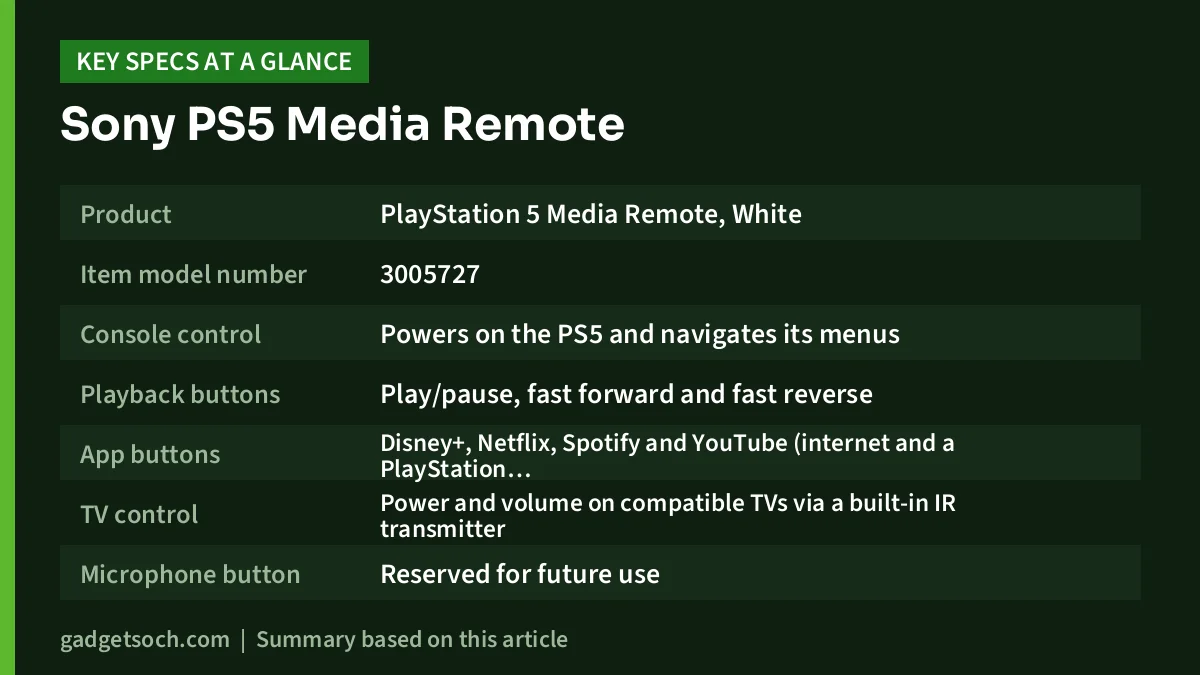
| Item | Details | Source |
|---|---|---|
| Product | PlayStation 5 Media Remote, White | Amazon.in listing title |
| Item model number | 3005727 | Amazon.in listing |
| Console control | Powers on the PS5 and navigates its menus | PlayStation India |
| Playback buttons | Play/pause, fast forward and fast reverse | PlayStation India |
| App buttons | Disney+, Netflix, Spotify and YouTube (internet and a PlayStation account needed) | PlayStation India |
| TV control | Power and volume on compatible TVs via a built-in IR transmitter | PlayStation India |
| Microphone button | Reserved for future use | PlayStation India |
| Batteries | 2 x AA, included | Amazon.in listing |
| Weight | 159 g | Amazon.in listing |
| Dimensions | 8.64 x 4.32 x 21.34 cm | Amazon.in listing |
| Software | A PS5 system software update may be required | PlayStation India |
Two notes on the table. Sony’s page does not list battery life, weight or dimensions, so those figures come only from the seller-provided Amazon.in listing, which does not say whether they include packaging. Sony’s page also does not explain how the remote connects to the console itself; the only wireless method it names is the infrared transmitter used to control the TV.
Check the current price of the Sony PS5 Media Remote (White) on Amazon.in
What the Media Remote actually does
Think of this as a dedicated remote for the PS5’s entertainment side. According to PlayStation India, you can use it to switch the console on and move around the PS5 menus, so you do not need to pick up a controller just to open an app. That is handy when the controller is not within reach.
The remote has built-in play/pause, fast forward and fast reverse buttons. On a game controller these functions are usually mapped to face buttons or shoulder buttons that differ between apps, which makes skipping an intro or rewinding a missed line of dialogue less intuitive. A remote with labelled transport keys removes that guesswork, which matters most for family members who do not play games and never learned the controller layout.
One-press app buttons
PlayStation India says the remote can launch Disney+, Netflix, Spotify and YouTube at the push of a button. Sony’s footnotes add three important conditions: you need an internet connection and an account for PlayStation, streaming services may need a paid subscription, and they are not available in every country. Before you buy mainly for these shortcuts, confirm that you actually use and subscribe to these services on your PS5 in India. If your daily viewing happens on an app that has no dedicated button, the shortcuts lose much of their value and you will be navigating through the menus like any other app.
TV power and volume through infrared
The second big feature is TV control. Sony says the remote can adjust volume and power on compatible TVs using a built-in IR transmitter. In practice, this is what lets the Media Remote replace the TV remote for a typical streaming session: turn things on, set the volume, watch, and switch off without juggling two remotes.
Two things are worth understanding here. First, “compatible” means not every TV will respond, and Sony’s page does not publish a compatibility list, so treat TV control as likely rather than guaranteed. Second, infrared generally works best with a clear line of sight to the TV’s sensor, so a TV hidden behind a soundbar or inside a cabinet may respond less reliably. Sony’s page also mentions only TV power and volume, not soundbars, AV receivers or set-top boxes.
The microphone button does nothing yet
There is a microphone button on the remote, but PlayStation India describes it as “reserved for future use”. Do not buy this remote expecting voice search or voice commands. If Sony enables the button later through software, that would be a bonus, but nothing on the official page promises it.
Design, batteries and build
The Amazon.in listing describes the linked unit as the white model, matching the PS5’s standard white styling. According to the listing, the remote runs on two AA batteries, which are included. Using replaceable cells has a practical upside: you never have to charge it, and when the batteries run down you can swap in fresh ones or rechargeable AA cells in seconds. The downside is that Sony does not publish an expected battery life, so we cannot tell you how long a set will last.
The listing gives a weight of 159 g and dimensions of 8.64 x 4.32 x 21.34 cm. Since the listing does not say whether these are packaged figures, use them only as a rough guide to size rather than the weight of the bare remote.
Setting it up and getting the most from it
Sony’s own page notes that a PS5 system software update may be required, so start by making sure your console is fully updated before you try to pair the remote. A sensible setup routine looks like this:
- Update the PS5 system software first, while you still have a controller connected
- Insert the two AA batteries that, according to the listing, come in the box
- Follow the pairing instructions in the box or on Sony’s PlayStation support pages to register the remote with your console
- Set up TV control and test whether your TV responds to power and volume
- Try each app button and check that it opens the service you are signed into
Once it is set up, keep your DualSense charged and nearby. The Media Remote cannot play games, so you will still need a controller for anything beyond watching and listening.
Who should buy it, and who should skip it
Buy the PS5 Media Remote if your PS5 is the main streaming device in the house, if non-gaming family members want to watch shows without learning a controller, or if you are tired of switching between the TV remote and the DualSense for volume and playback.
Skip it if you rarely use streaming apps on the console, if your favourite services are not among those with dedicated buttons, or if you expect voice control. It is also not a good buy for anyone without a PS5: PlayStation India presents it as a PS5 accessory and does not list any other compatible console.
Alternatives worth comparing
Sony DualSense Wireless Controller
The controller that came with your PS5 already handles menus and playback, so the cheapest alternative is simply to keep using it. The trade-off is ergonomics and battery: our Sony DualSense review notes that published reviews put its battery life at roughly an evening of play per charge, whereas the Media Remote runs on AA cells. If you need a second pad anyway for local multiplayer, a spare DualSense may be the more useful purchase.
Sony DualSense Edge
Sony’s pro controller keeps the standard DualSense’s haptics and adaptive triggers and adds remappable buttons, saved profiles, swappable stick caps and back buttons. It is a gaming upgrade, not a media remote, so consider it only if competitive play matters more to you than streaming convenience.
Amazon Fire TV Stick 4K Plus
If streaming is your main use and you would rather leave the PS5 off, a dedicated stick is a different approach. As covered in our Fire TV Stick 4K Plus review, it plugs into an HDMI port, supports Dolby Vision, HDR10+ and Dolby Atmos, and comes with an Alexa Voice Remote that has dedicated power and volume buttons. That means working voice search, which the PS5 Media Remote does not offer today.
What to check before you order
- Exact product: the linked listing is the white PS5 Media Remote, item model number 3005727. Make sure the title says Media Remote and not a controller or a charging station.
- App buttons: look at the listing photos to see which app logos appear on the unit you will receive, and confirm those services are available to you in India.
- Your console: Sony’s page describes it as a PS5 accessory. It is not listed for the PS4.
- TV compatibility: Sony only says compatible TVs are supported, so keep your TV remote handy in case yours does not respond.
- Batteries: the listing says two AA batteries are included. Keep a spare pair or rechargeable AA cells at home.
- Seller and warranty: check who the seller is, what warranty and service terms the listing states for India, and keep your invoice.
See the white PS5 Media Remote listing on Amazon.in
Frequently asked questions
Can the PS5 Media Remote control my TV?
It can control power and volume on compatible TVs using a built-in IR transmitter, according to PlayStation India. Sony does not publish a list of compatible TVs, so test it with your set after setup.
Does the PS5 Media Remote support voice search?
Not at present. There is a microphone button, but PlayStation India says it is reserved for future use.
Does it work with the PS4?
Sony’s official page presents the Media Remote as a PS5 accessory and does not list the PS4. If you own only a PS4, do not buy it expecting it to work.
Does the remote need charging?
No. According to the Amazon.in listing, it uses two AA batteries, which are included. Sony does not publish an official battery life figure.
Can I play games with it?
No. It handles power, menus, playback and app shortcuts. You still need a controller such as the DualSense for gaming.
Which streaming apps have dedicated buttons?
PlayStation India lists Disney+, Netflix, Spotify and YouTube. Services may need a paid subscription and are not available in all countries, so check the logos on the listing photos and your own subscriptions.
Final word
The PS5 Media Remote does one job: it makes the PS5 easier to use as a streaming box. If that is how your household uses the console, the dedicated playback keys, app shortcuts and TV control are genuinely convenient, and AA batteries mean no charging. If you mostly game, or your streaming happens elsewhere, your DualSense already covers the basics and the remote adds little.
Check the current price of the Sony PS5 Media Remote on Amazon.in
Related reading on GadgetSoch: Sony DualSense Charging Station Review (CFI-ZDS1): Is a Two-Controller Dock Worth It?, PowerA Twin Charging Station for PS5 Review: Two DualSense Pads, One Dock and Stellar Blade PS5 Review (Disc): Story, Combat, PS5 Features and Who It Suits.
Sources
- PlayStation India: Media Remote official product page (checked 17 October 2026)
- Amazon.in listing data for ASIN B08FC5R4KV, including batteries, weight, dimensions and model number (captured 17 October 2026)




