

If you are deciding between the Lenovo V15 G4 AMN (82YU00W7IN) and the HP 15 (2025), both built around the AMD Ryzen 3 7320U with 8GB memory and a 512GB SSD, the short answer is this: the Lenovo V15 is the simpler buy for most people because it ships with Windows 11 Home and a Full HD screen, while the HP 15 makes sense mainly if you already have a Windows licence, plan to run Linux, or value its lighter 1.5kg body.
With the same processor, everyday speed should be very similar on paper. The Lenovo’s main compromise is a 250-nit screen that Lenovo lists as a TN panel. The HP’s are DOS instead of Windows and an HD rather than Full HD display.
How we compared them: our picks are based on official specifications and published reviews summarised in our individual reviews, not hands-on testing. Gadget Soch has not tested either laptop in person. Availability and prices on Amazon.in change often, so check the listing for the exact variant before you buy.
Quick verdict: Lenovo V15 or HP 15?
- Choose the Lenovo V15 if you want Windows 11 Home ready out of the box, a Full HD 1920 x 1080 resolution, a wired Ethernet port and a numeric keypad for office or accounts work
- Choose the Lenovo V15 if you want USB-C charging support or plan to run an external 4K monitor at 60Hz over USB-C
- Choose the HP 15 if you already own a Windows licence, have a business or college volume licence, or plan to install Linux
- Choose the HP 15 if a lighter 15.6-inch laptop (1.5kg listed) matters more to you than screen sharpness
- Skip both if you need more than 8GB of memory, a bright screen for outdoor use, or any real gaming or video editing ability
Lenovo V15 vs HP 15: specifications side by side
Lenovo details come from the listing title and Lenovo’s PSREF sheet. For the HP, we could not match an official HP India spec sheet to this listing, so only the listing title and AMD’s processor page are used. Anything unconfirmed is marked as such.
| Specification | Lenovo V15 G4 AMN (82YU00W7IN) | HP 15 (2025) Ryzen 3 7320U |
|---|---|---|
| Amazon.in ASIN | B0C69Z4TKW | B0F6TSW761 |
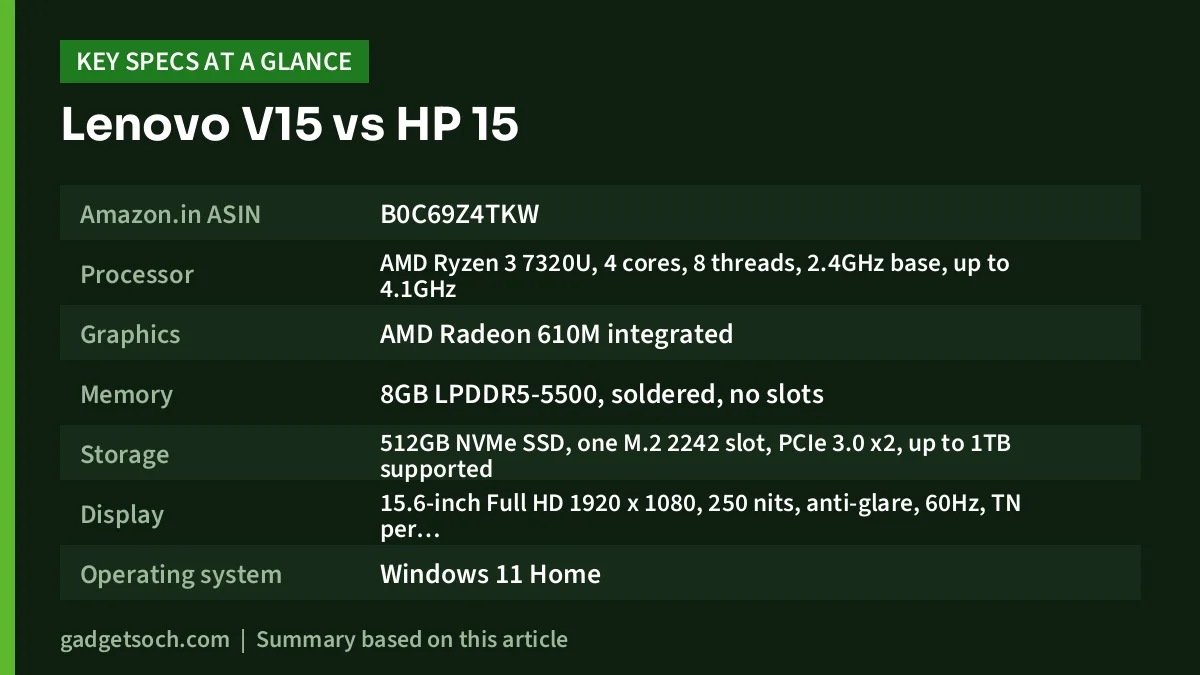
| Processor | AMD Ryzen 3 7320U, 4 cores, 8 threads, 2.4GHz base, up to 4.1GHz | AMD Ryzen 3 7320U, 4 cores, 8 threads, 2.4GHz base, up to 4.1GHz |
| Graphics | AMD Radeon 610M integrated | AMD Radeon 610M integrated |
| Memory | 8GB LPDDR5-5500, soldered, no slots | 8GB (the processor supports only LPDDR5, which is soldered, max 16GB) |
| Storage | 512GB NVMe SSD, one M.2 2242 slot, PCIe 3.0 x2, up to 1TB supported | 512GB SSD (interface not confirmed) |
| Display | 15.6-inch Full HD 1920 x 1080, 250 nits, anti-glare, 60Hz, TN per Lenovo PSREF (one spec site says IPS) | 15.6-inch HD (exact resolution, panel type and brightness not confirmed) |
| Operating system | Windows 11 Home | DOS (no Windows licence) |
| Ports | 2x USB-A 5Gbps, USB-C 5Gbps with power delivery and DisplayPort 1.2, HDMI 1.4b, RJ-45 Gigabit Ethernet, 3.5mm jack | Not confirmed |
| Card reader | None listed | Not confirmed |
| Wi-Fi | Wi-Fi 5 or Wi-Fi 6 by configuration (confirm on listing) | Not confirmed |
| Webcam | 720p with privacy shutter | Not confirmed |
| Battery | 38Wh or 47Wh by configuration (confirm on listing) | Not confirmed |
| Keyboard | Spill-resistant, numeric keypad, not backlit | Not confirmed |
| Weight | 1.65kg (listing title) | 1.5kg (listing title) |
| Colour | Arctic Grey | Turbo Silver |
Operating system: Windows 11 Home vs DOS
This is the biggest difference. The Lenovo V15 82YU00W7IN comes with Windows 11 Home, so you can set it up and start working the day it arrives. Note that the title mentions Windows only, so do not assume Microsoft Office is included.
The HP 15 (2025) listing says DOS, which means there is no Windows licence. Switch it on and you get a basic command-line environment, not a Windows setup screen. You will need a genuine Windows 11 licence, a volume licence, or a free Linux distribution such as Ubuntu. The hardware exceeds Microsoft’s minimum requirements and the same chip ships with Windows 11 in the Lenovo, but confirm firmware support (Secure Boot and TPM 2.0) with HP or the seller before buying a licence. Avoid unlicensed copies of Windows, which are illegal and a common malware route.
Better for whom: the Lenovo V15 is the clear choice for anyone who wants a ready-to-use Windows laptop or is not comfortable installing an operating system. The HP 15 only evens out for buyers who already have a licence or prefer Linux, and when comparing the two you should add the cost of a genuine Windows licence to the HP.
Display: Full HD on a TN-class panel vs HD
Both laptops have a 15.6-inch screen, but they are not equal. The Lenovo is Full HD 1920 x 1080 with an anti-glare coating, giving reasonably sharp text and room for two windows side by side. The catch is the panel. The listing says 250 nits, and Lenovo’s PSREF sheet lists that Full HD option as TN with 500:1 contrast and 45% NTSC colour. Smartprix also lists TN, while one other spec site says IPS, so confirm on the listing. TN means colours and contrast shift when viewed from an angle.
The HP listing says only “HD”. Budget 15.6-inch HD laptops are usually 1366 x 768, roughly half the pixels of Full HD, though the exact resolution, panel type and brightness are not confirmed. Expect softer text and less on screen.
Better for whom: the Lenovo V15 wins on sharpness and workspace, which matters for spreadsheets, coding, reading and online classes. Neither is a good choice for working near bright windows or for colour-sensitive work. The HP’s screen matters much less if the laptop will mostly sit on a desk connected to an external monitor.
Performance, memory and storage
Both use the AMD Ryzen 3 7320U: four cores, eight threads, up to 4.1GHz at 15W. It uses Zen 2 cores on a 6nm process, launched by AMD in September 2022, so despite the “7000” name it is not a current-generation design. Notebookcheck places it below the Ryzen 5 7520U and classes the integrated Radeon 610M as entry-level.
On paper that means both are comfortable for Word and Excel, Google Docs, a good number of browser tabs, Teams or Zoom calls and Full HD streaming. Neither is suited to long video exports, large programming builds, CAD or modern 3D games.
Lenovo states the V15’s 8GB is soldered LPDDR5 with no slots. For the HP, AMD lists LPDDR5 as the only supported memory, so plan on its 8GB being permanent too. Storage is better documented on the Lenovo: a single M.2 2242 slot at PCIe 3.0 x2, supporting up to 1TB. The HP listing does not confirm the SSD interface.
Better for whom: it is a tie on performance, since the processor, graphics and memory capacity match. The Lenovo has the edge for anyone who wants a confirmed upgrade path for storage. If you multitask heavily, look for a 16GB configuration of either range rather than these 8GB models.
Ports, connectivity and webcam
The Lenovo V15 has a well-documented, office-friendly port list according to Lenovo’s PSREF sheet: two USB-A ports at 5Gbps, one USB-C port at 5Gbps with USB Power Delivery and DisplayPort 1.2, HDMI 1.4b, a full-size RJ-45 Gigabit Ethernet port and a 3.5mm combo jack. It can drive a 4K monitor at 60Hz over USB-C. There is no card reader, and sources disagree on whether this model has Wi-Fi 5 or Wi-Fi 6. The webcam is 720p with a privacy shutter, with dual microphones and Dolby Audio speakers.
For the HP 15 (2025), the listing title gives no ports, Wi-Fi or webcam details, and we could not match an HP India spec sheet to it, so check “Technical Details” on Amazon.in before ordering.
Better for whom: the Lenovo V15 is the safer pick for offices, hostels and homes that rely on wired internet, and for anyone who wants USB-C charging or a 4K monitor at 60Hz. With the HP, you have to verify connectivity yourself.
Design, weight, keyboard and battery
The HP has the advantage on weight: its listing gives 1.5kg against 1.65kg in the Lenovo listing title (Lenovo’s PSREF gives under 1.63kg for the series). For a 15.6-inch laptop carried to college or the office every day, that difference is noticeable. The HP comes in Turbo Silver and the Lenovo in Arctic Grey.
The Lenovo’s spill-resistant keyboard has a numeric keypad, useful for data entry, but no backlight, and Lenovo says the series passed MIL-STD-810H tests. The HP listing does not say whether its keyboard has a numeric keypad or backlight.
Lenovo offers the V15 G4 AMN with a 38Wh or 47Wh battery. 91mobiles lists 38Wh for this model, which we could not confirm from Lenovo. Lenovo’s MobileMark 2018 lab ratings are up to 8.7 hours (38Wh) and 11.6 hours (47Wh), benchmark figures rather than real-world promises. The HP listing gives no battery capacity, so we quote no figure for it.
Better for whom: the HP 15 suits buyers who carry their laptop all day and want the lighter machine. The Lenovo suits desk-bound office users who want a numeric keypad, spill resistance and a battery spec that is at least documented. For warranty on either laptop, check the term on the listing and register the laptop with Lenovo India or HP India after delivery.
Who should buy which
Buy the Lenovo V15 G4 AMN (82YU00W7IN) if you are an office worker, accountant, student or family buyer who wants a full-size Windows laptop that works out of the box, with a Full HD resolution, Ethernet, a capable USB-C port and a numeric keypad. Accept the 250-nit TN-class screen and fixed 8GB memory as the trade-offs. Read our Lenovo V15 Ryzen 3 7320U review for the full breakdown, or check the current price of the Lenovo V15 on Amazon.in.
Buy the HP 15 (2025) Ryzen 3 7320U if you have a Windows licence you can legally use, buy laptops for an office or college with volume licences, or want to run Linux, and you prefer a lighter 1.5kg body. Read our HP 15 (2025) Ryzen 3 7320U review for details, or check the current price of the HP 15 on Amazon.in.
Bottom line
With identical processors and memory, this comes down to software and screen. The Lenovo V15 is the better fit for most buyers, and the HP 15 only pulls ahead if Windows is already covered and lightness matters more than sharpness. Confirm the exact variant, panel type and Wi-Fi on the listing before ordering. See the Lenovo V15 (82YU00W7IN) on Amazon.in or see the HP 15 (2025) DOS variant on Amazon.in.
Frequently asked questions

Is the Lenovo V15 faster than the HP 15 (2025)?
On paper, no. Both use the same AMD Ryzen 3 7320U with Radeon 610M graphics and 8GB of memory, so everyday performance should be very similar. The differences are the operating system, screen, ports and weight.
Does the HP 15 (2025) Ryzen 3 7320U come with Windows?
No. The Amazon.in listing title states DOS, so there is no Windows licence. You need to buy and install Windows 11 yourself, use an existing or volume licence, or install a free Linux distribution. The Lenovo V15 82YU00W7IN comes with Windows 11 Home.
Which has the better screen?
The Lenovo V15, for resolution. It is Full HD 1920 x 1080, while the HP is listed only as HD, which on budget 15.6-inch laptops usually means 1366 x 768. However, the Lenovo’s 250-nit panel is listed as TN in Lenovo’s spec sheet, so viewing angles and colours are limited. The HP’s panel type and brightness are not confirmed.
Can I upgrade the RAM on either laptop?
Plan on not being able to. Lenovo states the V15’s memory is soldered LPDDR5 with no slots, and AMD lists LPDDR5 as the only memory type the Ryzen 3 7320U supports, with a 16GB maximum. Look for a 16GB configuration if you need more.
Our full reviews
Lenovo V15 Ryzen 3 7320U Review (82YU00W7IN): A Practical Office Laptop With One Big Catch
HP 15 (2025) Ryzen 3 7320U Review: What DOS and an HD Screen Mean for You
Related reading on GadgetSoch: Lenovo LOQ Ryzen 7 RTX 4050 vs ASUS TUF A15 RTX 3050: Which Gaming Laptop Should You Buy? and HP 15 Core Ultra 5 125H vs Dell 15 i5-1334U: Which 16GB Laptop Should You Buy?.




