
The Geonix Trek T3 is a foldable aluminium laptop stand that, according to its Amazon.in listing, offers seven tilt and height positions, weighs 219 grams and supports laptops up to 17 inches and up to 5 kg. For anyone working on a laptop at a dining table, a hostel desk or a co-working bench, it is a simple way to lift the screen closer to eye level and keep the base off the table, provided you also use an external keyboard and mouse.
Short verdict: a sensible, portable tabletop riser for students and office workers. It has no cooling fan, and Geonix publishes no spec sheet for it on its own site, so details such as the maximum lift height remain unknown.
How this article was put together: it is based on the product’s Amazon.in listing data (seller-provided title, feature bullets and technical details, captured on 17 October 2026) and on a check of Geonix’s official India website on the same date. We have not used this stand ourselves, so there are no hands-on impressions or load tests here. Where a figure comes only from the listing, we say so.
Quick verdict
- Best for: students, remote workers and anyone who wants a light, foldable stand to raise a 13- to 17-inch laptop on a desk or table
- Skip if: you need a precise, published maximum height, a built-in cooling fan, or a stand you can clamp to a desk
- Key strengths (as listed): seven adjustable angles, 219 g weight, aluminium alloy frame, silicone anti-slip pads, open frame for airflow, folds flat, 1-year manufacturer warranty
- Key limitations: no official product page found on geonix.in, maximum lift height not stated, no carry pouch listed in the box, and any laptop on a stand needs an external keyboard and mouse for comfortable long sessions
Geonix Trek T3 key specifications
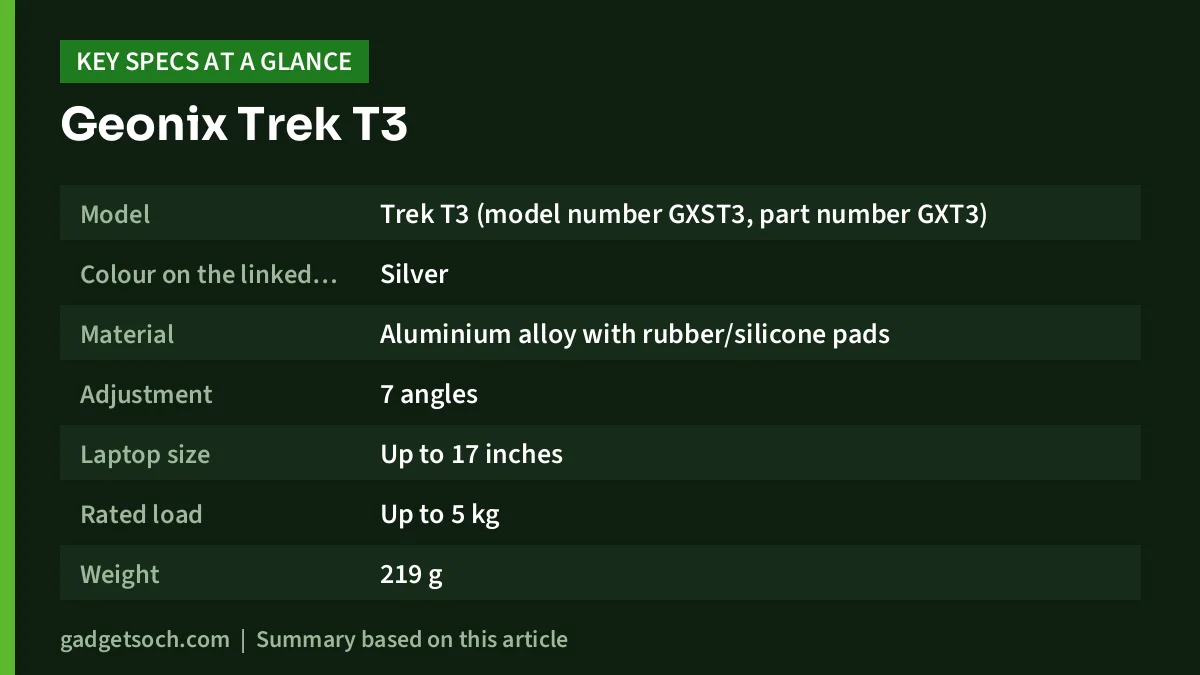
| Specification | Geonix Trek T3 (per the Amazon.in listing) | What it means for you |
|---|---|---|
| Model | Trek T3 (model number GXST3, part number GXT3) | Use the model name to confirm you are looking at the T3 |
| Colour on the linked listing | Silver | The listing says a black version also exists, so check the colour before ordering |
| Material | Aluminium alloy with rubber/silicone pads | Metal frames generally flex less than plastic ones |
| Adjustment | 7 angles | Lets you pick a tilt and height that suits your chair and eye level |
| Laptop size | Up to 17 inches | Covers most 13-inch to 16-inch laptops sold in India |
| Rated load | Up to 5 kg | Comfortably above the weight of typical thin-and-light and many gaming laptops |
| Weight | 219 g | Light enough to carry daily in a laptop bag |
| Listed dimensions | 23.7 x 4.3 x 1.3 cm | Appears to describe the folded size, not the open stand |
| In the box | Laptop stand | No pouch or tools are listed |
| Origin | China (manufacturer listed as Geonix International Private Limited) | The named manufacturer is the company to contact for warranty |
| Warranty | 1 year manufacturer | Keep your invoice for claims |
Specifications above are taken from the Amazon.in listing, checked on 17 October 2026. On the same date, a search on Geonix’s official India website did not return a Trek T3 product page, so we could not cross-check these figures against a manufacturer spec sheet.
Check the current price of the Geonix Trek T3 (Silver) on Amazon.in
Why raise your laptop at all?
On a flat desk, a laptop screen sits low and you tend to bend your neck to read it. Raising the laptop moves the display up, which is the main reason to buy a stand like the Trek T3. Common ergonomic guidance is to place the top of the screen at or slightly below eye level and about an arm’s length away.
Once the laptop is lifted and tilted, its own keyboard becomes awkward for long typing sessions, so a stand works best with a separate keyboard and mouse. If you are building such a setup, our work from home desk setup guide covers keyboards, mice and monitors that pair well with a stand.
Design and build: aluminium and seven angles
The listing describes the Trek T3 as being made from an aluminium alloy, with silicone rubber pads on both the base and the surfaces where the laptop rests. Aluminium is the usual choice for better laptop stands because it is light, does not rust easily and tends to feel more rigid than ABS plastic at the same size. The listing’s claim that the stand weighs only 219 grams while supporting up to 5 kg is the headline spec here; it makes the T3 something you can genuinely carry every day rather than leave at one desk.
The seven adjustable angles are the other key point. Each step changes both the tilt and the effective height of the rear edge of the laptop. More steps give you finer control, which matters if you switch between chairs or tables of different heights. However, the listing does not state the lowest or highest height in centimetres, so it is not possible to say from the official data exactly how high the screen will sit on the top setting. If you are tall or your table is low, this is the single detail worth checking in the listing’s images and the questions section before you order.
A note on the listing details
The listing gives the model number as GXST3 and the part number as GXT3; both refer to the Trek T3. Its technical details also list the fastening type as “sticky pad”, while the feature bullets describe only silicone grip pads. This looks like a listing field error, but confirm with the seller if residue on your desk is a concern.
Stability and grip
According to the listing, the Trek T3 uses silicone pads on the base and on the device rests to stop the laptop sliding and to protect it from scratches. Grip on any stand of this type also depends on the angle you choose and how clean the pads are, so wipe them occasionally with a damp cloth.
Airflow: what an open frame can and cannot do
The listing highlights a hollow, open-frame design that leaves space under the laptop for air to move. Lifting the rear of a laptop does give its bottom vents more room than when it lies flat on a table or bed, and that is genuinely useful for machines with intake vents underneath.
It is important to keep expectations realistic, though. The Trek T3 has no fan, so it only helps passive airflow. It will not turn a gaming laptop that runs hot under load into a cool one, and the listing provides no temperature measurements. If heat is your main problem, an active cooling pad is a different product category; our Zebronics ZEB-NC3300 cooling pad review explains what a dual-fan pad can and cannot do.
Compatibility: will your laptop fit?
The listing states compatibility with laptops up to 17 inches, and also lists tablets and smartphones as compatible devices. Use these checks before ordering:
- Screen size: 13-inch to 16-inch laptops fall well within the stated 17-inch limit
- Weight: the 5 kg rating covers almost every consumer laptop, but with a heavy 17-inch machine, check that it sits firmly before typing at the steepest angle
- Front lip: very thick laptops or those with ports along the front edge may need you to check that the front stoppers do not block a port or the lid opening
Who should buy the Geonix Trek T3

- Students and office workers who carry their laptop daily and want a stand that adds little weight to the bag
- People setting up a temporary workspace at home, in a hostel or in a co-working space
- Anyone who already uses, or plans to buy, an external keyboard and mouse
Who should skip it
- Buyers who need a guaranteed screen height, since the listing does not give one
- Gamers who need active cooling rather than just a raised base
- People who want a stand that clamps to a desk or swivels the laptop around
- Anyone who will keep typing on the laptop’s own keyboard all day, as a tilted keyboard can be less comfortable than a flat one
Alternatives worth comparing
- Portronics My Buddy K9 Pro: Portronics’ official site lists it as a 2-in-1 laptop and mobile stand with height and angle adjustment, compatible with devices up to 17 inches
- Portronics My Buddy K Lite: listed by Portronics as a foldable laptop stand with adjustable heights and angles and improved airflow, a close rival for the same portable use
- Portronics My Buddy K10: a laptop stand with a built-in cooling fan and anti-slip silicone pads, according to Portronics, for buyers who want active cooling in a stand
- Zebronics ZEB-NC3300: a cooling pad with dual 120 mm fans rather than a stand, better suited to laptops that run hot on a desk
Buying tips: what to check before you order

- Confirm the variant: the affiliate link opens the Silver Trek T3 listing. The listing says a black version exists, which may be a separate listing, so check the colour shown before you pay
- Check the model: make sure the title says Trek T3 and aluminium, since many similar-looking stands are sold online
- Box contents: the listing mentions only the stand, so do not expect a carry pouch
- Warranty and service: the listing states a 1-year manufacturer warranty. Keep the invoice, and note that Geonix International Private Limited is listed as the manufacturer for claims in India
- Height: if a specific screen height matters, check the listing images and customer questions for the maximum height, since it is not in the technical details
- Accessories: budget for an external keyboard and mouse if you do not already own them
See the Geonix Trek T3 aluminium laptop stand (Silver) on Amazon.in and confirm the colour and details on the listing.
Setting it up for better posture
Set your chair first, so your feet are flat and your elbows are at roughly a right angle over the external keyboard. Then place the stand about an arm’s length away and step through the angles until the top of the screen is at or just below eye level. Adjust the lid so the screen faces you squarely, and fold the stand flat when you pack up.
Frequently asked questions
How many angles does the Geonix Trek T3 have?
Seven, according to the Amazon.in listing. Heights in centimetres for each step are not given.
Can the Geonix Trek T3 hold a 17-inch gaming laptop?
The listing states compatibility with laptops up to 17 inches and a load capacity of up to 5 kg, which covers most 17-inch laptops.
How heavy is the Geonix Trek T3?
The listing gives its weight as 219 grams.
Is the Geonix Trek T3 made of metal or plastic?
The listing describes it as an aluminium alloy stand with silicone rubber pads.
What warranty does the Trek T3 have in India?
The Amazon.in listing states a 1-year manufacturer warranty.
Conclusion
The Geonix Trek T3 is a straightforward, portable aluminium laptop stand. On paper it ticks the boxes most buyers care about: seven angles, a 17-inch and 5 kg rating, a 219 g weight and a fold-flat design. Its weak points are missing information, chiefly the maximum height, rather than known hardware flaws. If you pair it with an external keyboard and mouse, it should make long laptop sessions easier on your neck.
Check the current price of the Geonix Trek T3 on Amazon.in
Related reading on GadgetSoch: Canon PIXMA G670 Review: A 6-Colour MegaTank Photo Printer, Specs and Trade-offs and Amkette Optimus BT 4 in 1 Review: Multi-Device Keyboard With an AI Key, Explained.
Sources
- Amazon.in listing for the Geonix Trek T3 Aluminium Ergonomic Laptop Stand (Silver), ASIN B0F7B1W5MN, listing data captured 17 October 2026
- Geonix official India website, searched 17 October 2026 (no Trek T3 product page found)
- Portronics official website, laptop stand range, checked 17 October 2026




