

The Canon PIXMA MG2577s is a compact, USB-only colour inkjet all-in-one that prints, scans and copies. It is a reasonable pick for a home or student desk that prints a few pages a week from one Windows or Mac computer, but it is a poor fit for anyone who prints in bulk, wants to print from a phone, or needs Wi-Fi. Canon rates the standard cartridges at about 100 pages each, so the running cost per page is far higher than on an ink tank printer.
Canon India describes the MG2577s as a compact all-in-one with Auto Power ON/OFF and recommends 10 to 80 pages a month. Inside that range it is simple and adequate. Beyond it, a refillable ink tank model usually makes more sense.
How this article was prepared: it is based on Canon India’s official product and specification pages and the Amazon.in listing data, all checked on 17 October 2026. It is not based on hands-on testing, and gadgetsoch did not print, scan or copy anything with this printer.
Quick verdict
- Best for: students and homes that print occasional school work, forms and the odd colour page from a single PC or laptop over a USB cable
- Skip if: you print more than about 80 pages a month, want to print from a phone, or need Wi-Fi, automatic two-sided printing or a document feeder
- Key strengths: print, scan and copy in one compact body, simple USB 2.0 setup, flatbed scanner for IDs and single sheets, optional higher-yield XL cartridges
- Key limitations: small 100-page standard cartridges, slow colour output (up to 4.0 ipm), 60-sheet paper feed, older operating systems named in the listing’s support list
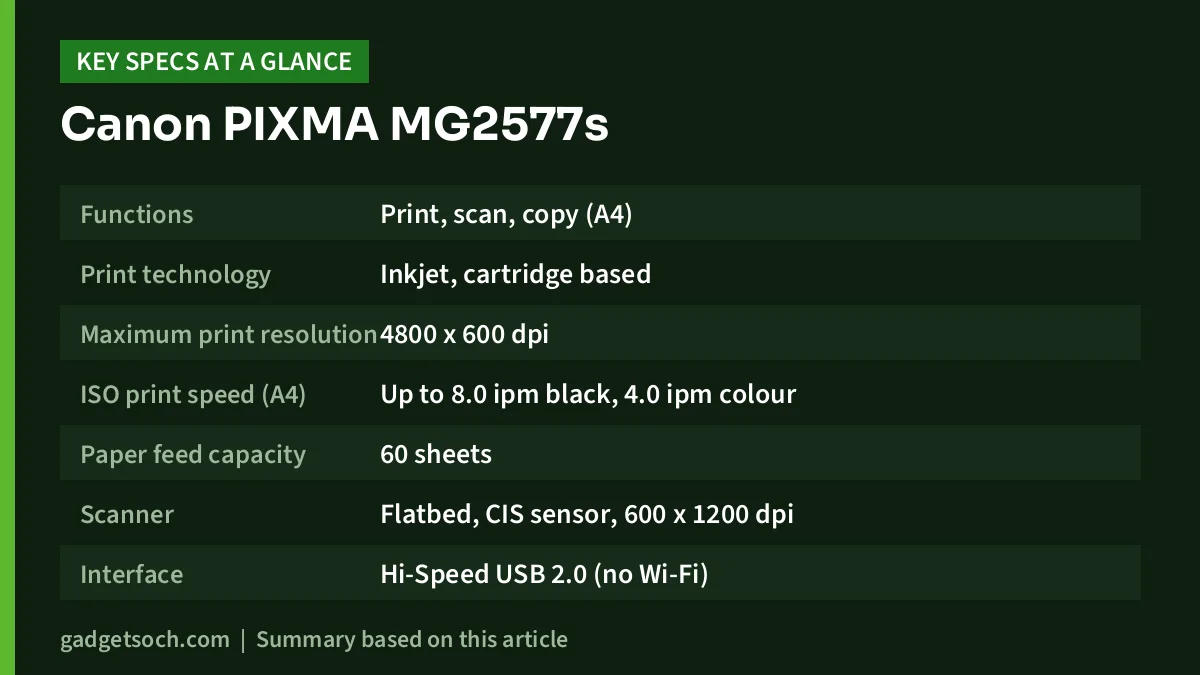
| Specification | Canon PIXMA MG2577s | Source |
|---|---|---|
| Functions | Print, scan, copy (A4) | Canon India |
| Print technology | Inkjet, cartridge based | Canon India |
| Maximum print resolution | 4800 x 600 dpi | Canon India, Amazon.in listing |
| ISO print speed (A4) | Up to 8.0 ipm black, 4.0 ipm colour | Canon India |
| Paper feed capacity | 60 sheets | Canon India |
| Scanner | Flatbed, CIS sensor, 600 x 1200 dpi | Canon India (CIS, resolution), listing (flatbed) |
| Interface | Hi-Speed USB 2.0 (no Wi-Fi) | Canon India |
| Standard cartridges | PG-745S black (100 pages), CL-746S colour (100 pages) | Canon India |
| Optional cartridges | PG-745 (180 pages), PG-745XL (300 pages), CL-746 (180 pages), CL-746XL (300 pages) | Canon India |
| Recommended monthly volume | 10 to 80 pages | Canon India |
| Borderless printing | Listed | Amazon.in listing |
| Operating systems listed | Windows 8, 7, Vista, XP and Mac OS X v10.7.5 or later | Amazon.in listing |
| Dimensions (W x D x H) | 42.6 x 30.6 x 14.5 cm | Amazon.in listing |
| Weight | 3.5 kg | Amazon.in listing |
| Colour | Blue and white | Amazon.in listing |
| Warranty | 1 year, carry-in | Amazon.in listing |
Page yields above are Canon’s ISO/IEC 24711 figures for A4 test pages, so real yields will be lower if you print photos or heavy colour. Check the current price of the Canon PIXMA MG2577s on Amazon.in.
What kind of printer the MG2577s is
The MG2577s is an entry-level model in Canon’s PIXMA MG range. It uses two replaceable cartridges, one black (PG-745 series) and one colour (CL-746 series), rather than refillable ink tanks. That keeps the printer small and the upfront outlay low, and replacing ink is as simple as clicking in a new cartridge, with no bottles to pour. The trade-off is that each cartridge holds far less ink than an ink tank refill.
On top sits a flatbed scanner, and Canon lists copying as one of the three built-in functions, so photocopying an Aadhaar card, a marksheet or a notebook page is covered. What it does not have, according to both Canon’s page and the listing, is any wireless connection. The Amazon.in title literally calls it a “Non Wifi” printer, and Canon India lists only Hi-Speed USB 2.0 as the interface.
Running cost: why the cartridge yield matters most
The single most important number on this printer is the page yield. Canon India lists the standard PG-745S black and CL-746S colour cartridges at 100 pages each, and the Amazon.in listing repeats the “up to 100 black and 100 colour prints” claim, measured to ISO/IEC 24711 with the ISO/IEC 24712 test file. Those test pages have modest coverage, roughly the density of a typical letter or form, not a full-page photo.
In practice that means a student printing 20 pages of notes a week could use up a 100-page black cartridge in about five weeks. That is simple arithmetic on Canon’s rating, not a test result.
Canon also sells higher-capacity cartridges for the same printer. Its India page lists the standard PG-745 and CL-746 at 180 pages and the XL versions (PG-745XL and CL-746XL) at 300 pages. If you buy this printer, plan on using XL cartridges for refills, because more pages per cartridge usually brings down the cost per page. Compare current cartridge prices against page yields before deciding.
Even with XL cartridges, a cartridge printer cannot match ink tank printers on running cost. For example, Epson rates a single black ink bottle for its EcoTank L3250 at up to 4,500 pages. For heavy printing, that gap outweighs the lower upfront price.
Print quality and speed in practice
Canon lists a maximum print resolution of 4800 x 600 dpi. That is fine for crisp text and simple charts, and the Amazon.in listing also advertises borderless photo printing. Canon does not market this model as a photo printer, though, and with a single colour cartridge it is better for occasional school-project photos than for regular photo printing.
Speed is modest. Canon quotes ISO speeds of up to 8.0 images per minute (ipm) in black and 4.0 ipm in colour. On those figures, a ten-page black document takes a little over a minute, and colour pages take twice as long. That is acceptable for homework and forms but tedious for long reports.
The paper feed holds up to 60 sheets, per Canon. That is small compared with the 100-sheet trays on many ink tank models, so you will refill paper more often on longer jobs. Neither Canon’s page nor the listing mentions automatic two-sided printing, so plan on flipping pages by hand if you want to save paper.
Scanning and copying
Canon lists a CIS scanning element with a 600 x 1200 dpi scan resolution, and the Amazon.in listing describes the scanner as a flatbed. For everyday needs, such as scanning ID cards, certificates, signed forms or a page from a textbook, that resolution is more than enough.
Neither Canon nor the listing mentions an automatic document feeder, so expect to place each page on the glass one at a time, which is slow for multi-page documents. Scanning to a file also needs the USB connection to a computer.
Setup and compatibility: check your operating system
Setup is straightforward on paper: connect the USB cable, install the cartridges and install the driver. However, the Amazon.in listing names only Windows 8, Windows 7, Windows Vista, Windows XP and Mac OS X v10.7.5 or later as supported systems. It does not mention Windows 10 or Windows 11.
That does not necessarily mean it will not work on a newer PC, but confirm it before ordering: search Canon India’s support section for the MG2577s and check that drivers are listed for your exact Windows or macOS version. If you use a Chromebook, or want to print straight from an Android phone, a USB-only printer like this is the wrong choice.
Who should buy it

- Students who print a few pages of assignments each week from one laptop
- Homes that occasionally need to photocopy IDs and forms without visiting a photocopy shop
- People who print rarely and prefer replacing a cartridge to refilling ink bottles
Who should skip it
- Anyone printing more than about 80 pages a month, which is above Canon’s recommended range
- Families who print mostly from phones or tablets
- Small offices that need fast colour, automatic duplex or a document feeder
- Anyone whose computer is on an operating system that Canon’s support pages do not list for this model
Alternatives worth comparing
- Epson EcoTank L3250: an ink tank all-in-one with Wi-Fi, Wi-Fi Direct and USB 2.0, and Epson rates one black bottle at up to 4,500 pages and a colour set at up to 7,500 pages. Better for regular printing and phone printing.
- HP Smart Tank 589: a Wi-Fi colour ink tank all-in-one with a 100-sheet input tray and flatbed scanner, aimed at homes and small offices that print often.
- Epson EcoTank L130: a print-only, USB-only ink tank printer. It cannot scan or copy, but suits people who print large volumes of documents from one PC.
For a deeper look at refillable options, see our guide to the best ink tank printers for home in India.
What to check before you order

- Model name: confirm the listing reads PIXMA MG2577s. Canon sells similar-looking models such as the MG2570S, and the link here is only for the MG2577s listing.
- Cartridges: note the cartridge codes (PG-745 series and CL-746 series) so you buy the right refills later, and prefer the XL versions for more pages.
- Operating system: check Canon India’s support page for drivers for your Windows or macOS version.
- Box contents: confirm whether starter cartridges and a USB cable are included.
- Warranty and service: the listing states a 1-year carry-in warranty. Keep the invoice and find your nearest Canon service centre before you need it.
- Usage pattern: print at least a page every week or two. Long idle periods can dry ink in any inkjet.
If those checks work out for you, see the Canon PIXMA MG2577s listing on Amazon.in and confirm the model and colour (blue and white) on the page.
Frequently asked questions
Does the Canon PIXMA MG2577s have Wi-Fi?
No. Canon India lists only a Hi-Speed USB 2.0 interface, and the Amazon.in listing describes it as a non-Wi-Fi printer. You must connect it to a computer with a USB cable to print or scan.
How many pages does an MG2577s cartridge print?
Canon rates the standard PG-745S black and CL-746S colour cartridges at 100 pages each (ISO/IEC 24711). Canon also lists PG-745 and CL-746 at 180 pages and the XL versions at 300 pages. Real yields depend on what you print.
Can I print from my phone with the MG2577s?
Not directly. Without Wi-Fi, the printer has no wireless path to a phone. You would need to send the file to a computer connected by USB and print from there.
Does the MG2577s work with Windows 10 or Windows 11?
The Amazon.in listing names Windows 8, 7, Vista and XP and Mac OS X v10.7.5 or later, but not Windows 10 or 11. Check Canon India’s support pages for current drivers for your system before buying.
Can the MG2577s photocopy?
Yes. Canon lists print, scan and copy as its functions, and the Amazon.in listing gives a black copy speed of 8 ppm. Scanning to a file needs the USB connection to a computer.
Is the MG2577s good for heavy printing?
No. Canon recommends a monthly print volume of 10 to 80 pages. For heavier use, an ink tank printer will be more economical over time.
Final word
The Canon PIXMA MG2577s does the basics, print, scan and copy, in a compact USB-only package, and Canon’s own numbers make its limits clear: 100-page standard cartridges, 4.0 ipm colour speed and a recommended 10 to 80 pages a month. For a light-use home or student desk with a compatible computer it is a sensible, simple choice. For anything heavier or phone-based, look at an ink tank printer instead. Check the current price of the Canon PIXMA MG2577s on Amazon.in.
Related reading on GadgetSoch: Amkette XS Series Natural Review: Vertical Wireless Mouse With Side Scroll, Specs and Limits and AIWaft 4K UHD Webcam Review: 12MP Sensor, ePTZ and Dual Mics, Explained.
Sources
- Canon India: PIXMA MG2577S product page (print speeds, interface, recommended volume, cartridge yields), checked 17 October 2026
- Canon India: PIXMA MG2577S specifications (resolution, paper feed, scanner, consumables), checked 17 October 2026
- Amazon.in listing for the Canon PIXMA MG2577s (ASIN B01EJ5MM5M), seller-provided details captured 17 October 2026
- gadgetsoch reviews of the Epson EcoTank L3250, HP Smart Tank 589 and Epson EcoTank L130 (alternative specifications)




