

The OBSBOT Tiny 3 Lite is a 4K webcam on a built-in two-axis gimbal that physically turns to follow you, with a 1/2-inch sensor, 1080p at up to 120fps, three microphones and voice and gesture control. It is a good fit for teachers, presenters, fitness coaches and streamers who move around and want the camera to keep them in frame. If you sit still at a desk for calls, a fixed webcam does the job for less.
Compared with the flagship Tiny 3, the Lite version keeps the gimbal, the frame rates and the three-mic system but uses a smaller sensor, and one published review singles out dim rooms as its weak spot.
Note on method: this article is based on OBSBOT’s official specifications, the Amazon.in listing and published reviews by CGMagazine and Tech4Gamers, all checked on 17 October 2026. We have not tested the camera ourselves.
Short answer: is the Tiny 3 Lite worth it?
- Best for: people who move while on camera (teaching at a whiteboard, workouts, demos) and want automatic tracking
- Skip if: you only take seated video calls, work mostly in a dim room, or use only an iPhone or iPad
- Key strengths: 4K at 30fps, 1080p and 720p at up to 120fps, PTZ gimbal with AI tracking, three microphones with five audio modes, voice and gesture control, 73 g body
- Key limitations: smaller sensor than the Tiny 3, low light is the main weakness in published reviews, no Whiteboard Mode, demanding PC requirements for 4K and some effects
Check the current price of the OBSBOT Tiny 3 Lite on Amazon.in
OBSBOT Tiny 3 Lite specifications
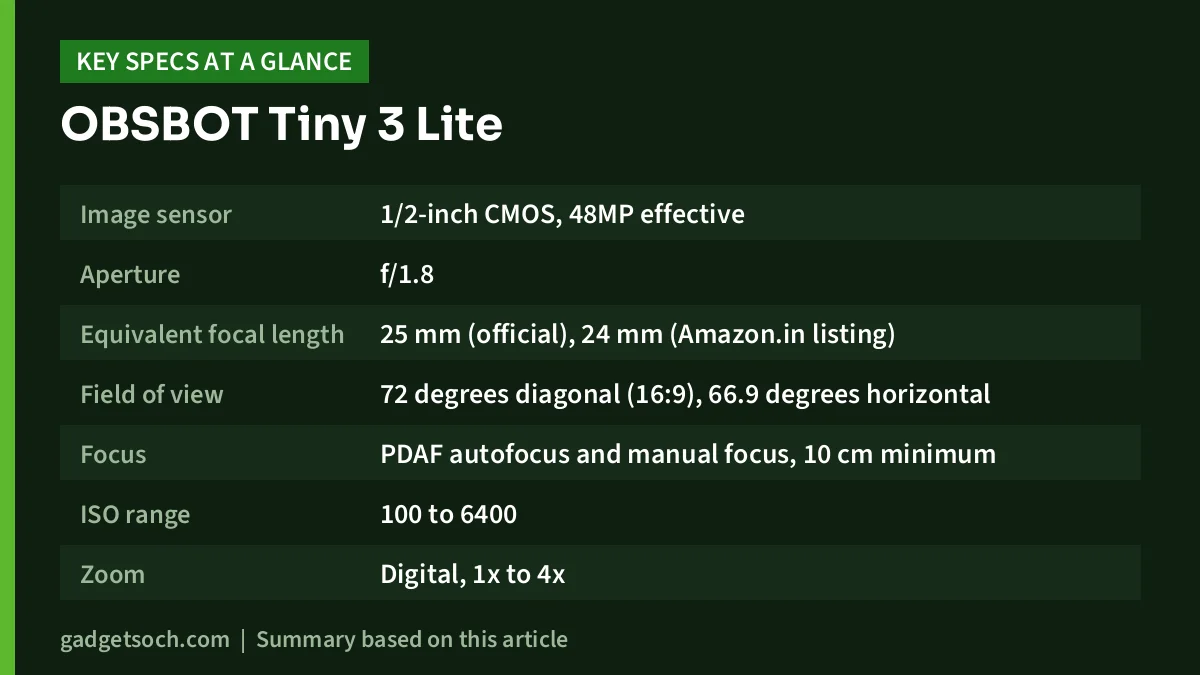
| Specification | OBSBOT Tiny 3 Lite |
|---|---|
| Image sensor | 1/2-inch CMOS, 48MP effective |
| Aperture | f/1.8 |
| Equivalent focal length | 25 mm (official), 24 mm (Amazon.in listing) |
| Field of view | 72 degrees diagonal (16:9), 66.9 degrees horizontal |
| Focus | PDAF autofocus and manual focus, 10 cm minimum |
| ISO range | 100 to 6400 |
| Zoom | Digital, 1x to 4x |
| HDR | Supported |
| Video | 3840 x 2160 at up to 30fps, 1920 x 1080 and 1280 x 720 at up to 120fps |
| Video format | MJPEG and YUV |
| Gimbal | Two-axis, non-removable, pan up to plus or minus 150 degrees mechanical |
| Gimbal speed | Up to 120 degrees per second |
| Microphones | 3 (1 omnidirectional + 2 directional) |
| Audio modes | Pure Audio, Spatial Audio, Smart Omni, Directional, Dual-Directional |
| Control | Gesture, voice (English and Mandarin), OBSBOT Center software |
| Power | 5V 0.5A over USB |
| Size and weight | 41 x 41 x 58 mm, 73 g |
| OS support | Windows 10 (64-bit) or later, macOS 11.0 or later |
| Warranty | 2 years according to the Amazon.in listing title |
Specifications are from OBSBOT’s official Tiny 3 Series tech specs page unless marked. The listing gives a 24 mm focal length, while OBSBOT’s own page says 25 mm for the Lite. The difference is minor, but the official figure is the one to trust.
What “Lite” gives up compared with the Tiny 3
According to OBSBOT’s specs page, the Tiny 3 uses a larger 1/1.28-inch 50MP sensor with an ISO range up to 12800, DCG HDR and dual all-pixel PDAF, while the Lite has a 1/2-inch 48MP sensor, ISO up to 6400, standard HDR and PDAF. The Tiny 3 is also slightly smaller and lighter at 37 x 37 x 49 mm and 63 g, and it adds a Whiteboard Mode that the Lite does not have.
What stays the same matters just as much. Both share the same gimbal ranges and speed, the same 4K and 120fps frame rates, the same three-mic array and audio modes, and the same voice and gesture controls. The Lite’s savings come mainly from the sensor.
Image quality: what the sensor means for you
A 1/2-inch sensor is large for a webcam but smaller than the Tiny 3’s. In practical terms, a bigger sensor gathers more light, which keeps faces cleaner in a dim room. The Lite’s f/1.8 aperture helps, and HDR is meant to balance a bright window behind you with your face.
Tech4Gamers reports that faces look clear in well-lit spaces but not as crisp as OBSBOT’s flagship, and calls low light the main weakness, with noise and grainy patterns when relying on screen light. CGMagazine says the Lite shows less detail than the Tiny 3, describing the gap as the difference between “great” and “really good”. If you work at night in a dim room, plan to add a light; our YouTube starter kit guide covers simple lighting options.
The 4K mode at 30fps is useful for recording or for cropping a tighter frame in editing software. The 1080p at 120fps mode suits slow-motion clips and smooth motion for streaming, but everyday video calls rarely need either mode. CGMagazine notes that H.264 output is not offered, only MJPEG and YUV, which can matter for some capture setups.
The gimbal and AI tracking
The defining feature is the motorised gimbal. OBSBOT lists a mechanical pan range of plus or minus 150 degrees and tilt of plus or minus 90 degrees, with a controllable pan range of plus or minus 130 degrees.
According to the Amazon.in listing, tracking modes include Group Tracking, Only Me, Object Tracking and Zone Tracking. OBSBOT’s series page also lists AI Tracking 2.0 and Voice Tracking, where the camera turns toward whoever is speaking.
In Tech4Gamers’ testing, tracking was reliable: the camera picked the reviewer up again after they walked out of frame and returned, and object tracking was smooth. The same review notes it struggles with very fast movement even at 1080p and 120fps, and that the desk and whiteboard modes available on the Tiny 3 are missing.
Microphones and audio
The Tiny 3 Lite has three built-in microphones, one omnidirectional and two directional, with five audio modes selectable in OBSBOT Center. In general, directional pickup favours the voice in front of the camera, while omnidirectional pickup covers more of a room, which helps small group calls.
Reviews are positive within limits. CGMagazine says the mics beat most webcams and sound very clear for calls and meetings, but voice quality drops with distance and is not broadcast quality. Tech4Gamers reached a similar conclusion. If you record voice-overs or podcasts, a dedicated microphone is still the better choice. OBSBOT says the camera supports up to two of its own Vox SE wireless microphones, sold separately.
Voice, gestures and software
You can control the camera without touching it. OBSBOT lists gesture control and voice control, with voice commands in English and Mandarin. Tech4Gamers describes the voice commands (track, unlock, zoom, presets, sleep) as reliable, mentions an open-hand gesture to toggle tracking and an L-shape gesture for zoom, and says these work without OBSBOT Center open. OBSBOT’s FAQ notes that voice control uses the camera’s own mic array and does not work through the Vox SE.
The OBSBOT Center app adds manual exposure, white balance, saved angle presets and, according to the listing, beauty modes, background blur, picture-in-picture and teleprompter tools. The listing also claims support for Stream Deck, SDK, OSC and global hotkeys, useful for streamers with custom setups.
Check your computer first
This is easy to overlook. OBSBOT recommends an Apple M1 or later Mac, or a PC with a 10th-generation Intel Core i5 or better and 8GB RAM, for 4K or 1080p at 120fps. For 4K with beauty and background effects on Windows, it says an NVIDIA RTX 2060 or higher is required, and its FAQ says eye tracking and advanced background blur need an RTX 20 series GPU or newer. Avatar and virtual voice features are Windows-only with a dedicated graphics card. On older laptops, expect some advanced features to be unavailable.
Who should buy it, and who should not

A good fit if you teach online and move around, run fitness or music classes, demo products on camera, or stream and want a camera that reframes itself. It also suits small meeting rooms where several people speak, thanks to group tracking and voice tracking.
Not a good fit if you mostly sit in one place for calls, often work in dim light without extra lighting, need the best image quality OBSBOT offers, or plan to use it mainly with an iPhone or iPad, since OBSBOT’s FAQ says iOS support is not yet available. Readers setting up a home office can see our work from home desk setup guide for simpler options.
Alternatives to compare
OBSBOT Tiny 3: the step-up model with a 1/1.28-inch 50MP sensor, ISO up to 12800, DCG HDR, all-pixel PDAF and Whiteboard Mode, in a smaller 63 g body. Choose it if low-light image quality matters most.
OBSBOT Tiny 2 Lite: the older Lite model. OBSBOT lists a 1/2-inch sensor, 4K at 30fps, 1080p at 60fps, a two-axis gimbal, AI tracking with zone tracking, Gesture Control 2.0, HDR and dual omnidirectional microphones. It lacks the Tiny 3 Lite’s 120fps mode and three-mic array, and voice control is not mentioned on its page.
Before you order: a checklist

- Variant: this link is for the Tiny 3 Lite, not the Tiny 3, so confirm the model name on the listing before checkout
- Box contents: the listing says mount and USB cable, while Tech4Gamers found a USB-C cable, a USB-C to USB-A adapter, a manual and a warranty card, with the mount built into the camera and no storage case
- Ports: the camera has a USB-C port, per Tech4Gamers, so check that your computer has a free USB-C or USB-A port
- Mounting: the folding stand sits on a monitor, and a 1/4-inch thread underneath fits a tripod, per both reviews
- HDMI or NDI: OBSBOT says these need separately sold adapters
- Warranty: the listing title says 2 years, so keep your invoice and confirm service terms with the seller
See the OBSBOT Tiny 3 Lite on Amazon.in
Frequently asked questions
Does the OBSBOT Tiny 3 Lite work with Zoom, Google Meet and Teams?
It connects as a USB webcam on Windows 10 (64-bit) or later and macOS 11.0 or later, according to OBSBOT, so it appears as a camera in common meeting apps. Tracking and gestures work on the camera itself, while finer settings need OBSBOT Center.
Can I use it with a phone or iPad?
OBSBOT’s FAQ says phones and tablets can connect through the OBSBOT Live app, with compatibility varying by model, and that iOS support is not currently available.
How is it different from the Tiny 3?
The Tiny 3 has a larger 1/1.28-inch sensor, higher ISO, DCG HDR, dual all-pixel PDAF and Whiteboard Mode. Gimbal, frame rates, microphones and controls are shared.
Is it good in low light?
It is the weakest area according to Tech4Gamers, which saw noise when relying on display light. Adding a front light is the simplest fix.
Is the built-in microphone good enough?
For calls and meetings, both CGMagazine and Tech4Gamers rate it above most webcams. Neither considers it a replacement for a dedicated microphone, and quality drops with distance.
Verdict
The OBSBOT Tiny 3 Lite brings the main Tiny 3 features (gimbal tracking, 120fps, three mics, voice and gesture control) to a cheaper model, giving up mainly sensor size and some low-light quality. It makes most sense for people who move on camera, not for seated calls.
Check the current price of the OBSBOT Tiny 3 Lite on Amazon.in
Related reading on GadgetSoch: STRIFF Adjustable Laptop Stand Review: 7 Heights, Phone Stand and Honest Limits and Frontech FT-1603AW Review: 78-Key Rechargeable Bluetooth Mini Keyboard, Explained.
Sources
- OBSBOT Tiny 3 Series tech specs (checked 17 October 2026)
- OBSBOT Tiny 3 Series product page (checked 17 October 2026)
- OBSBOT Tiny 3 Series FAQ (checked 17 October 2026)
- OBSBOT Tiny 2 Lite product page (checked 17 October 2026)
- CGMagazine, OBSBOT Tiny 3 Lite Webcam Review by Joe Findlay (28 January 2026)
- Tech4Gamers, Obsbot Tiny 3 Lite Review by Abdul Hannan (1 February 2026)
- Amazon.in listing for ASIN B0GNFBB571, title, feature bullets and technical details (captured 17 October 2026)




