The Logitech B170 is a basic three-button wireless mouse that plugs into a USB-A port through a tiny receiver, runs for up to 12 months on one AA battery according to Logitech, and works up to 10 metres from the computer. It is a good fit for students, offices and home users who want a dependable, no-software mouse. It is not for anyone who needs Bluetooth, extra buttons, adjustable DPI or a rechargeable battery.
Do not be confused by the Amazon.in title, which calls it a “USB Mouse”. The B170 is wireless: the “USB” part is the nano receiver you plug into your computer. The listing for ASIN B01J0XWYKQ is the black B170 with model number 910-004659.
This article is based on Logitech’s official B170 datasheet and the Amazon.in listing data captured on 17 October 2026. We have not tested the mouse ourselves, and we flag where the sources disagree.
Quick verdict
- Best for: office desks, school laptops, and anyone replacing a worn-out mouse who just wants to plug in and work
- Skip if: your laptop has only USB-C ports, you want Back and Forward buttons, or you want a quiet-click or rechargeable mouse
- Key strengths: 10-metre range, 12-month battery claim on one AA cell, no pairing or software needed, ambidextrous shape, Windows, Mac and Chrome support listed by Logitech
- Key limitations: only three buttons, no DPI figure published by Logitech, USB-A receiver only, and a plain design aimed at business buyers
Logitech B170 specifications
Figures come from Logitech’s B170 datasheet unless marked as the Amazon.in listing’s claim. Where the two give slightly different numbers, both are shown.
| Specification | Logitech B170 (910-004659, Black) |
|---|---|
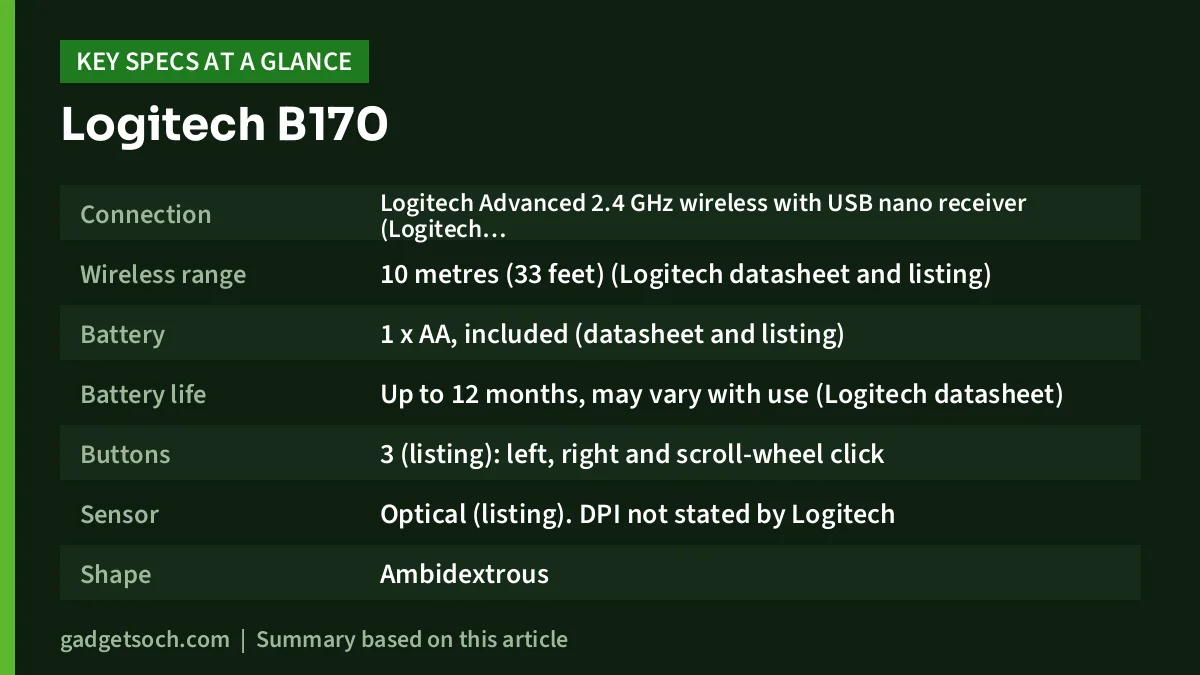
| Connection | Logitech Advanced 2.4 GHz wireless with USB nano receiver (Logitech datasheet) |
| Wireless range | 10 metres (33 feet) (Logitech datasheet and listing) |
| Battery | 1 x AA, included (datasheet and listing) |
| Battery life | Up to 12 months, may vary with use (Logitech datasheet) |
| Buttons | 3 (listing): left, right and scroll-wheel click |
| Sensor | Optical (listing). DPI not stated by Logitech |
| Shape | Ambidextrous |
| Mouse size | 97.7 x 61.5 x 35.2 mm (datasheet). Listing shows 9 x 6 cm |
| Weight | 70.5 g with battery (datasheet). Listing shows 68 g |
| Receiver | 18.7 x 14.4 x 6.6 mm, 2 g (datasheet) |
| Compatibility | Windows, Mac, Chrome (datasheet). Listing adds Linux |
| In the box | Mouse, USB receiver, 1 AA battery, user documentation |
Check the current price of the Logitech B170 on Amazon.in
Three listing errors to ignore
Seller listings are often written in a hurry, and the B170’s Amazon.in page has a few mistakes worth clearing up so you know exactly what arrives.
- “USB Mouse”: it is a wireless mouse with a USB receiver, not a corded mouse.
- “This wired Logitech mouse”: one feature bullet uses the word wired. Logitech’s datasheet and the rest of the listing describe a cordless mouse with a 10-metre range.
- “1 A batteries required”: the technical table says “A” but the included-components line and Logitech’s datasheet both say one AA battery.
You may also see a different part number on Logitech’s datasheet (910-004798). Logitech uses different part numbers for different regions and packaging. The Amazon.in listing is for 910-004659, the black B170.
Design and size: small, symmetrical and light
At 97.7 mm long and 61.5 mm wide, according to Logitech, the B170 is a compact mouse. That suits a laptop bag and smaller hands, and its symmetrical shape works for left- and right-handed users. People with large hands who rest their whole palm on the mouse may find it a little short over a full workday. A full-size or vertical mouse would suit them better.
The weight of about 70 grams with the battery fitted keeps it easy to glide without feeling flimsy. Logitech positions the B170 as a business product, so the look is plain black with no lighting or styling extras.
The wireless link: 10 metres and no pairing
The B170 uses Logitech’s 2.4 GHz wireless connection through a nano receiver. Logitech says no pairing or software installation is required: plug the receiver into a USB-A port and the mouse works. This is why basic 2.4 GHz mice remain popular in offices, where IT teams often block driver installs and Bluetooth.
The 10-metre range is far more than a desk needs, but it helps if your laptop is connected to a TV for presentations or videos and you are controlling it from a sofa. Walls, metal desks and crowded USB 3.0 ports can shorten real range, so if the pointer stutters, move the receiver to a front port or use a short USB extension cable.
The receiver is a single-device dongle. Logitech’s datasheet does not mention Unifying or Bolt support, so treat the receiver in the box as the one that works with this mouse and keep it safe.
Battery life: what 12 months really means
Logitech rates the B170 at up to 12 months on a single AA battery and adds that battery life may vary based on use. That estimate assumes typical office use, not eight-hour daily gaming. Even so, an AA-powered mouse rarely needs attention, and spare AA cells are easy to buy anywhere in India.
To get the most from it, use a fresh alkaline or a good NiMH rechargeable cell, and if you will not use the mouse for months, take the battery out to avoid leakage. When the pointer starts to lag or skip, a weak battery is the first thing to check.
Tracking and DPI
The listing describes optical tracking that works on “almost any surface”. Logitech’s datasheet does not publish a DPI figure, and the B170 has no DPI button. For office work that is fine: you can set pointer speed in Windows, macOS or ChromeOS settings. Like most optical mice, it may struggle on clear glass or very glossy surfaces, so a cloth mouse pad is a cheap fix.
Who should buy the Logitech B170

- Students and home users who want a simple, reliable cordless mouse for a laptop with a USB-A port
- Offices buying several identical mice for staff, where plug-and-play matters more than features
- Left-handed users who need a symmetrical shape
- Anyone who presents from a laptop and wants a mouse that works across a room
Who should skip it
- Owners of USB-C-only laptops, MacBooks and tablets unless you are happy to use an adapter
- Users who rely on Back and Forward side buttons for browsing
- People who want quiet clicks in shared spaces
- Gamers and designers who need published DPI and adjustable sensitivity
Alternatives worth comparing
Facts below come from each product’s Amazon.in listing, captured on 17 October 2026.
| Mouse | Battery (listing) | Buttons (listing) | Worth it if |
|---|---|---|---|
| Logitech B170 | 1 x AA, 12 months | 3 | You want the simplest plug-and-play option |
| Logitech M235 | 1 x AAA, about a year | 3 | You prefer contoured rubber grips and an on/off switch |
| HP M190 (AB3C6AA) | 1 x AA, up to 18 months | 6, with DPI switch | You want extra buttons |
| ASUS WT300 | 1 x AA, up to 15 months | Listed as 2 | You want a stated 1000/1600 DPI switch |
The Logitech M235 listing also mentions a smart sleep mode and a battery indicator light, plus a three-year limited hardware warranty. The ASUS WT300 listing names Windows 8/10 and above and ChromeOS. If quiet clicking matters more than price, read our Logitech M221 Silent review.
Before you order: a quick checklist

- Confirm the variant: the listing title should read Logitech B170, black, model 910-004659. Other colours or bundles may sit on different listings.
- Check your ports: you need a free USB-A port. For USB-C laptops, add a USB-C to USB-A adapter or a hub.
- Unbox carefully: the listing notes the USB receiver may be packed inside the mouse. Open the battery cover before you assume it is missing.
- Warranty: Logitech’s datasheet mentions a 2-year manufacturer’s guarantee, but the Amazon.in listing does not state the India warranty. Keep your invoice and confirm coverage with Logitech India support.
- Seller: prefer a listing sold or fulfilled through the brand’s official store for smoother warranty claims.
See the Logitech B170 (Black, 910-004659) on Amazon.in and check the seller and delivery details before you buy.
Setting up the B170 in under a minute
Open the battery cover, fit the included AA battery the right way round, and pull out the nano receiver if it is stored inside. Plug the receiver into a USB-A port and switch the mouse on if there is a power switch. Windows, macOS and ChromeOS should recognise it within seconds. Then adjust pointer speed and scroll direction in your system settings, and swap the primary button if you are left-handed. For a full home-office setup, our work-from-home desk setup guide covers keyboards, monitors and cooling.
Frequently asked questions
Is the Logitech B170 wired or wireless?
Wireless. It connects through a 2.4 GHz USB nano receiver with a range of up to 10 metres, according to Logitech. The Amazon.in title calls it a “USB Mouse” because the receiver plugs into USB.
Does the Logitech B170 work with Bluetooth?
No. Logitech lists only its 2.4 GHz wireless connection with the included receiver. You cannot pair it directly with a phone or tablet over Bluetooth.
Which battery does the B170 use?
One AA battery, which is included. Logitech rates battery life at up to 12 months, depending on use.
Does the Logitech B170 work with a Mac or Chromebook?
Yes. Logitech’s datasheet lists Windows, Mac and Chrome compatibility. Macs and Chromebooks with only USB-C ports need an adapter for the USB-A receiver.
What is the DPI of the Logitech B170?
Logitech’s datasheet does not state a DPI figure, and the mouse has no DPI button. You can change pointer speed in your operating system’s settings.
Can I use the B170 receiver with another Logitech mouse?
Do not count on it. The datasheet does not mention Unifying or Bolt support, so treat the B170 and its receiver as a matched pair.
Bottom line
The Logitech B170 does one job well on paper: it gives a USB-A laptop or desktop a cordless mouse with a long battery life and no setup. It is plain and has only three buttons, but for everyday office and study work that is often enough. If you want side buttons or a stated DPI switch, look at the HP M190 or ASUS WT300. Otherwise, check the current price of the Logitech B170 on Amazon.in.
Related reading on GadgetSoch: EMEET PIXY Review: 4K PTZ Webcam With AI Tracking, Strengths and Caveats and ZEBRONICS Companion 301 Review: Retro Wireless Keyboard and Mouse Combo With Rupee Key.
Sources
- Logitech B170 Wireless Mouse datasheet (Logitech, 2016): dimensions, weight, receiver size, range, battery life, compatibility, box contents and warranty, checked 17 October 2026
- Amazon.in listing for Logitech B170, ASIN B01J0XWYKQ (model 910-004659): title, bullets and technical details, checked 17 October 2026
- Logitech India product page (logitech.com/en-in): attempted on 17 October 2026 but could not be loaded
- Amazon.in listings for Logitech M235 (ASIN B004IO5BMQ), HP M190 (ASIN B0DXNTYWHV) and ASUS WT300 (ASIN B0CFF2K7C8), used for alternatives, checked 17 October 2026