
The Acer EK220Q E3 is a 21.5-inch Full HD IPS monitor with a 100 Hz refresh rate, AMD FreeSync, 99% sRGB colour coverage (as Acer rates it) and HDMI plus VGA inputs. For a first desktop, a second screen for a laptop, or replacing an old 60 Hz office panel, it covers the basics well. The main things to understand before you buy are that the headline “1ms” figure is a VRB number, not a standard grey-to-grey response time, and that the stand only tilts.
The variant behind our Amazon.in link is the EK220Q E3 abi in Black, which Amazon lists with an HDMI cable in the box. Acer India sells this model under part number UM.WE0SI.303.
A note on how this article was put together: it is based on Acer’s official product and specification pages and on published retailer spec listings, checked on 17 October 2026. We have not tested this monitor ourselves, so there are no first-hand measurements here.
Quick verdict
- Best for: students, home-office work, everyday browsing and video, and casual gaming on a budget PC or laptop
- Skip if: you need height adjustment, USB-C or DisplayPort, built-in speakers, or a sharper picture for detailed photo or code work
- Key strengths: IPS panel with wide viewing angles, 100 Hz over HDMI, AMD FreeSync, 99% sRGB rating, VESA 100 x 100 mount support, 3-year on-site warranty listed by Acer India
- Key limitations: tilt-only stand, 250-nit brightness, 6-bit+FRC colour, VGA limited to 75 Hz, no published grey-to-grey response time
Check the current price of the Acer EK220Q E3 on Amazon.in
Acer EK220Q E3 key specifications
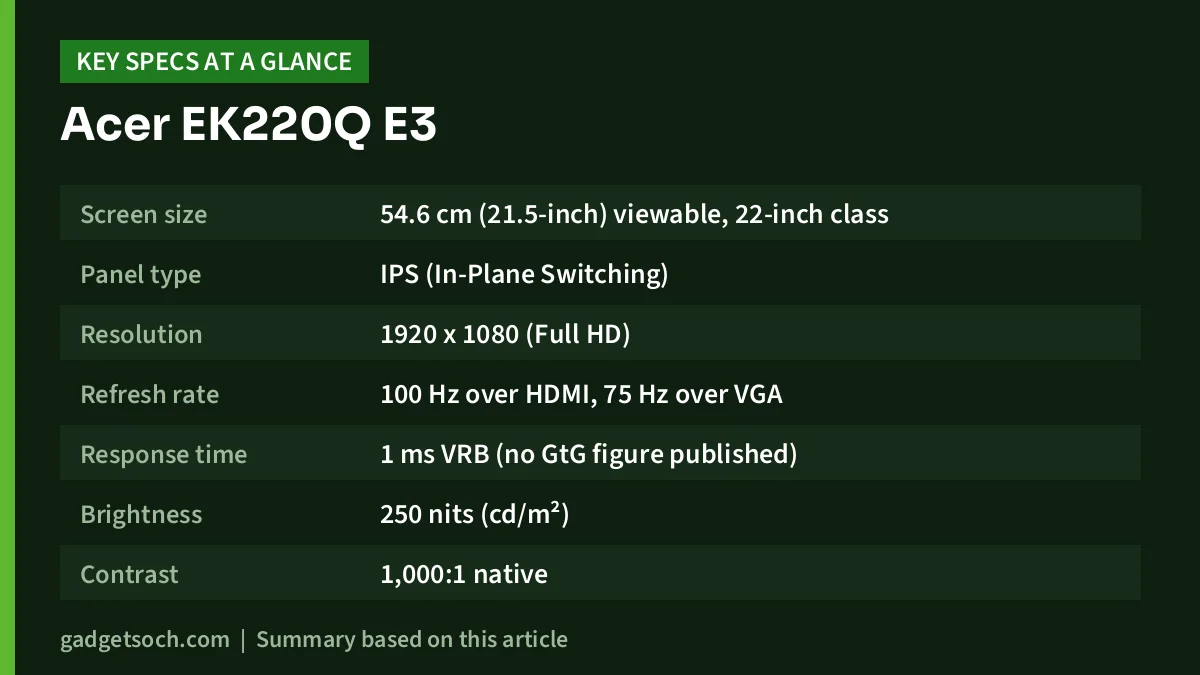
| Specification | Acer EK220Q E3 (official listing) |
|---|---|
| Screen size | 54.6 cm (21.5-inch) viewable, 22-inch class |
| Panel type | IPS (In-Plane Switching) |
| Resolution | 1920 x 1080 (Full HD) |
| Refresh rate | 100 Hz over HDMI, 75 Hz over VGA |
| Response time | 1 ms VRB (no GtG figure published) |
| Brightness | 250 nits (cd/m²) |
| Contrast | 1,000:1 native |
| Colour gamut | 99% sRGB |
| Colour depth | 6-bit + FRC, 16.7 million colours |
| Viewing angles | 178° horizontal and 178° vertical |
| Pixel pitch | 0.241 mm |
| Adaptive sync | AMD FreeSync |
| Inputs | 1 x HDMI 1.4, 1 x VGA |
| Speakers | None listed by Acer India |
| Stand | Tilt -5° to 20° |
| Wall mount | VESA 100 x 100 mm |
| Power consumption | 21 W operating, 24 W maximum, 0.5 W standby |
| Weight | About 2.5 kg with stand, 2.1 kg without |
| Warranty (India) | 3 years on-site, per Acer India store |
| In the box (India) | Monitor, stand, power cord, user manual, HDMI cable |
Most of these figures come from Acer’s global specification page for the EK220Q E3 (European part UM.WE0EE.304). Panel and port details match Acer India’s listing for UM.WE0SI.303, but power and weight figures are from the global page, so small regional differences are possible.
What “1ms VRB” actually means
Amazon’s title and Acer’s own listing say “1 ms VRB”. VRB stands for Visual Response Boost, Acer’s name for a motion-clarity mode that works by strobing the backlight, briefly switching it off between frames so that your eyes see less smear during movement. The 1 ms number describes the perceived blur with that mode switched on.
It is not the same as a grey-to-grey (GtG) response time, which measures how quickly the liquid crystals in each pixel actually change from one shade to another. GtG is the figure people usually compare between monitors, and Acer does not publish one for the EK220Q E3 on the pages we checked. So do not treat it as equal to a gaming monitor that quotes 1 ms GtG.
Backlight strobing in general has trade-offs: it usually dims the picture, and on many monitors it cannot run alongside adaptive sync. Acer’s spec pages do not detail how VRB behaves on this model, so check the menu and manual. For most people, leaving VRB off and using FreeSync at 100 Hz will be the more comfortable everyday setting.
Display quality: what the numbers mean in practice
IPS panel and viewing angles
An IPS panel is the main reason to pick this monitor over cheaper VA or TN options. Acer rates it at 178° horizontally and vertically, which means colours and contrast hold up well when you look from an angle or when someone sits beside you.
Full HD on 21.5 inches
A 1920 x 1080 resolution on a 21.5-inch screen works out to roughly 102 pixels per inch, consistent with Acer’s 0.241 mm pixel pitch. At normal desk distance, text looks reasonably crisp at 100% scaling. The same resolution stretched to 24 or 27 inches looks noticeably softer.
Brightness, contrast and colour
At 250 nits, the panel is bright enough for a typical indoor room but will not fight strong sunlight from a window behind you. The 1,000:1 native contrast is standard for IPS, so blacks in a dark room will look dark grey rather than deep black. Ignore the 100,000,000:1 “dynamic contrast” figure, which comes from adjusting the backlight rather than from the panel.
The 99% sRGB rating is a good sign for web content, office work and casual photo viewing, since most websites, YouTube videos and Windows apps are made for sRGB. But the panel is 6-bit+FRC (dithering to reach 16.7 million colours) and the sRGB figure is Acer’s claim, not an independent measurement, so treat it as a general-purpose screen, not an editing monitor.
100 Hz and FreeSync for everyday use and light gaming
Moving from 60 Hz to 100 Hz makes scrolling, dragging windows and moving the mouse feel smoother, even if you never play games.
For gaming, AMD FreeSync lets the monitor match its refresh rate to the frame rate your graphics card produces, within the supported range. That reduces tearing and stutter when a game runs below 100 fps, common on entry-level hardware. Many NVIDIA cards can also drive FreeSync monitors, but Acer does not list this model as G-SYNC Compatible, so results with NVIDIA graphics may vary.
One important detail: Acer lists the full 100 Hz only over HDMI. Over VGA, the maximum is 1920 x 1080 at 75 Hz. If your PC only has VGA, you will not get the full refresh rate, and VGA is an analogue signal that can look slightly less sharp than HDMI.
Design, stand and connectivity
The EK220Q E3 uses a simple fixed stand that tilts from -5° to 20°. There is no height adjustment, swivel or rotation into portrait mode. To raise it to eye level, plan on a monitor riser or a VESA arm. Acer lists VESA 100 x 100 mm mounting, so most standard desk arms and wall brackets should fit.
Connections are limited to one HDMI 1.4 port and one VGA port. HDMI 1.4 is enough for 1080p at 100 Hz. What you do miss is DisplayPort and USB-C. Many slim laptops now output video only through USB-C, so check your laptop first. If it has a full-size HDMI port, such as the Acer Aspire Lite i5-1334U, you can connect it with the HDMI cable included in the box. Otherwise, you will need a USB-C to HDMI adapter.
Acer India’s listing says there are no built-in speakers. Some third-party pages list 2 x 2W speakers, but go by Acer and plan on headphones or separate speakers. There are no USB ports listed either.
Eye comfort features
Acer India lists BlueLight Shield, Flickerless, Low Dimming and ComfyView for this model. In practice, these features do the following:
- Flickerless: avoids dimming the backlight by rapidly pulsing it, which some people find tiring over long sessions
- BlueLight Shield: a menu setting that warms the colour tone to reduce blue light, useful for late-night work but not for colour-accurate tasks
- Low Dimming: lets the screen go dimmer than usual, which helps in a dark room
- ComfyView: Acer’s name for a non-glossy, anti-glare screen finish that cuts reflections from lights and windows
Who should buy it, and who should skip it
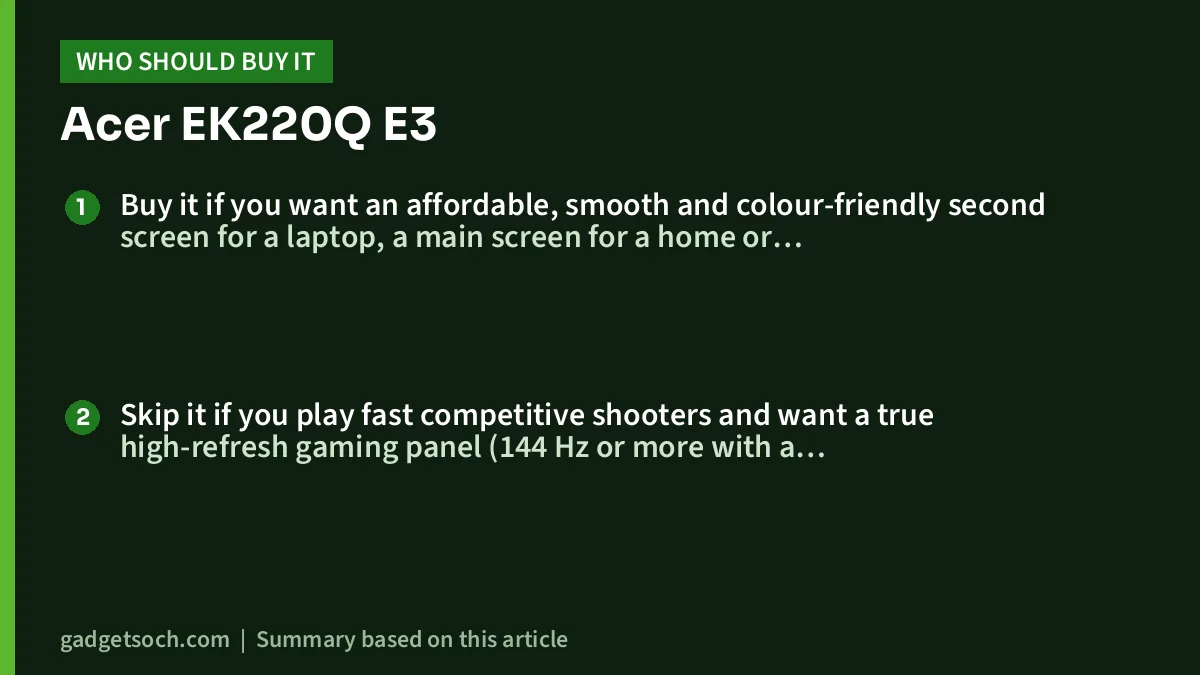
Buy it if you want an affordable, smooth and colour-friendly second screen for a laptop, a main screen for a home or office desktop, or a step up from an old 60 Hz panel. It also suits students mixing classes, assignments and casual gaming.
Skip it if you play fast competitive shooters and want a true high-refresh gaming panel (144 Hz or more with a published GtG figure), if you edit photos or video professionally, if your laptop only has USB-C video out and you do not want an adapter, or if you need an adjustable stand for comfort.
Alternatives worth comparing
Other 22-inch-class Full HD monitors to compare (specs from the sources listed below, so confirm them on the listing you buy from):
- LG 22MR410: LG lists it as a 22-inch Full HD monitor with 100 Hz and AMD FreeSync. Smartprix lists it as a VA panel, which typically gives deeper contrast than IPS but narrower viewing angles. Smartprix also lists a headphone jack.
- Samsung Essential S3 (LS22D300GAWXXL): Smartprix lists it as a 22-inch IPS, 100 Hz Full HD monitor with HDMI 1.4 and VGA. It is a close rival on paper, so compare stand design and warranty terms.
- BenQ GW2283: Smartprix lists it as a 21.5-inch IPS monitor at 60 Hz with two HDMI ports, VGA, built-in 2 x 1W speakers and BenQ’s low-blue-light and flicker-free features. It is a better fit if you want speakers and two HDMI inputs, but worse for smooth motion.
What to check before you order

- Exact variant: our link opens the EK220Q E3 abi in Black. Acer sells similar models under close names (such as the EK221Q E3), so confirm the model name on the listing before you pay.
- Your PC’s ports: make sure your laptop or graphics card has HDMI to get 100 Hz. VGA tops out at 75 Hz, and USB-C-only laptops need an adapter.
- Box contents: Acer India and Amazon’s title both mention an HDMI cable. Check that it is in the box when it arrives.
- Warranty: Acer India’s store lists a 3-year on-site warranty for UM.WE0SI.303. Keep the invoice and confirm the terms with the seller.
See the Acer EK220Q E3 abi (Black) on Amazon.in
Frequently asked questions
Is the Acer EK220Q E3 really a 1ms monitor?
Only in VRB mode. The 1 ms figure refers to Acer’s Visual Response Boost backlight-strobing mode, which reduces perceived motion blur. It is not a grey-to-grey pixel response time, and Acer does not publish a GtG figure for this model.
Does the Acer EK220Q E3 support 100Hz on HDMI?
Yes. Acer lists 1920 x 1080 at 100 Hz over HDMI (version 1.4). Over VGA, the maximum is 75 Hz.
Does the Acer EK220Q E3 have speakers?
Acer India’s official listing says no. Some third-party sites list speakers, but go by the manufacturer and use headphones or external speakers.
Can I wall-mount the Acer EK220Q E3?
Yes. Acer lists VESA 100 x 100 mm mounting, which works with most standard wall brackets and desk arms.
Can I connect a MacBook or USB-C laptop?
Not directly, because the monitor has no USB-C or DisplayPort input. You will need a USB-C to HDMI adapter or hub. With HDMI, it should work as a standard external display.
Final thoughts
The Acer EK220Q E3 is a sensible, no-frills upgrade: IPS, 99% sRGB (rated), 100 Hz with FreeSync over HDMI, VESA support and, per Acer India, a 3-year on-site warranty. The trade-offs are a tilt-only stand, limited ports, no speakers and a “1ms” claim that applies only to VRB mode. If those limits are acceptable, it is a good-value everyday monitor.
Check the current price of the Acer EK220Q E3 on Amazon.in
Related reading on GadgetSoch: LG UltraGear 34GS95QE Review: 240Hz Ultrawide OLED Explained and Zebronics A24FHD (100Hz) Monitor Review: Specs, Strengths and Limits.
Sources
- Acer: EK220Q E3 official specifications (UM.WE0EE.304), checked 17 October 2026
- Acer India Store: EK220Q E3 (UM.WE0SI.303), checked 17 October 2026
- MD Computers: Acer EK220Q E3 listing, checked 17 October 2026
- Smartprix: Acer EK220Q E3 specifications, checked 17 October 2026
- LG: 22MR410-B product page, checked 17 October 2026
- Smartprix: LG 22MR410 vs Samsung Essential S3 LS22D300GAWXXL, checked 17 October 2026
- Smartprix: BenQ GW2283 specifications, checked 17 October 2026




