

The ASUS Vivobook Go 15 OLED (E1504FA-LK522WS) is a budget 15.6-inch laptop whose standout feature is its screen: a Full HD OLED panel that ASUS rates for 100% DCI-P3 colour and 600 nits peak brightness, which is unusual at this level. It is a good fit for students and home users who mostly browse, stream, write documents and attend online classes. The catch is the configuration on this listing: the AMD Ryzen 5 7520U is a modest four-core chip, and the 8GB of memory is soldered, so it cannot be upgraded later.
This article is about the specific Amazon.in listing titled “ASUS Vivobook Go 15 (OLED), AMD Ryzen 5 7520U, 15.6″ (39.62 cm) FHD OLED, Thin and Light Laptop (8GB/512GB SSD/Windows 11/Office 2021/Backlit Keyboard/Mixed Black/1.63 kg), E1504FA-LK522WS” (ASIN B0BTWG3K45). The E1504F series also comes with other processors, 16GB of memory and an LCD screen, so not every spec you read elsewhere applies to this unit.
Our approach: this is a research-based overview built from ASUS’s official product and specification pages, AMD’s processor page and published coverage from Notebookcheck, all checked on 17 October 2026. Gadget Soch has not tested this Vivobook Go 15 OLED hands-on.
Verdict in brief
- Best for: students, home users and office workers who mainly use a browser, Microsoft Office, video calls and streaming, and who value a vivid screen
- Skip it if: you keep many apps open at once, plan to use editing or engineering software, want to play games, or want to add RAM later
- Strengths: 15.6-inch OLED with 100% DCI-P3 and PANTONE validation, backlit full-size keyboard with number pad, 180-degree hinge, Wi-Fi 6E, MIL-STD-810H tested, privacy shutter on the webcam
- Weaknesses: 8GB soldered memory with no upgrade option, four-core Zen 2 processor, basic integrated graphics, 720p webcam, HDMI 1.4, a glossy panel that reflects light, and no SD card reader
What the E1504FA-LK522WS listing gets you
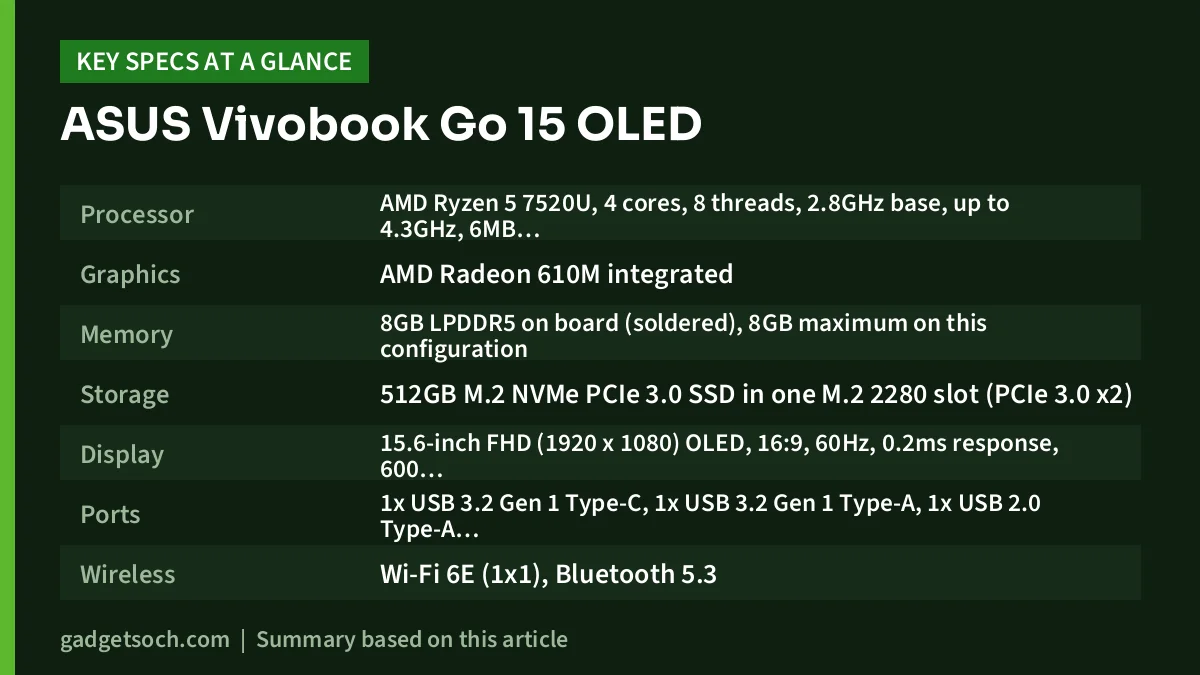
| Component | ASUS Vivobook Go 15 OLED (8GB / 512GB, as listed) |
|---|---|
| Processor | AMD Ryzen 5 7520U, 4 cores, 8 threads, 2.8GHz base, up to 4.3GHz, 6MB total cache (2MB L2 + 4MB L3), 15W |
| Graphics | AMD Radeon 610M integrated |
| Memory | 8GB LPDDR5 on board (soldered), 8GB maximum on this configuration |
| Storage | 512GB M.2 NVMe PCIe 3.0 SSD in one M.2 2280 slot (PCIe 3.0 x2) |
| Display | 15.6-inch FHD (1920 x 1080) OLED, 16:9, 60Hz, 0.2ms response, 600 nits peak, 100% DCI-P3, PANTONE Validated, glossy, TÜV Rheinland certified |
| Ports | 1x USB 3.2 Gen 1 Type-C, 1x USB 3.2 Gen 1 Type-A, 1x USB 2.0 Type-A, HDMI 1.4, 3.5mm combo audio jack, DC-in |
| Wireless | Wi-Fi 6E (1×1), Bluetooth 5.3 |
| Keyboard | Backlit chiclet keyboard with numeric keypad, 1.4mm key travel |
| Webcam and audio | 720p HD camera with privacy shutter, SonicMaster audio, array microphone |
| Battery | 42Wh or 50Wh 3-cell, depending on configuration |
| Size and weight | 360.3 x 232.5 x 17.9mm, 1.63kg |
| Durability and security | US MIL-STD-810H, firmware TPM |
| Software and colour | Windows 11 Home, Office 2021 (per listing), Mixed Black |
Check the current price of the ASUS Vivobook Go 15 OLED (8GB, 512GB) on Amazon.in
Why the OLED panel stands out at this level
Most laptops in the budget segment use basic LCD panels with limited colour coverage. ASUS specifies the Vivobook Go 15’s OLED as a 15.6-inch Full HD panel with 100% DCI-P3 colour gamut, a 1,000,000:1 contrast ratio, 600 nits peak brightness, a 0.2ms response time and PANTONE validation. The product page also states an average Delta-E below 2, a measure of colour accuracy where lower is better.
Why it matters: OLED pixels switch off for black, so films, videos and dark-mode apps look much richer than on an entry-level LCD, and wide colour coverage helps photos look vivid. ASUS also claims 70% less harmful blue light than average LCDs and lists TÜV Rheinland eye-care certification.
Keep three limits in mind. First, the panel is glossy, so it reflects windows and ceiling lights more than a matte screen. Second, it runs at 60Hz, which is standard for this class. Third, the 600-nit figure is a peak value; ASUS does not list a typical sustained brightness on the spec page. As with any OLED screen, avoid leaving bright static images on screen at full brightness for very long periods.
How fast is the Ryzen 5 7520U in practice?
Despite the “7000-series” name, the Ryzen 5 7520U uses older technology. AMD’s specification page lists it as a Zen 2 design (codename Mendocino) built on a 6nm process, with 4 cores, 8 threads, a 2.8GHz base clock, up to 4.3GHz boost and a 15W default power level. It launched in September 2022.
Notebookcheck’s processor database calls it a lower mid-range chip that resembles the older Ryzen 4000 series. In its May 2023 review of the Acer Aspire 3, a different laptop with the same Ryzen 5 7520U, Notebookcheck found that the chip’s performance sits between AMD’s Ryzen 5 5500U and Ryzen 3 5300U, and noted that its Zen 2 cores fall short in some demanding workloads. The same review measured a noticeable drop in multi-core performance on battery compared with mains power.
In plain terms, the Ryzen 5 7520U suits browsing, Office documents, online classes and streaming, not video editing, CAD or virtual machines. The integrated Radeon 610M has only two graphics cores at up to 1.9GHz, according to AMD, so modern 3D games are not realistic. If you are weighing this chip in another brand’s laptop, our Lenovo IdeaPad Slim 3 Ryzen 5 7520U review covers the same processor in a different design.
Is 8GB of RAM enough?
This is the most important question for this listing. ASUS lists the memory on this configuration as 8GB LPDDR5 on board, with 8GB as the maximum total system memory. In other words, the RAM is soldered and there is no slot to add more. AMD’s own page also caps the Ryzen 5 7520U at 16GB of LPDDR5.
8GB is workable for light, one-task-at-a-time use. It gets tight with many browser tabs plus Teams or Zoom and Excel, as Windows starts using the Vivobook Go 15 OLED for overflow, which slows things down. ASUS also lists a 16GB Vivobook Go 15 configuration, the safer long-term choice, but that is a different variant from the one this page links to.
Storage is easier to live with. The 512GB NVMe SSD sits in a standard M.2 2280 slot, so you can replace it with a larger drive later, though ASUS lists the slot at PCIe 3.0 x2 speed. There is only one slot, so you cannot add a second drive.
Battery and charging: what ASUS does and does not say
ASUS lists two battery options for the E1504F series, 42Wh and 50Wh (both 3-cell), and two adapter options, 45W and 65W, with a round 4.5mm connector. The Amazon title does not say which battery this unit has, so check the technical details on the listing or the label on the box.
ASUS claims the Vivobook Go 15 OLED can charge to 60% in 49 minutes when it is switched off or in standby, using an adapter of 45W or more. ASUS does not publish a battery-life hour figure on the spec page we checked, so we do not give one here. Runtime will depend on brightness and workload.
Keyboard, ports and everyday practicality
The keyboard is one of the more practical parts of this laptop. ASUS calls it ErgoSense, with a full-size 19.05mm key pitch, 1.4mm key travel and a numeric keypad, which helps with spreadsheets and accounts work. This listing’s title confirms a backlit keyboard, useful for late-night study. ASUS lists a fingerprint sensor in the touchpad as optional, so do not assume this unit has one.
The 180-degree lay-flat hinge lets the screen fold back fully, which is handy for showing content to someone across a table. ASUS says the design is tested to US MIL-STD-810H standards, covering tests such as shock, vibration, humidity and temperature extremes on selected products.
Connectivity covers the basics: one USB-C port (5Gbps), one USB-A 5Gbps port, one USB 2.0 port, HDMI 1.4 and a combo audio jack. HDMI 1.4 suits Full HD monitors better than 4K. There is no SD card reader or Ethernet port. Wireless is Wi-Fi 6E (single-stream 1×1) with Bluetooth 5.3.
The 720p webcam has a physical privacy shield, and ASUS’s MyASUS software adds AI noise cancelling for calls.
Is the Vivobook Go 15 OLED right for you?
A good choice if you are a school or college student in commerce, arts or humanities, a home user who streams a lot, or someone who wants a cheap secondary laptop with a much better screen than usual at this level. The OLED, the backlit keyboard with number pad and the 1.63kg body suit simple everyday work.
Not a good choice if you are an engineering, design or programming student who needs heavier software, a gamer, or a heavy multitasker. The 8GB of soldered memory is the main reason to hesitate, followed by the four-core Zen 2 processor and the basic 720p webcam.
Compare before you decide
ASUS Vivobook Go 15 with 16GB or an LCD panel: ASUS’s spec page for the E1504F series lists a 16GB LPDDR5 option and an LED-backlit Full HD LCD option with an anti-glare surface and TÜV Rheinland certification. Choose 16GB if you multitask, or the anti-glare LCD if you work near windows and prefer a matte screen.
Lenovo IdeaPad Slim 3 15AMN8: uses the same Ryzen 5 7520U. Lenovo’s PSREF lists a 15.6-inch Full HD anti-glare screen (TN 250 nits or IPS 300 nits, both 45% NTSC), a 47Wh battery, an SD card reader and a USB-C port with power delivery and DisplayPort output, at about 1.62kg. It adds an SD card reader but has a far less colourful screen than the Vivobook Go 15 OLED.
ASUS Vivobook Go 14 (E1404F): ASUS lists it with a Ryzen 5 processor, up to 16GB of LPDDR5, a 14-inch Full HD display, a 180-degree hinge and an optional NumberPad 2.0. It suits buyers who want a smaller, more portable body and do not need the OLED panel.
Ordering checklist for Amazon.in
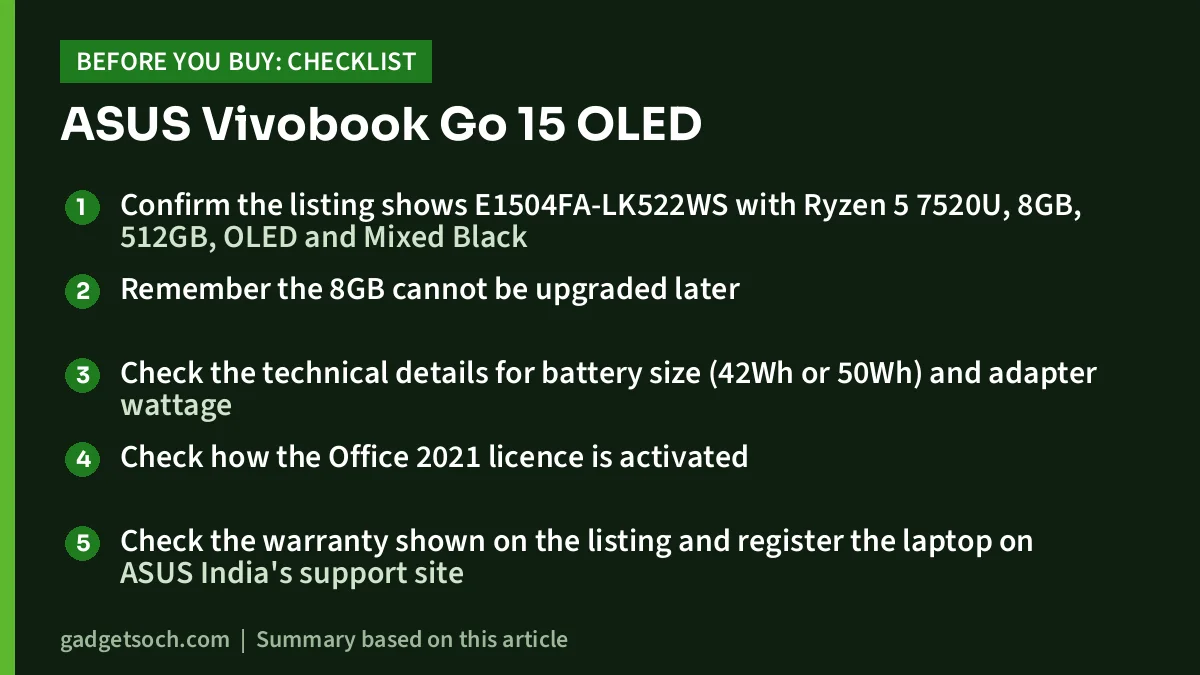
- Confirm the listing shows E1504FA-LK522WS with Ryzen 5 7520U, 8GB, 512GB, OLED and Mixed Black
- Remember the 8GB cannot be upgraded later
- Check the technical details for battery size (42Wh or 50Wh) and adapter wattage
- Check how the Office 2021 licence is activated
- Check the warranty shown on the listing and register the laptop on ASUS India’s support site
- ASUS says bundled extras such as a mouse or backpack vary by region, so rely on the listing’s box contents
Once those details match your needs, see the ASUS Vivobook Go 15 OLED E1504FA-LK522WS on Amazon.in.
FAQs
Can I upgrade the RAM in the ASUS Vivobook Go 15 OLED?
No. ASUS lists the 8GB as LPDDR5 on board with 8GB as the maximum for this configuration, so there are no memory slots. You would need to buy a 16GB variant at the start.
Is the Vivobook Go 15 OLED good for students?
For general study, yes: notes, Office, research, online classes and streaming are within the Ryzen 5 7520U’s comfort zone. It is not a good fit for engineering, design or video software because of its four-core processor and 8GB memory.
Can it run games?
Only very light or older titles at low settings. AMD lists the Radeon 610M with just two graphics cores, so it is not designed for modern 3D games.
Can I replace the SSD?
Yes. ASUS lists one M.2 2280 slot, so the 512GB drive can be swapped for a larger M.2 NVMe SSD. The slot runs at PCIe 3.0 x2 speed, and there is no second slot.
Bottom line
The ASUS Vivobook Go 15 OLED E1504FA-LK522WS brings a wide-gamut OLED display, a backlit number-pad keyboard and a sturdy MIL-STD-tested body to the entry level. The Ryzen 5 7520U and especially the soldered 8GB of memory limit it to light work, so buy it for the screen and simple daily tasks, not for heavy multitasking. If that matches how you work, check the current price of the Vivobook Go 15 OLED (8GB, 512GB) on Amazon.in.
Related reading on GadgetSoch: HP Victus 15 Review (i5-14450HX, RTX 3050 6GB, 24GB): Specs, Strengths and Trade-offs and ASUS Vivobook 15 i3-1215U Review: A Full HD, Backlit-Keyboard Laptop for Everyday Work.




