
The Boult Z40 Pro, now sold under the GOBOULT name, is a budget pair of truly wireless earbuds built around one big claim: up to 100 hours of total playtime with the charging case. Around that it adds 13mm drivers, Bluetooth 5.3, a quad-mic ENC system for clearer calls and a 45ms low-latency mode for mobile gaming. If you want earbuds you rarely need to charge and you can live without active noise cancellation, it deserves a place on your shortlist. If ANC or confirmed two-device pairing matters to you, it is the wrong pick.
This review is based on Boult’s official product page (checked on 17 October 2026), the Amazon.in listing and published reviews. It is not based on hands-on testing by gadgetsoch. Where we describe sound, battery life or controls in real use, we name the publication that reported it and stick to what it actually wrote.
Our Amazon link opens the Lavender listing of the GOBOULT Z40 Pro. Boult also sells Midnight, Dawn, Jungle and Metal, so confirm the colour on the product page before you order.
Quick verdict
- Best for: students, commuters and casual mobile gamers who want very long total battery life on a small budget
- Skip if: you want active noise cancellation, on-bud volume controls or guaranteed dual-device pairing
- Key strengths: 100-hour total playtime claim, 10 minutes of charging for 120 minutes of playback, 45ms low-latency mode, IPX5 splash resistance, AAC support, made in India
- Key limitations: no ANC (the ENC only cleans up your voice on calls), no official per-earbud battery figure, no volume gesture in Boult’s published control list, and reviewers disagree on how reliable the touch controls are
Boult Z40 Pro specifications
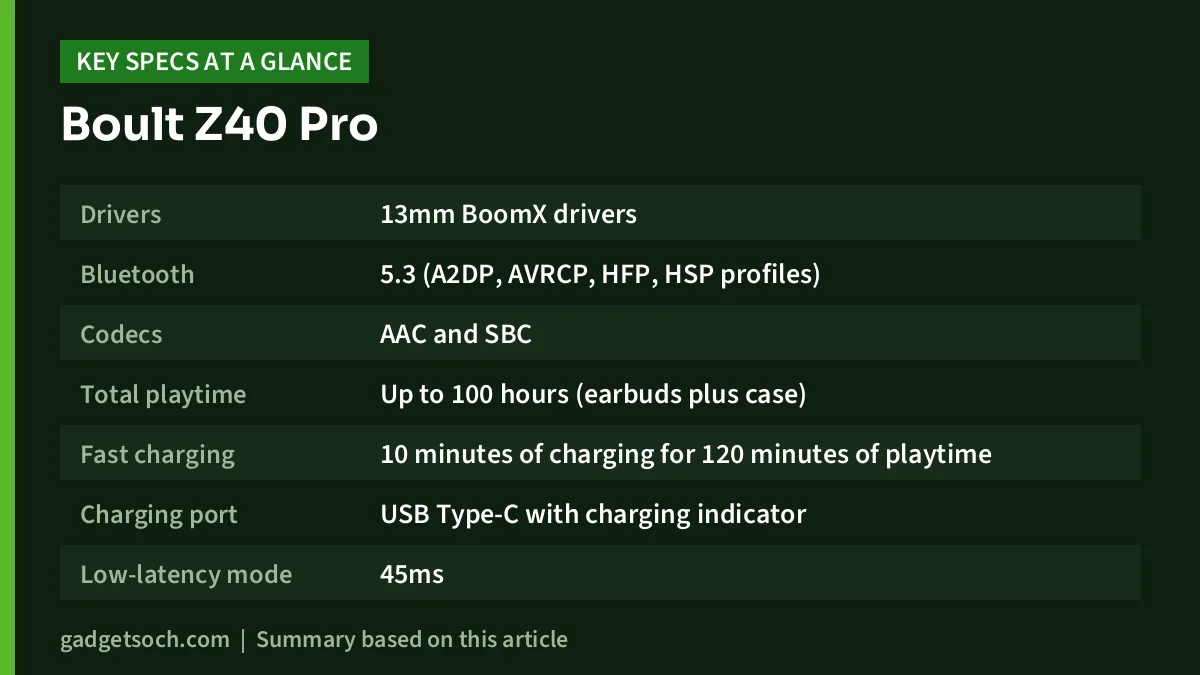
| Specification | Boult Z40 Pro (as listed by Boult) |
|---|---|
| Drivers | 13mm BoomX drivers |
| Bluetooth | 5.3 (A2DP, AVRCP, HFP, HSP profiles) |
| Codecs | AAC and SBC |
| Total playtime | Up to 100 hours (earbuds plus case) |
| Fast charging | 10 minutes of charging for 120 minutes of playtime |
| Charging port | USB Type-C with charging indicator |
| Low-latency mode | 45ms |
| Call noise reduction | Quad-mic ENC (Zen Mode) |
| Water resistance | IPX5 |
| Voice assistant | AI voice assistant support |
| Compatibility | Android and iOS |
| Official colours | Midnight, Dawn, Jungle, Lavender, Metal |
| Colour on our Amazon link | Lavender |
| Warranty | 1 year (per Boult) |
| Product origin | India |
Specifications come from Boult’s official Z40 Pro page (17 October 2026). Battery capacities, full charging time, weight and box contents are not published, so they are left out. Check the current price of the Boult Z40 Pro (Lavender) on Amazon.in.
What the 100-hour battery claim really means
The 100-hour number is a total: what the earbuds play on one charge plus the top-ups stored in the case. Boult does not say how it is split, yet that split decides how long you can listen before docking the buds. For a long flight or a day of calls, single-charge endurance matters more than the headline figure.
Published reviews do not settle the question. AudioPick reported a little over nine hours from one charge in a mixed Spotify and YouTube session at roughly 70% volume, and said the case took about two hours to refill. MyMobile India’s ten-point review summary gives a much lower figure of two to three hours per earbud charge. With reports that far apart, treat the per-charge runtime as unconfirmed.
Fast charging is the more practical feature for most people. Boult says a 10-minute charge gives 120 minutes of playtime, enough for a commute if you forgot to charge overnight.
Sound: 13mm drivers with a bass focus
Boult lists 13mm BoomX drivers for the Z40 Pro, and the Amazon title also says 13mm bass drivers. The specification block on the same official page mentions a 10mm driver in one place, which looks like an error, but it is worth knowing the page is not fully consistent.
The two reviews we consulted describe the tuning differently. AudioPick calls it V-shaped, with strong, thumpy bass that suits EDM and Bollywood, slightly recessed mids and boosted treble, and suggests using an equaliser if you want a more natural sound. MyMobile India describes a balanced soundstage, good instrument separation, clear vocals and only decent bass. The safest reading is that the Z40 Pro leans towards a lively, bass-forward sound typical of budget earbuds, and that listeners who want a flat, neutral tone may need to adjust it.
The Z40 Pro supports AAC, which suits iPhones and most recent Android phones, and SBC as the universal fallback. No LDAC or aptX is listed, which is normal at this price.
Calls and Zen Mode ENC are not the same as ANC
Boult’s Zen Mode uses four microphones for Environmental Noise Cancellation. ENC works on the microphone side, reducing traffic and crowd noise so the person you are calling hears you more clearly. It does not cancel noise while you listen to music. That is the job of Active Noise Cancellation, which the Z40 Pro does not have.
According to AudioPick, voices stayed clear on calls even in busy streets, though heavy wind noise was not fully removed. AudioPick also lists the lack of ANC among its cons. MyMobile India says noise reduction while listening comes mostly from a good ear-tip seal, which is passive isolation. If you ride a noisy metro or bus every day, the fit of the ear tips will matter more than any setting.
Gaming and video latency
Boult advertises 45ms of latency in its low-latency gaming mode. Latency is the delay between an on-screen event and the sound reaching you, and a low figure matters in shooters where footsteps help you react.
AudioPick reported almost no noticeable delay while playing BGMI and Call of Duty Mobile, with lag only creeping in when there was Bluetooth interference. Keep in mind that 45ms is a best-case figure. Your phone’s Bluetooth chip, the codec in use and a crowded wireless environment can all add delay.
Design, case and controls
The Amazon listing highlights a premium rubber grip case, and reviewers comment on it. AudioPick says the rubberised case resists slipping and fits easily into a pocket, while MyMobile India describes a matte case with an unusual opening mechanism, a front LED for charging status and earbuds with a slightly glossy finish that can pick up scratches. The Z40 Pro is IPX5 rated, which covers sweat and splashes during a workout or a light drizzle, but not swimming or washing.
Boult’s official controls are simple: double tap either earbud to play or pause, and long-press the left or right earbud for two seconds to go to the previous or next track. Volume is not part of the published control list, and AudioPick lists the lack of on-bud volume control as a con, so expect to change volume on your phone.
Reviewers do not agree on everything here. MyMobile India calls the touch controls inconsistent and lists the lack of a dedicated pairing app as a drawback. AudioPick says touch responses were reliable, mentions customising taps through an Android companion app and reports connecting to a phone and a laptop together. Boult’s own page mentions neither an app nor dual-device connection, so do not buy the Z40 Pro counting on either feature.
Who should buy the Boult Z40 Pro, and who should skip it

Buy it if
- You forget to charge gadgets and want a case that lasts a long time between top-ups
- You play mobile games and want a dedicated low-latency mode
- You take many calls outdoors and want multi-mic ENC
- You want splash resistance for the gym or a sweaty commute
Skip it if
- You need active noise cancellation for flights, metros or open offices
- You switch between a phone and a laptop all day and need officially supported multipoint
- You prefer neutral, studio-style tuning
- You want to control volume from the earbuds
- You want a confirmed long runtime from a single earbud charge
Alternatives worth comparing
Boult Astra: a close sibling with the same 13mm drivers, Bluetooth 5.3, 45ms Combat Mode, quad-mic ENC and IPX5 rating. It is rated for 48 hours of total playtime instead of 100, but adds Mode Sync LEDs, and Boult says its touch controls are customisable.
Boult Klarity 4: the Boult to consider if you want ANC. Boult lists 35dB active noise cancellation, 60 hours of total playtime (35 hours with ANC on), Bluetooth 5.4, a 45ms gaming mode and dual-device connectivity.
realme Buds T310: realme lists 46dB hybrid noise cancellation, a 12.4mm driver, Bluetooth 5.4 and 40 hours of total playback. Read our realme Buds T310 review for the details.
OnePlus Nord Buds 3: OnePlus lists up to 32dB ANC, a 12.4mm driver, Bluetooth 5.4, dual connection, IP55 for the earbuds and up to 43 hours with the case with ANC off. Our OnePlus Nord Buds 3 review covers it in depth.
What to check before you order

- Colour: our link opens the Lavender listing. Check the selected colour and that the product title says Z40 Pro, not a different Boult model
- Seller: buy from Boult’s own storefront or a well-rated seller so the warranty is honoured
- Warranty: Boult lists a 1-year warranty. Keep your invoice and register the product on Boult’s warranty page
- Box contents: Boult’s page does not list them, so check the listing for ear-tip sizes and a charging cable
- Phone compatibility: Boult lists Android and iOS. Laptop and Windows use is not officially addressed
- Expectations: remember that the 100 hours includes the case, and that ENC is for calls, not music
If the checks above line up with your needs, see the GOBOULT Z40 Pro in Lavender on Amazon.in and confirm the variant details on the listing.
Frequently asked questions
Does the Boult Z40 Pro have active noise cancellation?
No. The Boult Z40 Pro has quad-mic Environmental Noise Cancellation (Zen Mode), which cleans up your voice on calls but does not reduce outside noise while you listen to music.
Is 100 hours the battery life of the earbuds alone?
No. Boult’s 100-hour figure is the total playtime with the charging case. Boult does not publish the single-charge runtime of the earbuds, and published reviews report very different numbers, so treat per-charge battery life as unconfirmed.
Is the Boult Z40 Pro good for gaming?
For casual mobile gaming, it is a reasonable option. Boult claims 45ms latency in its low-latency mode, and AudioPick reported almost no noticeable delay in BGMI and Call of Duty Mobile. Actual latency still depends on your phone and the wireless conditions around you.
Does the Boult Z40 Pro work with an iPhone?
Yes. Boult lists Android and iOS compatibility, and the earbuds support the AAC codec, which iPhones use for Bluetooth audio.
Is the Boult Z40 Pro waterproof?
It is water resistant, not waterproof. The IPX5 rating covers sweat and splashes, so it is fine for workouts and light rain, but the earbuds should not be submerged or rinsed under a tap.
How do I reset the Boult Z40 Pro?
According to Boult, tap both earbuds five times together until you hear a tone, then put them back in the case and pair again.
Final word
The Boult Z40 Pro suits buyers who value a long-lasting case, a gaming mode and call noise reduction more than ANC. Its weak spots are the missing ANC, no volume gestures and uncertainty over single-charge battery life. If that trade-off works for you, check the current price of the Boult Z40 Pro on Amazon.in.
Related reading on GadgetSoch: boAt Airdopes 141 ANC Review: Budget ANC Earbuds Explained and boAt Airdopes 300 Review: 50-Hour Battery, Spatial Audio, No ANC.
Sources
- GOBOULT Z40 Pro official product page (specifications, controls, colours, warranty, checked 17 October 2026)
- AudioPick: Boult Z40 Pro review (sound, calls, battery, gaming observations)
- MyMobile India: Boult Z40 Pro TWS review in 10 points (sound, build, controls observations)
- GOBOULT Astra official product page (alternative specifications)
- GOBOULT Klarity 4 official product page (alternative specifications)
- realme India: Buds T310 launch page (alternative specifications)
- OnePlus India: Nord Buds 3 specifications (alternative specifications)
- Amazon.in listing for ASIN B0CHVWYZV8 (observed title and Lavender colour, checked 17 October 2026)




