

The Portronics Vader Pro is a budget 2.4GHz wireless mouse with a gaming-style shell, six buttons, a built-in thumb rest and an optical sensor that tops out at 1,600 DPI, according to Portronics. It suits casual gamers, students and office users who want a cable-free mouse with a sculpted grip and back/forward buttons. It is not a mouse for competitive esports players, as Portronics does not publish a polling rate, the sensor model or software support.
Key takeaways
- Who it suits: Students and office users who want a comfortable wireless mouse with a thumb rest.
- Who should skip it: Competitive FPS players who need a published polling rate, high-end sensor and low weight.
- Check before you buy: Variant: the link on this page goes to the Stone Grey model POR-2384. The black, blue and pink versions are separate listings, and Portronics marks the pink one as coming soon.
This review is based on Portronics’ official product page and the Amazon.in listing, both checked on 17 October 2026. It is not based on hands-on testing, and we have not cited independent test results because we did not find any for this model that we could verify. Where the official page and the listing disagree, we point it out.
The variant linked here is the Stone Grey Vader Pro, model POR-2384. Portronics also lists Midnight Black, Indigo Blue and Cherry Pink versions, and those are separate listings.
Vader Pro at a glance
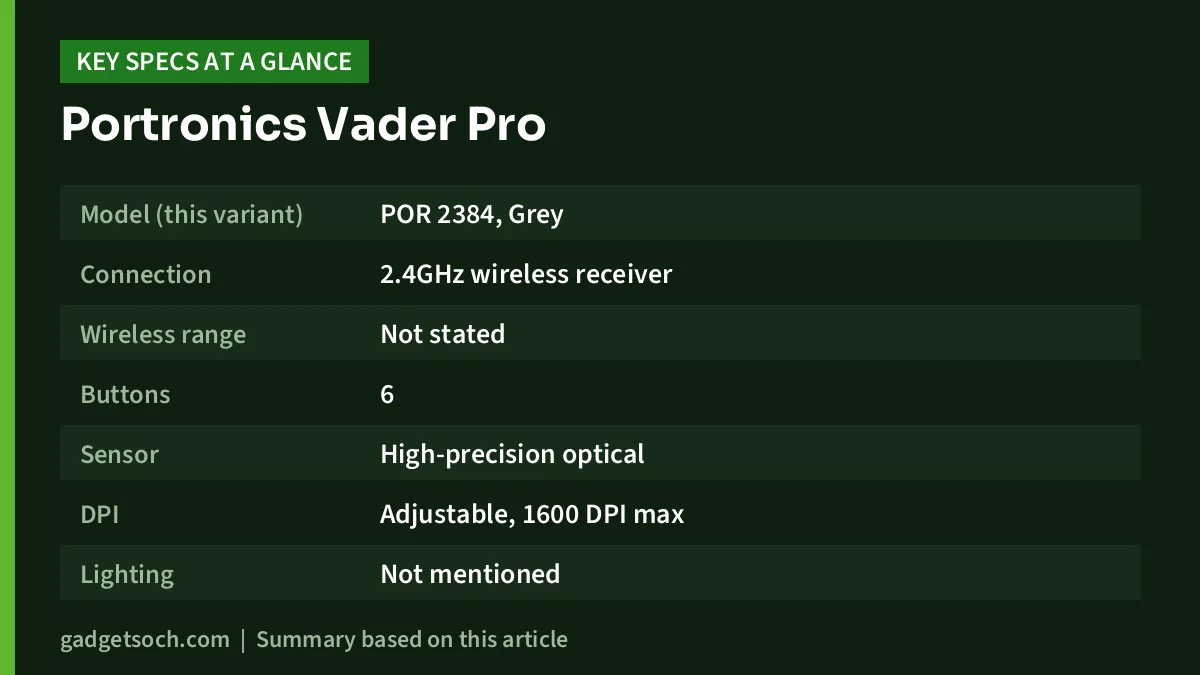
| Feature | Portronics official page | Amazon.in listing |
|---|---|---|
| Model (this variant) | POR 2384, Grey | POR-2384, Stone Grey |
| Connection | 2.4GHz wireless receiver | 2.4GHz with plug-and-play USB receiver |
| Wireless range | Not stated | Up to 10 metres |
| Buttons | 6 | 6 (left, right, DPI, scroll wheel, next, previous) |
| Sensor | High-precision optical | Optical |
| DPI | Adjustable, 1600 DPI max | Adjustable (steps not stated) |
| Lighting | Not mentioned | RGB lights |
| Weight | 106 g | 100 g |
| Size | 12.0 x 8.2 x 4.5 cm | 12 x 8 cm |
| Compatibility | Desktops, laptops, gaming consoles | Laptop, PC, Mac (title), Linux and Windows listed in details |
| Power source | Not stated | Not clearly stated |
| Warranty | 12 months plus 7-day replacement | 1 year |
Check the current price of the Portronics Vader Pro (Stone Grey) on Amazon.in
Verdict in brief
- Buy it for: a wireless mouse with a thumb rest, back and forward buttons, and a gaming look for everyday work and casual games
- Main strengths: 2.4GHz receiver, 6 buttons, ergonomic shape with thumb support, 12-month warranty with a 7-day replacement window
- Main weaknesses: 1,600 DPI maximum, no published polling rate or sensor model, power source not clearly stated, no mention of software
- Skip it if: you play competitive shooters, are left-handed, or want a mouse you can charge over USB-C
Is the Vader Pro really a gaming mouse?
Portronics markets the Vader Pro as a gaming mouse, and the design leans that way: an angular shell, a thumb rest and, according to the Amazon.in listing, RGB lighting. The specs that matter most for competitive play are a different story.
DPI: 1,600 is enough for most people
DPI (dots per inch) controls how far the cursor moves for each inch of hand movement. A high number sounds impressive, but most players use moderate settings, and 1,600 DPI is enough for a 1080p or 1440p screen in office work and casual games. The Vader Pro’s DPI button lets you change sensitivity on the fly, which helps if you switch between precise photo editing and fast desktop navigation. Portronics does not list the individual DPI steps for the Pro, so we cannot tell you which levels you get below 1,600.
For context, Portronics’ own wired Vader lists DPI steps of 1000, 1600, 3200 and 6400 on its Amazon.in listing. The Pro is the wireless model, but it has a lower maximum DPI.
Polling rate and sensor: not published
Polling rate is how often the mouse reports its position to the computer. Many dedicated gaming mice state 1,000Hz, and some list the exact sensor model. Neither appears on the Vader Pro’s official page or listing. That does not mean it tracks badly, but it does mean you cannot judge it the way you would judge a mouse aimed at competitive players. If you play fast shooters seriously, choose a mouse that publishes both figures.
Buttons: useful, but pre-set
The six buttons are left click, right click, the scroll wheel click, a DPI button, and next and previous buttons on the side, according to the listing. Portronics’ page describes them as pre-programmed. Back and forward buttons are genuinely handy in browsers and file managers, and some games let you bind actions to them. There is no mention of companion software for remapping buttons, recording macros or changing the lighting, so assume the layout is fixed.
Comfort and shape
The Vader Pro’s main draw is its shape. Portronics highlights an ergonomic design with a built-in thumb support base, which lets your thumb rest on a ledge instead of dragging on the mouse mat. The official size is 12.0 x 8.2 x 4.5 cm, which makes it a full-size mouse rather than a compact travel one.
The Amazon.in technical details list the hand orientation as ambidextrous, but a thumb rest on one side usually means a right-hand shape. Left-handed users should check the listing photos carefully before buying.
Weight is listed as 106 g on Portronics’ page and 100 g on the Amazon.in listing. Either figure is mid-weight. Light esports mice are much lighter, while this weight gives a steadier, more planted feel that many office users prefer. If you want to see what a very light, high-end wireless mouse offers by comparison, our Logitech G PRO X Superlight 2 review covers that end of the market.
Wireless connection and power
The Vader Pro connects through a 2.4GHz USB receiver. The Amazon.in listing claims a range of up to 10 metres without obstructions. In everyday terms, a 2.4GHz receiver is plug-and-play: insert it into a USB-A port and the mouse works without pairing. Note that Bluetooth is not mentioned on either the official page or the listing, so you cannot connect it to a tablet or phone without a USB port.
Power is the biggest unanswered question. Portronics’ page does not say whether the Vader Pro uses AA or AAA batteries or a built-in rechargeable battery, and the listing’s “Batteries Required: No” field does not settle the matter. Before ordering, check the listing images, the “From the manufacturer” section, or ask in the listing’s questions section. This matters for long-term cost and convenience, since a rechargeable mouse needs a cable and a disposable-battery mouse needs spare cells.
Compatibility
Portronics lists desktops, laptops and gaming consoles. The listing title adds Mac, and its technical details mention Linux and Windows. Because the Vader Pro uses a standard USB receiver, basic pointing and clicking should work on most computers with a free USB-A port. A few practical checks:
- USB-C-only laptops: many thin laptops and recent MacBooks lack USB-A ports, so you may need a USB-C to USB-A adapter for the receiver
- Mac: the side buttons may not act as back and forward in every app without extra settings
- Consoles: console mouse support depends on the game, so check your title before relying on it
Who should buy it

- Students and office users who want a comfortable wireless mouse with a thumb rest
- Casual gamers playing strategy, simulation or single-player titles
- Anyone who wants back and forward buttons for browsing and file management
Who should skip it
- Competitive FPS players who need a published polling rate, high-end sensor and low weight
- Left-handed users, given the thumb-rest shape
- People who want button remapping or lighting software
- Buyers who need Bluetooth for a tablet or phone
Alternatives worth comparing
The facts below come from each product’s Amazon.in listing, captured on 17 October 2026.
- Portronics Vader (wired): the wired version of the same design, with 6 buttons, a thumb rest, RGB lighting, DPI steps of 1000, 1600, 3200 and 6400, and a 1.5 m USB cable. Choose it if you play at one desk and never want to think about power
- Zebronics Viper 100W: a tri-mode mouse (2.4GHz, Bluetooth and wired) that is rechargeable, with a 1000Hz polling rate, up to 8000 DPI and a listed weight of 70 g. Choose it if you want Bluetooth and published gaming specs
- EvoFox Banshee 2: a tri-mode wireless mouse with a PixArt 3311 sensor, 12,000 DPI, polling rates of 1000Hz wired, 500Hz on 2.4GHz and 133Hz on Bluetooth, an LCD showing DPI and battery status, and onboard memory. Choose it if you want a named sensor and software support
Before you order

- Variant: the link on this page goes to the Stone Grey model POR-2384. The black, blue and pink versions are separate listings, and Portronics marks the pink one as coming soon
- Power: confirm whether it uses replaceable batteries or charges by cable, and whether batteries are included
- Receiver: make sure your laptop has a USB-A port, or buy an adapter
- Warranty: Portronics states a 12-month warranty plus a 7-day replacement window. Keep your invoice and register with Portronics support if asked
- Seller: buy from a listing sold or fulfilled by a trusted seller so warranty claims go smoothly
See the Stone Grey Portronics Vader Pro on Amazon.in
Frequently asked questions
What is the maximum DPI of the Portronics Vader Pro?
Portronics lists an adjustable DPI with a maximum of 1,600.
Is the Vader Pro wireless or wired?
It is wireless and connects through a 2.4GHz USB receiver. Portronics sells a separate wired model called the Vader.
Does it have Bluetooth?
Neither the official page nor the Amazon.in listing mentions Bluetooth, so plan on using the USB receiver.
Does it have RGB lighting?
The Amazon.in listing says it has RGB lights. Portronics’ official page does not mention lighting, so check the listing photos.
Is it rechargeable?
This is not clearly stated by Portronics or the listing. Check the listing images or ask the seller before buying.
What warranty does it have?
Portronics states a 12-month warranty plus a 7-day replacement policy.
Final thoughts
The Portronics Vader Pro is best seen as a comfortable, gaming-styled everyday wireless mouse rather than a serious esports tool. Its thumb rest, side buttons and 2.4GHz connection are practical, while the modest 1,600 DPI ceiling, missing polling-rate data and unclear power source are the trade-offs. If those suit you, check the current price of the Portronics Vader Pro on Amazon.in and confirm the Stone Grey variant before ordering.
Related reading on GadgetSoch: Ant Esports Dock5 RGB Review: PS5 Stand, Cooler and Dual Charger, With Caveats and Sony PS5 Media Remote Review: What It Controls, What It Doesn't, and Who Needs It.
Sources
- Portronics: Vader Pro Wireless Gaming Mouse (official page), checked 17 October 2026
- Amazon.in listing for ASIN B0CYT6Y4Q5 (title, feature bullets and technical details), checked 17 October 2026
- Amazon.in listing for ASIN B0CPYLGZTJ, Portronics Vader wired, checked 17 October 2026
- Amazon.in listing for ASIN B0H2YL23H6, Zebronics Viper 100W, checked 17 October 2026
- Amazon.in listing for ASIN B0FPX18W6Z, EvoFox Banshee 2, checked 17 October 2026




