
Is the Lenovo IdeaPad Slim 5 with the Intel Core i5-12450H (83BF0043IN) worth considering? For most people who want a compact, well-equipped work laptop, yes: this 14-inch model combines an 8-core H-series processor with 16GB of LPDDR5 RAM, a 1TB PCIe 4.0 SSD, a taller 16:10 WUXGA IPS screen and USB-C charging, in a body that starts at 1.46kg. Its main weaknesses are integrated Intel UHD graphics, a basic 45% NTSC colour gamut and memory that cannot be upgraded.
The variant on our Amazon.in link, as observed on 17 October 2026, is the grey model with Windows 11, Office 2021, a backlit keyboard, a Full HD webcam, Alexa and a three-month Game Pass offer mentioned in the listing title. It suits students, professionals and frequent travellers more than gamers or photo editors.
Please note: this is a research-based article, not a hands-on review. It draws on Lenovo’s official PSREF specification sheet for the IdeaPad Slim 5 14IAH8, Intel’s processor page and published spec listings, all checked on 17 October 2026. We have not tested the laptop ourselves.
Quick verdict on the IdeaPad Slim 5 83BF0043IN
- Who it is best for: students, office professionals and travellers who want a 14-inch laptop with plenty of storage, strong multitasking and an easy-to-carry body
- Who should skip it: gamers, video editors who need a dedicated GPU, and anyone who needs accurate colours for design or photography
- What it does well: 16:10 1920 x 1200 IPS display, 16GB dual-channel RAM, 1TB SSD, 56.6Wh battery, two USB-C ports with charging and DisplayPort, aluminium top cover, FHD webcam with privacy shutter
- Where it is weaker: Intel UHD graphics, 45% NTSC colour gamut, soldered RAM, HDMI 1.4b limited to 1080p at 60Hz, and 5Gbps USB ports throughout
IdeaPad Slim 5 14IAH8 (83BF0043IN) specifications
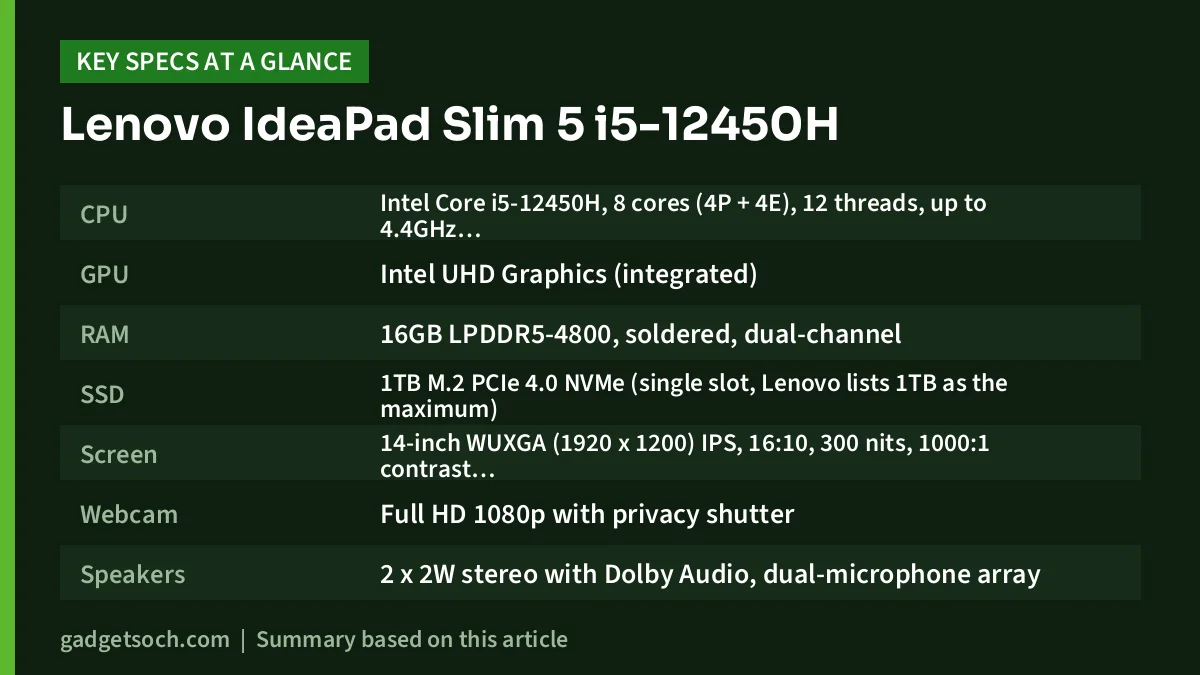
| Feature | 83BF0043IN |
|---|---|
| CPU | Intel Core i5-12450H, 8 cores (4P + 4E), 12 threads, up to 4.4GHz, 12MB cache, 45W base power |
| GPU | Intel UHD Graphics (integrated) |
| RAM | 16GB LPDDR5-4800, soldered, dual-channel |
| SSD | 1TB M.2 PCIe 4.0 NVMe (single slot, Lenovo lists 1TB as the maximum) |
| Screen | 14-inch WUXGA (1920 x 1200) IPS, 16:10, 300 nits, 1000:1 contrast, 45% NTSC, 60Hz, anti-glare |
| Webcam | Full HD 1080p with privacy shutter |
| Speakers | 2 x 2W stereo with Dolby Audio, dual-microphone array |
| Keyboard and touchpad | Backlit keyboard (as per listing), 75 x 120 mm Precision TouchPad |
| Battery | 56.6Wh with Rapid Charge Boost |
| Charger | 65W USB-C |
| Ports | 2 x USB-A 5Gbps (one always-on), 2 x USB-C 5Gbps (Power Delivery 3.0, DisplayPort 1.4), HDMI 1.4b, microSD reader, 3.5mm combo jack |
| Wireless | Wi-Fi 6 or Wi-Fi 6E with Bluetooth 5.2, depending on configuration |
| Body | Aluminium top cover, MIL-STD-810H (20 test items, per Lenovo) |
| Size | 312 x 221 x 16.9 to 17.9 mm (depends on bottom material) |
| Weight | From 1.46kg |
| Software | Windows 11, Office 2021 (as per the listing) |
Specs above come from Lenovo PSREF, Intel and the Amazon.in listing title for this variant. See the IdeaPad Slim 5 i5-12450H (16GB/1TB) on Amazon.in.
What sets the Slim 5 apart from cheaper IdeaPads
The IdeaPad Slim 5 14IAH8 sits above the IdeaPad Slim 3 in Lenovo’s range, and the differences show up in the details rather than the processor. Lenovo’s PSREF lists an anodised, sandblasted aluminium top cover on every configuration, paired with either a plastic or an aluminium bottom. The 14-inch footprint (312 x 221 mm) and a starting weight of 1.46kg, which matches the listing title, make it noticeably easier to carry daily than a 15.6-inch laptop.
Lenovo also says the design passed 20 MIL-STD-810H test items. This is a manufacturer test of selected conditions, not a drop-proof guarantee, but it indicates some attention to durability. The touchpad is larger than the one on the 15-inch Slim 3, at 75 x 120 mm, and the keyboard on this variant is backlit. There is no numeric keypad, which is the usual trade-off on a 14-inch laptop.
Living with the 14-inch 16:10 screen
The 16:10 aspect ratio is one of this laptop’s most practical features. Compared with a regular 16:9 Full HD screen, the 1920 x 1200 panel adds 120 rows of pixels, so you see more lines of a document, spreadsheet or web page without scrolling. Per PSREF, this IPS panel is rated at 300 nits with 1000:1 contrast, a 60Hz refresh rate, an anti-glare finish and 85-degree viewing angles.
The limitation is colour. At 45% NTSC, the panel covers a narrow colour range, so images look flatter than on laptops with 100% sRGB screens. That is fine for documents, coding and streaming, but not for photo editing or design work. Lenovo’s spec sheet also lists OLED and 2.2K 100% sRGB panels for the 14IAH8, but this variant uses the 300-nit WUXGA IPS screen named in its listing.
How the Core i5-12450H fits a 14-inch laptop
The Core i5-12450H is an H-series chip, and Intel lists 8 cores (4 performance and 4 efficient), 12 threads, a 4.4GHz peak, 45W base power and 95W maximum turbo power. In practical terms, that is a step up from the 15W U-series chips found in many thin laptops for longer multi-core jobs such as compiling code, large spreadsheets, virtual meetings with many apps open, or occasional photo exports. Sustained speed in a slim chassis depends on Lenovo’s cooling and power settings, and we did not find an independent lab review of this exact model to cite, so we are not quoting benchmark numbers.
Graphics are basic. The chip uses Intel UHD Graphics, not Iris Xe, so the three-month Game Pass offer in the listing is a bonus rather than a reason to buy: lighter and older games are realistic, while demanding new titles are not. The 16GB of LPDDR5-4800 is dual-channel, which helps the integrated GPU, but it is soldered with no slots, so you cannot add more later.
Storage is generous at 1TB. Lenovo’s spec sheet lists a single M.2 slot that accepts 2242 or 2280 drives, with 1TB as the supported maximum, so this variant already ships at Lenovo’s listed capacity limit. Buying the 1TB model now is the sensible way to avoid running out of space.
Battery life and USB-C charging
The Slim 5 14IAH8 carries a 56.6Wh battery, larger than the 47Wh unit in the 15-inch IdeaPad Slim 3 15IAH8. For the IPS version, Lenovo rates it at up to 9.98 hours in MobileMark 2018 at 200 nits and up to 15.3 hours of local 1080p video playback at 150 nits. These are manufacturer lab figures, and mixed real-world use with Wi-Fi, video calls and higher brightness will be shorter, especially when the H-series processor is under load.
Charging is via a 65W USB-C adapter, and both USB-C ports support Power Delivery 3.0. That means one charger can also top up a phone or tablet, and you are not stuck with a proprietary round-pin plug. Lenovo’s Rapid Charge Boost is rated to give about 2 hours of use from a 15-minute charge.
Ports, webcam and audio
The port selection is good for a 14-inch laptop: two USB-A ports (one stays powered when the laptop is off for charging a phone), two USB-C ports with DisplayPort 1.4, HDMI 1.4b, a microSD reader and a 3.5mm combo jack. All USB ports run at 5Gbps. There is one catch for monitor users: Lenovo rates the HDMI 1.4b port at up to 1920 x 1080 at 60Hz only, while USB-C can drive 3840 x 2160 at 60Hz. If you own a 1440p or 4K monitor, plan on a USB-C to DisplayPort or USB-C to HDMI 2.0 cable.
The Full HD webcam with a privacy shutter is a step up from 720p webcams, and the dual microphones help with online classes and calls. Audio comes from two 2W speakers tuned with Dolby Audio. Wireless is Wi-Fi 6 or Wi-Fi 6E with Bluetooth 5.2 depending on the configuration, and there is no Ethernet port.
Is it the right laptop for you?
Buy it if
You want a portable 14-inch laptop for study, office work or coding, value 1TB of storage and 16GB of RAM out of the box, and like the idea of charging over USB-C. The FHD webcam, backlit keyboard and bundled Office 2021 (as per the listing) add everyday convenience.
Skip it if
You want to play modern games, edit video with GPU acceleration, need a colour-accurate display, or need a numeric keypad and a bigger screen. Also skip it if you may need more than 16GB of RAM in future, since it cannot be upgraded.
Other laptops to compare
- Lenovo IdeaPad Slim 3 15IAH8 (83ER008DIN): the same Core i5-12450H and 16GB RAM in a 15.6-inch plastic body with a numeric keypad, 512GB SSD, 47Wh battery and a 65W round-tip charger, starting at 1.62kg
- Samsung Galaxy Book4 (Core i5-1335U): a 15.6-inch Full HD IPS laptop with a U-series processor, Iris Xe graphics, 54Wh battery, RJ45 Ethernet port and two SSD slots, weighing 1.55kg per Samsung India. Read our Samsung Galaxy Book4 review
- Lenovo LOQ 15IAX9 (Core i5-12450HX, RTX 3050): the pick if gaming matters, with an RTX 3050 6GB GPU rated at 95W and a 144Hz screen, but it starts at 2.38kg. See our Lenovo LOQ i5-12450HX RTX 3050 review
Before you place the order
Check that the listing shows the model number 83BF0043IN and the configuration you expect: Core i5-12450H, 16GB RAM, 1TB SSD and the 300-nit WUXGA IPS screen. Amazon pages sometimes show several colours or variants together, so confirm the exact one before adding it to your cart.
Confirm the extras too. The listing title mentions Office 2021, Alexa and a three-month Game Pass offer, and these bundles can change. Lenovo’s standard warranty for this series is one year (courier or carry-in), so after delivery check the warranty on Lenovo India’s support site using the serial number, keep the GST invoice, and make sure the 65W USB-C charger is in the box. If you specifically need Wi-Fi 6E, an IR camera or a fingerprint reader, verify them on the listing, as they vary by configuration.
When everything checks out, check the current price of the Lenovo IdeaPad Slim 5 i5-12450H on Amazon.in.
Frequently asked questions

Is the Lenovo IdeaPad Slim 5 i5-12450H good for coding and office work?
Yes. The 8-core, 12-thread Core i5-12450H, 16GB of dual-channel RAM and 1TB SSD suit coding, office apps and heavy browser use, and the 16:10 screen shows more lines of code or spreadsheet rows than a 16:9 panel.
Can I upgrade the RAM or SSD on the 83BF0043IN?
The 16GB LPDDR5 RAM is soldered and cannot be upgraded. The SSD sits in a standard M.2 slot, but Lenovo lists 1TB as the maximum supported capacity, which this variant already has.
Does the IdeaPad Slim 5 charge over USB-C?
Yes. It ships with a 65W USB-C adapter, and both USB-C ports support Power Delivery 3.0 according to Lenovo.
Can it drive a 4K monitor?
Yes, through USB-C, which Lenovo rates at up to 4K 60Hz. The HDMI 1.4b port is limited to 1080p at 60Hz.
Is it good for gaming?
Only for light or older games. It relies on Intel UHD integrated graphics, so a laptop with a dedicated GPU is a better choice for modern titles.
Bottom line
The Lenovo IdeaPad Slim 5 83BF0043IN is a well-rounded 14-inch laptop for work and study, with a taller 16:10 screen, 1TB of storage, USB-C charging and an aluminium lid. Accept its integrated graphics, average colours and fixed RAM, and it is a practical everyday machine. View the Lenovo IdeaPad Slim 5 (83BF0043IN) listing on Amazon.in.
Related reading on GadgetSoch: Acer Aspire Lite i5-1334U (16GB) Review: The Multitasking Pick of the AL15-53 Range and Acer Aspire 15 Ryzen 7 7730U Review: Eight Cores for Everyday Work.
Sources
All sources were checked on 17 October 2026.
- Lenovo PSREF: IdeaPad Slim 5 14IAH8 specifications
- Intel: Core i5-12450H processor specifications
- Smartprix: Lenovo IdeaPad Slim 5 14IAH8 83BF0043IN specifications
- Lenovo PSREF: IdeaPad Slim 3 15IAH8 specifications
- Samsung India: Galaxy Book4 Core i5 (NP750XGJ-KG2) specifications
- Lenovo PSREF: LOQ 15IAX9 specifications




