

The Amazon Echo Pop is Amazon’s most compact Alexa smart speaker, and it is a sensible buy if you want voice control, music and simple smart home routines in a bedroom, study or kitchen without paying for a bigger Echo. The combo covered here pairs the Echo Pop (Black) with a Wipro Simple Setup 9W LED smart bulb, which gives you a ready-made first smart home device to control by voice on day one. The main things it lacks are the temperature and motion sensors of the Echo Dot, and bass that can only go so far from a small speaker.
Everything here is based on official specifications and documentation (Amazon’s developer pages and Wipro’s website) and published reviews, checked on 17 October 2026. It is not a hands-on test, and where sound or usability observations appear, the reviewer is named.
The affiliate link in this article opens one specific listing: Amazon Echo Pop (Black) Smart Home Speaker Combo with Wipro Simple Setup 9W LED Smart Bulb. It is not the standalone Echo Pop and not a different colour, so check the listing before ordering if you want something else.
The short answer
- Good fit for: first-time Alexa users, small rooms, people who want to try a voice-controlled light without buying parts separately, households that use Alexa in Hindi or English
- Not a good fit for: anyone who wants deep bass or room-filling volume, a speaker with a built-in temperature or motion sensor, or a portable battery-powered speaker
- Strengths: compact flat-front design, 1.95-inch front-firing speaker, dual-band Wi-Fi, Matter support, physical mic-off button, a smart bulb in the same box
- Weaknesses: no temperature or motion sensors, sound compresses at higher volume according to Tom’s Guide, needs constant mains power through a proprietary plug
What is in this combo
Amazon Echo Pop (Black)
According to Wikipedia’s Amazon Echo entry, the Echo Pop was first released on 31 May 2023 and is described as the most compact model in the Echo range, smaller than the Echo Dot. It has a hemispherical shape with a flat front face. That flat face matters more than it looks: the Echo Dot is a full sphere, while the Pop can sit flush against a wall, at the back of a bookshelf or on a narrow bedside table and still fire its sound forward into the room.
A small light bar on top shows when Alexa is listening, and a dedicated button on top turns the microphones off. Power comes from a wall adapter that plugs into a proprietary port at the back, so this is a speaker that lives in one spot rather than one you carry around.
Wipro Simple Setup 9W LED smart bulb
The second item is a Wipro 9W smart LED bulb labelled “Simple Setup” on the Amazon listing. On Wipro’s own consumer lighting website, the company’s 9W smart bulb is listed as a Wi-Fi LED bulb offered in B22 (pin) and E27 (screw) bases, with 16 million colours plus shades of white. We could not find a separate Wipro page for the exact “Simple Setup” bulb in this combo, so confirm the base type and colour capability on the Amazon listing before you order.
The B22 versus E27 point is practical. Many Indian ceiling and wall holders use the B22 bayonet (push and twist) fitting, while many table lamps and imported fittings use the E27 screw base. If the bulb does not fit the holder where you want it, the combo loses much of its value.
Echo Pop specifications at a glance
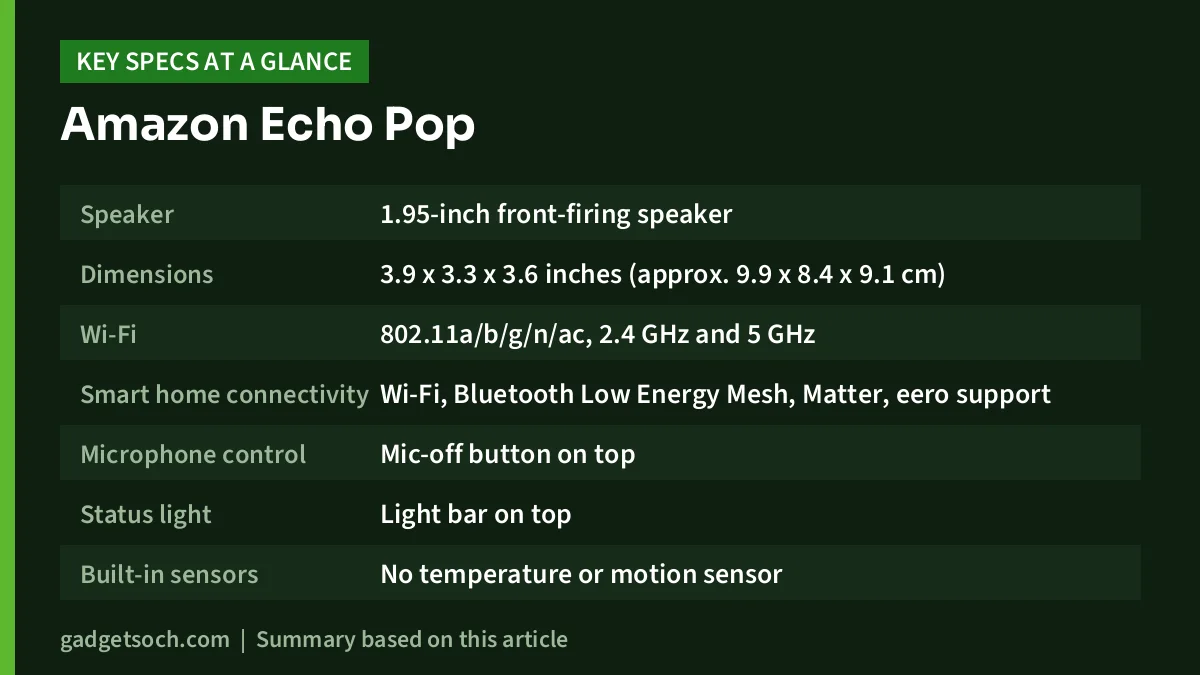
| Item | Detail |
|---|---|
| Speaker | 1.95-inch front-firing speaker |
| Dimensions | 3.9 x 3.3 x 3.6 inches (approx. 9.9 x 8.4 x 9.1 cm) |
| Wi-Fi | 802.11a/b/g/n/ac, 2.4 GHz and 5 GHz |
| Smart home connectivity | Wi-Fi, Bluetooth Low Energy Mesh, Matter, eero support |
| Microphone control | Mic-off button on top |
| Status light | Light bar on top |
| Built-in sensors | No temperature or motion sensor |
| Power | Wall adapter with proprietary plug |
| Colour in this combo | Black |
| Bundled item | Wipro Simple Setup 9W LED smart bulb |
Speaker size, connectivity and sensor details are from Tom’s Guide’s Echo Pop review. Design and launch details are from Wikipedia’s Amazon Echo entry. Weight is not listed in the sources checked, so it is left out.
Check the current price of the Echo Pop + Wipro 9W smart bulb combo on Amazon.in
Sound quality: built for small rooms
The Echo Pop uses a single 1.95-inch front-firing speaker. For context, Tom’s Guide notes the Echo Dot (5th Gen) uses a 1.73-inch driver. A front-firing design pushes sound towards you rather than all around, which suits a desk or a shelf facing the bed.
Tom’s Guide found the audio good for its size and suited to small spaces, but said bass was not as booming as on the full-size Echo and that sound became more compressed as volume went up. In a side-by-side listen with the Echo Dot, the same reviewer was hard-pressed to find much difference in audio. Wider press coverage summarised on Wikipedia echoes this: reviewers saw the Pop as a good fit for small rooms or for buyers who do not need higher audio quality.
That makes it well suited to news briefings, cricket score updates, podcasts and background playlists. If music is your main reason for buying, pick a larger speaker.
Privacy and everyday controls
Because an Alexa speaker is always waiting for its wake word, the physical mic-off button is an important feature. Pressing it stops the device from listening until you turn the microphones back on. Tom’s Guide notes one side effect: tapping the top to snooze an alarm works only while the microphones are on.
The light bar on top also acts as a quick visual check of whether Alexa is listening.
How to set up Alexa with the Wipro smart bulb
The steps below describe the general process. The bulb’s leaflet and the Alexa app on your phone are the final word, because app menus change over time.
Step 1: set up the Echo Pop
Install the Amazon Alexa app on your phone and sign in with the same Amazon account you used to buy the combo. Plug in the Echo Pop, wait for the light bar to show it is ready, then add the device from the app’s Devices section and connect it to your home Wi-Fi. Tom’s Guide confirms the Pop supports both 2.4 GHz and 5 GHz Wi-Fi.
Step 2: fit and power the bulb
Switch off the wall switch, fit the bulb in a holder that matches its base (B22 or E27), and switch it back on. Leave the wall switch on from now on: a smart bulb can only take commands when it has power. Train family members to use voice or the app, not the switch.
Step 3: let Simple Setup try first
Amazon’s developer documentation explains that its Frustration-Free Setup programme, which includes “simple setup”, uses a provisioner device that is already online, such as a compatible Echo, to help a new device join your network over Wi-Fi, Zigbee or Bluetooth, often after the customer simply powers it on. Amazon’s documentation describes this for devices linked to the buyer’s Amazon account, which is why using the same account for the purchase and the Alexa app matters. If the bulb is discovered, it will appear in the Alexa app under Devices.
Step 4: add it manually if it is not found
If the bulb does not appear, use the Add Device option in the Alexa app, choose the light category and select Wipro, then follow the prompts. Some Wipro bulbs are also set up through Wipro’s own smart home app first and then linked to Alexa, so follow the method named in the bulb’s leaflet. Keep your phone close to the bulb during setup.
Step 5: name it and build a routine
Give the bulb a simple name, such as “bedroom light”, so you can say “Alexa, turn off the bedroom light”, then use routines in the Alexa app to dim it at bedtime or switch it on in the morning.
Who will get the most from this combo
- Families trying Alexa for the first time who want one smart light working out of the box
- Students and working professionals who want a compact speaker for a desk or bedside table
- Elderly family members who find voice control easier than a phone app or a wall switch at night
Who should look elsewhere
- Music lovers who want strong bass and loud volume, given Tom’s Guide’s notes on compression and bass
- Anyone who wants temperature- or motion-triggered routines, which need an Echo with those sensors
- Buyers who need a portable speaker, since the Pop runs on mains power
- Homes where the light fittings do not match the bulb’s base type
- Households that already use Google Assistant for everything
Alternatives to consider
- Echo Pop without the combo: the same speaker on its own. Worth choosing if you already own smart bulbs or plan to buy a different brand.
- Amazon Echo Dot (5th Gen): Tom’s Guide lists a 1.73-inch driver, a built-in room temperature sensor and motion detection that can trigger routines. Pick it if those sensors matter to you.
- Echo Dot (5th Gen) with Clock: Tom’s Guide describes it as the same audio and smart home performance as the standard Dot, with an LED display for the time, making it a better bedside alarm clock.
If you already use Amazon’s ecosystem on your TV, our Fire TV Stick 4K Plus review covers another Alexa-ready device that can sit alongside an Echo.
Before you order: a quick checklist

- Confirm the listing: the link opens the Echo Pop (Black) combo with the Wipro 9W Simple Setup bulb. Check that the bundle and colour are as you expect.
- Bulb base: check whether the bulb is B22 or E27 and match it to your holder.
- Wi-Fi: keep your Wi-Fi name and password ready. Many smart bulbs only connect on 2.4 GHz, so check the bulb leaflet if setup fails.
- Account: buy with the same Amazon account you will use in the Alexa app.
- Warranty: the Echo Pop and the Wipro bulb are made by different companies, so warranty and service may be handled separately. Read the warranty details on the listing and in each box, and keep the GST invoice.
When you are ready, see the Echo Pop (Black) + Wipro 9W smart bulb combo on Amazon.in and confirm the bundle details on the page.
Frequently asked questions
Does the Echo Pop need Wi-Fi to work?
Yes. Alexa needs an internet connection for voice requests. Tom’s Guide lists dual-band Wi-Fi (2.4 GHz and 5 GHz) support for the Echo Pop.
Can Alexa control the Wipro bulb without a separate hub?
The “Simple Setup” label points to Amazon’s simplified setup programme, and Amazon’s documentation says simple setup uses an online Echo or another compatible device as the provisioner rather than a dedicated hub. If automatic discovery does not work, use the manual method in the bulb’s leaflet.
Is the Echo Pop better than the Echo Dot?
Not overall. Tom’s Guide found little audio difference between the two, but the Echo Dot (5th Gen) adds temperature and motion sensors. The Pop’s advantages are its smaller size and flat-front shape.
Can I mute the Echo Pop’s microphones?
Yes. There is a microphone-off button on top. While the mics are off, Alexa will not respond to voice commands, and Tom’s Guide notes tap-to-snooze for alarms also stops working.
Does Alexa on the Echo Pop understand Hindi?
Alexa supports Hindi as one of its languages, and it has been available in India since 2017.
Bottom line
The Echo Pop is a small, well-designed entry point into Alexa, and the Wipro 9W smart bulb in this combo turns it into a working smart home starter kit from the first evening. Expect clear voice responses and pleasant background music in a small room rather than big sound, and accept that there are no built-in sensors. If that matches your needs, check the current price of the Echo Pop + Wipro smart bulb combo on Amazon.in.
Related reading on GadgetSoch: Fire TV Stick 4K Plus Review India: Compatibility, Apps and Who Should Buy It.
Sources
- Tom’s Guide: Amazon Echo Pop review (specs, sound, mic-off, sensors) (checked 17 October 2026)
- Tom’s Guide: Amazon Echo Dot (5th Gen) review (checked 17 October 2026)
- Wikipedia: Amazon Echo (Echo Pop release date and design) (checked 17 October 2026)
- Wikipedia: Amazon Alexa (India launch, Hindi support) (checked 17 October 2026)
- Amazon Developer: Frustration-Free Setup (checked 17 October 2026)
- Wipro Consumer Lighting: smart home lights (9W Wi-Fi smart bulb) (checked 17 October 2026)




