
The Zebronics ZEB-NC3300 is a basic USB-powered laptop cooling pad with two 120 mm fans, blue LED lighting, dual USB ports and a retractable stand, made for laptops up to 15.6 inches. It is worth considering if you have a gaming or performance laptop that pulls air in through its bottom panel and runs hot during long sessions. Expect modest temperature gains rather than a performance boost, and skip it if your laptop is thin, quiet and already cool.
This review is based on the official Zebronics product page, retailer listings and published independent tests of laptop cooling pads, all checked on 17 October 2026. We have not tested this cooling pad hands-on, so there are no first-hand temperature figures here.
Quick verdict
- Best for: 15.6-inch gaming or performance laptops with intake vents on the underside, used on a desk for long gaming, rendering or compiling sessions
- Also useful for: raising the laptop off a bed, sofa or lap so the bottom vents are not blocked
- Key strengths: two large 120 mm fans, 75 CFM rated airflow, low 350 mA power draw, 650 g net weight, retractable stand
- Key limitations: no fan-speed control listed, only supports up to 15.6-inch laptops, no published noise figure, and the stand has no stated height levels
- Skip if: you own a thin-and-light laptop that already runs cool, a 16-inch or 17-inch machine, or a laptop that takes in air mainly from the sides or keyboard deck
Zebronics ZEB-NC3300 key specifications
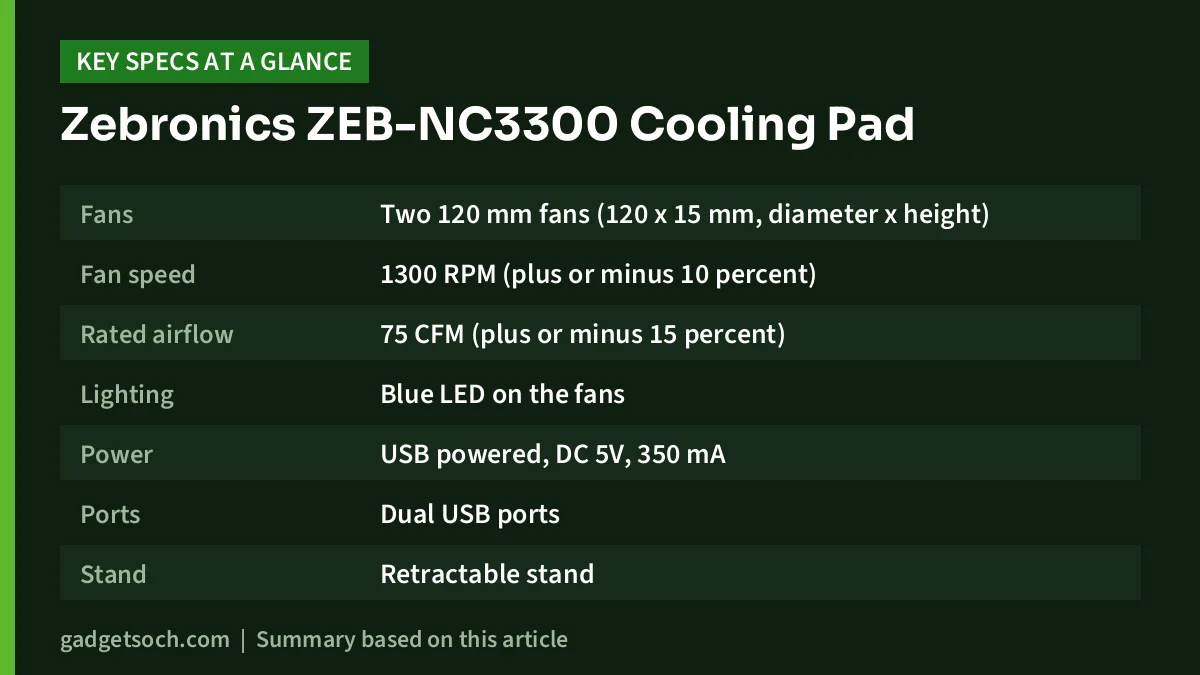
The table below lists the specifications published on the official Zebronics product page. Rows that Zebronics does not specify (such as noise level and stand angles) are left out rather than guessed.
| Specification | Zebronics ZEB-NC3300 |
|---|---|
| Fans | Two 120 mm fans (120 x 15 mm, diameter x height) |
| Fan speed | 1300 RPM (plus or minus 10 percent) |
| Rated airflow | 75 CFM (plus or minus 15 percent) |
| Lighting | Blue LED on the fans |
| Power | USB powered, DC 5V, 350 mA |
| Ports | Dual USB ports |
| Stand | Retractable stand |
| Supported laptop size | Up to 15.6 inches |
| Dimensions | 368 x 260 x 27 mm (W x D x H) |
| Net weight | 650 g |
| In the box | Cooling pad, USB cable |
| Country of origin | China |
Check the current price of the Zebronics ZEB-NC3300 cooling pad on Amazon.in
Do laptop cooling pads actually work?
Sometimes, and only modestly. A cooling pad cannot remove heat from inside the laptop by itself. It simply pushes more cool air towards the underside of the machine and lifts it off the surface it sits on. If your laptop’s own fans pull air in through vents on the bottom panel, that extra air and clearance can lower internal temperatures. If the laptop draws air from elsewhere, the gain shrinks.
Independent tests support this nuanced view. According to Notebookcheck’s 2020 test, a popular budget cooling pad (the Havit HV-F2056, not the Zebronics) lowered average CPU temperature on an MSI GP65 gaming laptop from 92°C to 80°C and average GPU temperature from 76°C to 70°C while running The Witcher 3. Notebookcheck chose that laptop because its bottom panel has more intake vents than most, and noted that laptops with smaller bottom vents would likely see smaller gains. The same test recorded a noticeable rise in overall fan noise, from 53.9 dB(A) to 59.2 dB(A).
Laptop Mag tested a dozen best-selling cooling pads on three laptops and found an average internal temperature drop of 13°F (roughly 7°C), with some pads managing only 1 to 2 degrees. Crucially, processing performance improved by less than 2 percent, and gaming gains never reached a full extra frame per second. Laptop Mag also notes that its tests date back to 2017 and that newer chips and better thermal designs have made cooling pads less necessary.
The takeaway: a pad like the NC3300 can make a hot laptop a little cooler and more comfortable, but it will not unlock more frames or faster exports. Neither test used the ZEB-NC3300, so its exact effect on your laptop is unknown.
When the NC3300 is likely to help
- Gaming laptops with large bottom intakes. Many gaming laptops draw air in through vents on the underside. Feeding that area with two 120 mm fans is exactly the scenario where Notebookcheck saw double-digit CPU temperature drops.
- Long, sustained loads. Gaming, video rendering and code compiling keep the CPU and GPU busy for hours, which is when heat builds up. Short browsing sessions rarely benefit.
- Soft surfaces. Using a laptop on a bed, mattress or cushion can block the bottom vents completely. Even with the fans off, the pad gives the laptop a flat, raised base.
- Comfort on your lap or desk. In Notebookcheck’s test, the laptop’s surface hot spot dropped from 44°C to 40°C with a pad, which matters if your palm rests or the underside get uncomfortably warm.
If you own a gaming laptop such as the Lenovo LOQ i5-12450HX RTX 3050 or the HP Victus 15 with RTX 3050, check where its intake vents sit before buying. If the underside has large vent grilles, a pad like the NC3300 is a sensible low-cost add-on for long gaming sessions.
Fans, airflow and noise
The NC3300 uses two 120 mm fans rated at 1300 RPM and 75 CFM of airflow, according to Zebronics. In Notebookcheck’s test, the pad’s larger fans produced a noticeably lower-pitched sound than the laptop’s own fans.
Zebronics describes the NC3300 as offering silent operation but publishes no decibel figure, so we cannot confirm how quiet it is. It also lists no fan-speed controller for this model, so if you want to dial the fans down for quiet work and up for gaming, look at a model with speed control. For best results, line up the two fans with your laptop’s main intake vents.
Design, stand, power and ports
At 368 x 260 x 27 mm and 650 g net (per the official page), the NC3300 is slim and light. The blue LED on the fans is purely cosmetic. Zebronics does not list an LED on-off switch for this model, so assume the lighting comes on whenever the fans run.
The retractable stand lifts the rear of the pad to tilt the keyboard towards you and add clearance under the laptop. Zebronics does not specify height levels or tilt angle, so do not expect the multi-step adjustment of pricier stands.
Power comes from a single USB connection rated at DC 5V, 350 mA, which works out to under 2 watts, so the pad has very little effect on battery life when used unplugged.
Zebronics lists dual USB ports but does not explain how the second port is meant to be used. Many pads of this type offer a pass-through port, but confirm this on the listing before relying on it. The connector type of the supplied cable is also not stated, so USB-C-only laptop owners should check the listing photos.
Who should buy the Zebronics ZEB-NC3300

- Owners of 15.6-inch gaming laptops with bottom intake vents who play or render for long stretches
- Students and home users who often use a laptop on a bed or sofa and want a flat, ventilated base
- Anyone in a warm room without AC who wants a small, low-cost way to reduce surface heat
- Buyers who prefer a simple plug-and-play pad without software, controllers or RGB modes
Who should skip it
- Owners of 16-inch or 17-inch laptops, which exceed the supported size
- Anyone who wants adjustable fan speed or multiple height levels
- People who expect higher frame rates or benchmark scores, since independent tests show negligible gains
- Users whose laptop has started overheating suddenly, who should first get the vents and heatsink cleaned
- Owners of thin-and-light laptops with small or no bottom vents, or machines that rarely get hot
Alternatives worth comparing
If the NC3300 does not quite fit your needs, these Zebronics cooling pads address some of its gaps. Specifications below are from the official Zebronics product pages.
- Zebronics ZEB-NC8000: supports laptops up to 17 inches, adds a fan-speed controller, a 5-level adjustable stand, RGB lighting and a mobile holder, with 65 CFM rated airflow.
- Zebronics ZEB-NC6500D: uses six 70 mm fans with speed control, RGB lighting and a 5-step retractable stand, and supports laptops up to 17 inches. Its rated airflow (47 CFM) is lower than the NC3300’s.
- Zebronics ZEB-NC9200: a larger pad with a single 140 mm RGB fan rated at 89 CFM, a 7-level speed controller and support for laptops up to 19 inches, but it is heavier at 1.25 kg and draws more power (DC 5V, 1.3 A).
What to check before you order

- Laptop size: confirm your laptop is 15.6 inches or smaller. Measure the base, not just the screen diagonal.
- Vent position: flip your laptop over and check for intake grilles on the bottom panel. No bottom vents means little benefit.
- Variant and listing: the affiliate link opens the listing titled Zebronics ZEB-NC3300 USB Powered Laptop Cooling Pad with Dual Fan, Dual USB Port and Blue LED Light. Confirm the model name and colour on the listing before you order.
- Box contents: Zebronics lists only the cooling pad and one USB cable, so do not expect any adapter in the box.
- Warranty and service: the product is imported and marketed in India by Zebronics India Pvt Ltd, Chennai. Check the warranty period stated on the Amazon listing and keep your invoice for claims.
- Ports: make sure your laptop has a free USB port that matches the supplied cable, or plan for an adapter.
See the Zebronics ZEB-NC3300 listing on Amazon.in to confirm the current price, seller and warranty details.
Frequently asked questions
Will the Zebronics NC3300 increase my laptop’s gaming FPS?
Do not expect it to. Independent tests by Laptop Mag found that cooling pads improved processing performance by less than 2 percent and did not add even one full frame per second in games. The main benefit is lower temperatures and a cooler surface, not more speed.
Does the ZEB-NC3300 fit a 16-inch laptop?
Zebronics officially supports laptops up to 15.6 inches. A 16-inch laptop may still sit on the pad but will overhang it and may not line up well with the fans, so a model rated for 17 inches is a safer choice.
Is the Zebronics NC3300 noisy?
Zebronics describes it as silent operation, but it does not publish a noise figure in decibels. Its two 120 mm fans run at a rated 1300 RPM, and Notebookcheck found that a pad’s larger fans sounded lower-pitched than the laptop’s own fans, though the combined noise level still rose. Without a measured figure, treat the silent claim as the brand’s description rather than a tested result.
Will a cooling pad fix a laptop that is overheating and shutting down?
Probably not on its own. Sudden overheating usually points to dust build-up, a failing fan or old thermal paste, and Laptop Mag calls a cooling pad a short-term solution to a long-term problem in such cases. Get the laptop cleaned or serviced first.
Final verdict
The Zebronics ZEB-NC3300 is a no-frills cooling pad with two large 120 mm fans, 75 CFM of rated airflow and a very low power draw. On a 15.6-inch gaming laptop with bottom intake vents, a pad like this can trim temperatures and make long sessions more comfortable, as independent tests of similar pads show. Buy it for comfort and modest cooling, not for extra performance.
Check the current price of the Zebronics ZEB-NC3300 cooling pad on Amazon.in
Related reading on GadgetSoch: Portronics Bubble Keyboard Review: Quiet, Compact and Built for Three Devices and Logitech MK270r Review: Full-Size Wireless Combo for Everyday Work.
Sources
- Zebronics ZEB-NC3300 official product page (specifications, checked 17 October 2026)
- Reliance Digital ZEB-NC3300 listing (features and dimensions cross-check, checked 17 October 2026)
- Notebookcheck: How well does a laptop cooling pad work? (Allen Ngo, 2020)
- Laptop Mag: Does anybody really need a laptop cooling pad? (Brian Westover, updated January 2023)
- Zebronics ZEB-NC8000 official page
- Zebronics ZEB-NC6500D official page
- Zebronics ZEB-NC9200 official page




