The Zebronics Viper 100W (model ZEB-VIPER 100W) is a budget rechargeable gaming mouse that connects three ways: a 2.4 GHz nano receiver, Bluetooth, or a wired cable. On paper it suits casual and entry-level gamers who also want one mouse for work, thanks to six DPI steps up to 8,000, polling rates up to 1,000 Hz and a light 70 g body. The catch is that Zebronics does not publish a battery life figure, a sensor model or a Bluetooth version, so some of the details serious players care about are unknown.
This review is based on Zebronics’ official product page and the Amazon.in listing, both checked on 17 October 2026, and not on hands-on testing. We did not find an independent review of this specific model, so we explain what each published spec means for you instead of claiming results.
The affiliate link here points to the Zebronics Viper 100W Premium Wireless Gaming Mouse listing on Amazon.in, where the colour is shown as Black_100. Check that the listing still says Viper 100W before ordering.
The short version
- Good fit for: students and casual gamers on Windows who want one wireless mouse for games, laptop work and a tablet or phone over Bluetooth
- Look elsewhere if: you play competitive shooters seriously and want a named high-end sensor, published battery life and very high click-life switches
- Strengths on paper: tri-mode connectivity, 800 to 8,000 DPI in six steps, 125 to 1,000 Hz polling, 70 g weight, 10 m wireless range, rechargeable
- Weak spots: no published battery life, unnamed sensor, Bluetooth version not stated, button count differs between the official page and the Amazon listing
Zebronics Viper 100W specifications
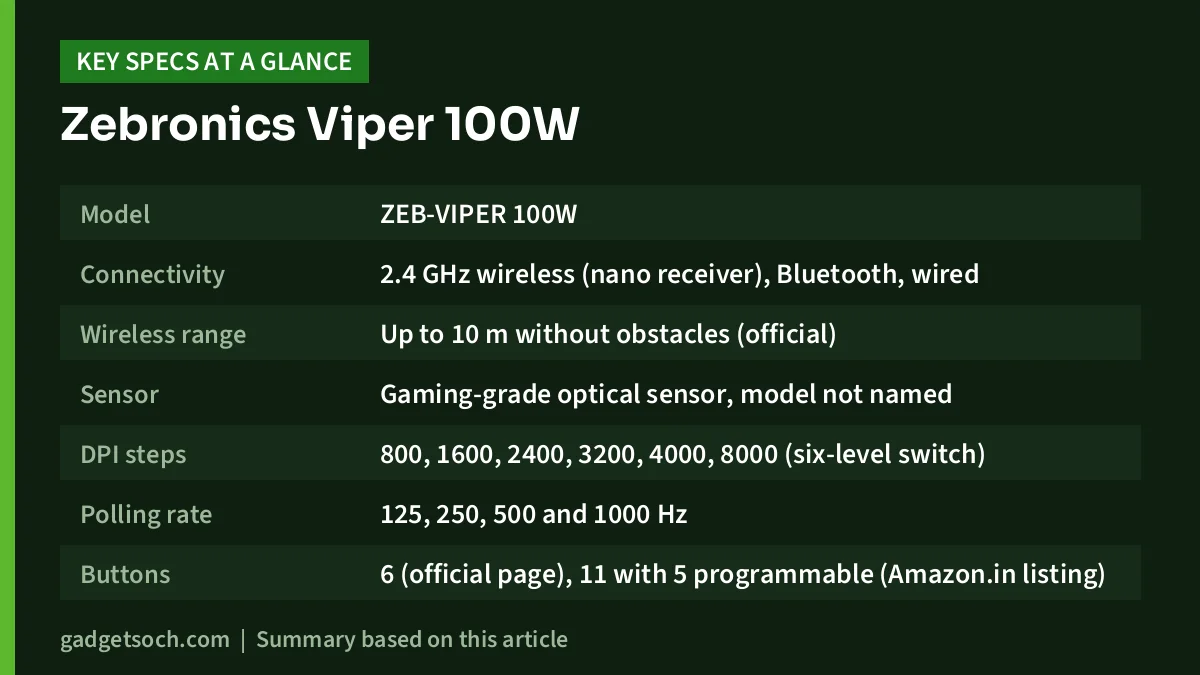
| Item | What Zebronics or the listing says |
|---|---|
| Model | ZEB-VIPER 100W |
| Connectivity | 2.4 GHz wireless (nano receiver), Bluetooth, wired |
| Wireless range | Up to 10 m without obstacles (official) |
| Sensor | Gaming-grade optical sensor, model not named |
| DPI steps | 800, 1600, 2400, 3200, 4000, 8000 (six-level switch) |
| Polling rate | 125, 250, 500 and 1000 Hz |
| Buttons | 6 (official page), 11 with 5 programmable (Amazon.in listing) |
| Switches | Huano, rated for 5 million clicks (official) |
| Battery | Built-in rechargeable, capacity and runtime not published |
| Charging time | About 3 hours (official) |
| Charging cable | 1.5 m, included |
| Weight | 70 g (mouse), 2 g (receiver) |
| Mouse size (W x D x H) | 6.1 x 11.6 x 3.8 cm |
| Software | Windows software (listing title calls it advanced) |
| In the box | Mouse, nano receiver, charging cable, QR code guide |
| Warranty (Amazon.in listing) | 1 year, carry-in to service centre |
| Country of origin | China |
Check the current price of the Zebronics Viper 100W on Amazon.in
Tri-mode connectivity: why it is the main reason to buy
Many budget wireless mice give you only one wireless option. The Viper 100W lists all three modes, and each has a different job.
The 2.4 GHz nano receiver is the mode to use for gaming on a PC or laptop. A dedicated receiver is normally more consistent than Bluetooth and is what makes the 1,000 Hz polling rate meaningful. Zebronics quotes a range of up to 10 m with no obstacles, which is more than enough for a desk.
Bluetooth frees up a USB port and lets you use the mouse with a tablet, a second laptop or a device that has no spare USB-A port. Zebronics does not name the Bluetooth version, and it does not say what polling rate applies in this mode, so think of Bluetooth as the office and travel mode rather than the gaming mode.
Wired mode uses the 1.5 m charging cable, so you can keep playing while the battery charges. Zebronics does not state the connector type on the product page, so check the listing photos if you want to share a cable with your phone.
There is a combined mode and power switch on the mouse and a power-saving mode, according to the official page. Switching off the mouse when you carry your laptop around is a simple way to stretch each charge.
DPI and polling rate in plain terms
DPI decides how far the cursor moves for each inch you move the mouse. The Viper 100W has fixed steps of 800, 1600, 2400, 3200, 4000 and 8000, selected with a DPI button. Many players use something between 800 and 1600 in games and slightly higher on a large or high-resolution monitor. The 8,000 setting looks impressive on a box, but very few people play at that sensitivity, so treat it as headroom rather than a reason to buy.
Polling rate is how often the mouse reports its position to the computer. Zebronics lists 125, 250, 500 and 1000 Hz. At 1,000 Hz the mouse reports every millisecond, which is the long-standing standard for gaming mice and feels smooth on high refresh rate screens. Lower rates can help save battery on a laptop when you are only browsing or typing.
What Zebronics does not publish is the sensor model, its maximum tracking speed or acceleration. Those figures help competitive players compare mice. For casual gaming they matter less, but their absence is worth knowing if you are deciding between this and a mouse with a well-documented sensor.
Battery: the missing number
The Viper 100W uses a built-in rechargeable battery and Zebronics quotes about 3 hours to charge. It does not publish battery capacity or expected hours of use per charge on the official page or in the Amazon.in listing we checked. Runtime on any wireless mouse depends heavily on mode and polling rate: 2.4 GHz at 1,000 Hz usually drains faster than Bluetooth at a lower rate.
Without an official figure, plan to charge it regularly and keep the cable at your desk. If long battery life is your top priority, mice that publish a runtime figure, such as the AA-powered options below, give you something concrete to compare.
Buttons, switches and shape
This is where the official page and the listing disagree. Zebronics’ product page lists six buttons. The Amazon.in listing’s technical details say 11 buttons, and its feature bullets describe 5 programmable buttons plus 6 responsive buttons. The listing title also says 5 programmable buttons. We cannot confirm which description matches the physical layout, so look at the listing photos and the button diagram before ordering if you need a set number of side buttons for games or shortcuts.
The main switches are Huano units rated by Zebronics for 5 million clicks. Huano is a common switch maker in budget and mid-range mice. Higher-end mice often quote much higher click ratings, so this is an area where price shows.
The mouse measures 6.1 x 11.6 x 3.8 cm and weighs 70 g, according to Zebronics. At 11.6 cm long it is a medium-length mouse. Grip comfort depends on your hand size and grip style, and Zebronics describes the shape only as comfortable and lightweight, so if you have large hands, compare those dimensions with a mouse you already like.
Software and compatibility
The listing title mentions advanced Windows software for customising the mouse, and the Amazon.in technical details list Windows as the operating system. The official page does not list macOS, Linux or Android support for the software. Zebronics does not confirm how the mouse behaves on other systems, so treat programmable buttons and software customisation as Windows-only unless Zebronics says otherwise.
Who it suits and who should skip it

- Buy it if you want one rechargeable mouse that switches between a gaming PC, a work laptop and a tablet
- Buy it if you play casual or mid-level games on Windows and want 1,000 Hz polling without a cable
- Buy it if you prefer a light mouse, since Zebronics lists it at 70 g
- Skip it if you need known battery life before buying
- Skip it if you are a Mac user who relies on software customisation
- Skip it if you play competitive esports and want a documented flagship sensor and high click-rated switches
Alternatives to consider
Logitech G304 / G305 LIGHTSPEED: Logitech India’s page lists a HERO sensor with 200 to 12,000 DPI, LIGHTSPEED wireless, and one AA battery with a claimed 250 hours of run-to-die battery life. Bluetooth is not mentioned on that page, and the battery is replaceable rather than rechargeable.
Razer Basilisk V3 X HyperSpeed: Razer lists its 5G Advanced 18K optical sensor, both HyperSpeed wireless and Bluetooth, one AA battery rated at up to 285 hours on HyperSpeed and up to 535 hours on Bluetooth, 7 programmable buttons, and mechanical switches rated for up to 60 million clicks. Razer publishes far more battery and switch detail than Zebronics does for the Viper 100W.
Logitech G PRO X Superlight 2: a much more expensive step up for competitive players. Logitech India lists a HERO 2 sensor up to 44,000 DPI, up to 8 kHz LIGHTSPEED polling, about 60 g, up to 95 hours of battery and hybrid switches rated for 70 million clicks. Read our Logitech G PRO X Superlight 2 review for the details.
Before you order: a quick checklist

- Confirm the listing says Viper 100W and the colour you want
- Look at the listing photos to count the buttons, since the official page and the listing differ
- Keep the nano receiver safe, as you need it for the 2.4 GHz gaming mode
- Download the Windows software from Zebronics’ official site rather than third-party sites
- Register the product for warranty on Zebronics’ site and keep the invoice; the Amazon.in listing states a 1-year carry-in warranty
- Charge it fully before first use and switch it off when you carry it in a bag
See the Zebronics Viper 100W (Black) on Amazon.in and check the current listing details before you buy.
Frequently asked questions
Is the Zebronics Viper 100W wireless and Bluetooth?
Yes. Zebronics lists three modes: 2.4 GHz wireless through a nano receiver, Bluetooth and wired. The Bluetooth version is not stated.
What is the battery life of the Zebronics Viper 100W?
Zebronics does not publish a battery life figure. It only says the battery is rechargeable and takes about 3 hours to charge.
Does the Viper 100W support 1000 Hz polling?
Yes. The official page lists selectable polling rates of 125, 250, 500 and 1000 Hz.
How many buttons does the Zebronics Viper 100W have?
The official product page lists six buttons, while the Amazon.in listing says 11 buttons with five programmable. Check the listing photos for the exact layout.
Does it work with a Mac?
Zebronics does not list macOS support, and the customisation software is described only for Windows. If you use a Mac, confirm compatibility with Zebronics support before buying.
Bottom line
The Zebronics Viper 100W puts tri-mode connectivity, 1,000 Hz polling and a 70 g rechargeable body into a budget gaming mouse, which makes it a flexible choice for Windows users who game casually and work on the same desk. Its unpublished battery life, unnamed sensor and inconsistent button count mean you are buying with less information than with better-known brands. If flexibility matters more than documented specs, it is worth a look.
Check the current price of the Zebronics Viper 100W on Amazon.in
Related reading on GadgetSoch: Kreo Hive 65 Review: Wired 65% Gasket Keyboard, Specs and Who It Suits and AULA F75 Review (Graywood): Tri-Mode 75% Gasket Keyboard, Strengths and Mac Caveats.
Sources
- Zebronics: ZEB-VIPER 100W official product page (checked 17 October 2026)
- Amazon.in listing for ASIN B0H2YL23H6, title, feature bullets and technical details (captured 17 October 2026)
- Logitech G India: G304/G305 LIGHTSPEED (checked 17 October 2026)
- Razer: Basilisk V3 X HyperSpeed (checked 17 October 2026)
- Logitech G India: PRO X Superlight 2 (checked 17 October 2026)