
The TP-Link Deco X15 (3-pack) is a dual-band AX1500 Wi-Fi 6 mesh system that, according to its Amazon.in listing, covers up to 5,600 sq ft and supports up to 120 devices. It is a sensible upgrade for multi-floor Indian homes where a single ISP router leaves dead zones, especially if you can run Ethernet between units. It is not a high-speed system: on fast fibre plans, its dual-band design and 1,201Mbps 5GHz link set a ceiling.
This 3-pack listing is sold through the TP-Link store on Amazon.in and includes three Deco X15 units, three power adapters, one Ethernet cable and a quick installation guide. Check that the listing you open still says “3-Pack”, because 1-pack and 2-pack versions use similar titles.
This article explains the Deco X15 using the Amazon.in listing details (captured 17 October 2026) and TP-Link’s India support page for the model. TP-Link’s product specification page could not be loaded during research, so specifications are labelled as listing claims. Gadget Soch has not tested this mesh system, and no speed or range test results are reported here.
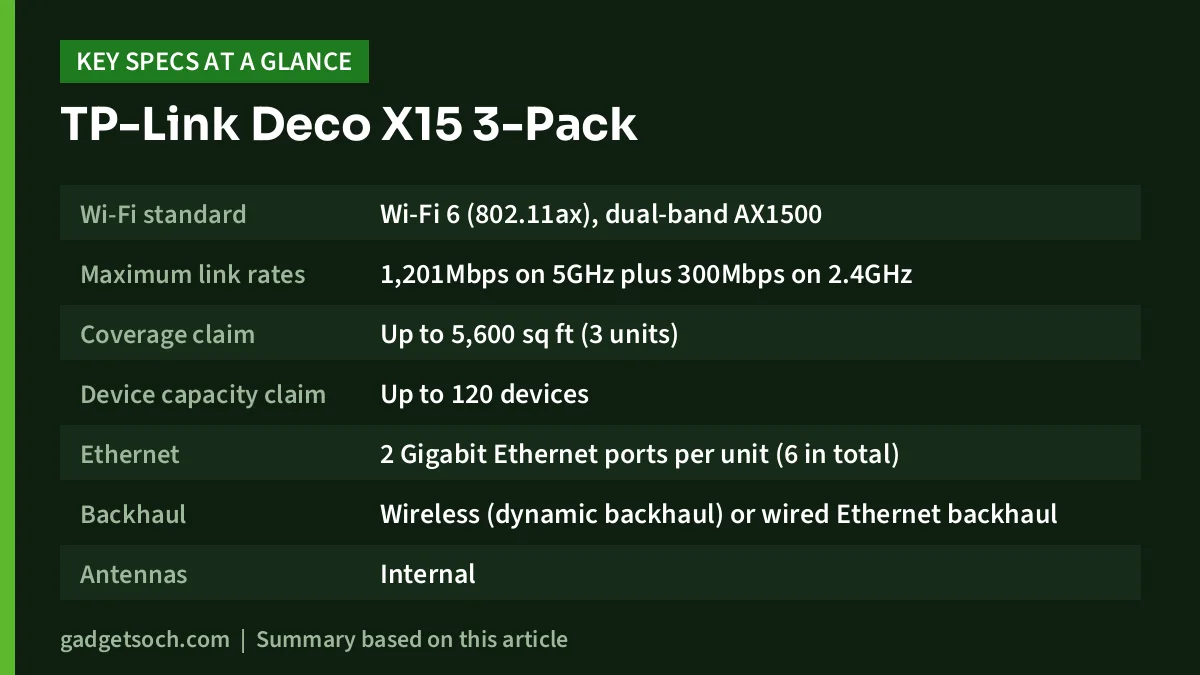
| Specification | Deco X15 3-pack (as listed on Amazon.in) |
|---|---|
| Wi-Fi standard | Wi-Fi 6 (802.11ax), dual-band AX1500 |
| Maximum link rates | 1,201Mbps on 5GHz plus 300Mbps on 2.4GHz |
| Coverage claim | Up to 5,600 sq ft (3 units) |
| Device capacity claim | Up to 120 devices |
| Ethernet | 2 Gigabit Ethernet ports per unit (6 in total) |
| Backhaul | Wireless (dynamic backhaul) or wired Ethernet backhaul |
| Antennas | Internal |
| Security | WPA3-Personal, TP-Link HomeShield (free basic tier) |
| Management | Deco app, remote management, Alexa and Google Assistant voice control |
| Backward compatibility | 802.11 b/g/n/ac/ax devices |
| Colour | White |
| In the box | 3 Deco X15 units, 3 power adapters, 1 RJ45 Ethernet cable, quick installation guide |
Quick verdict
- Best for: 2BHK to 4BHK homes and independent houses with dead zones, on broadband plans where coverage matters more than peak speed
- Skip if: you pay for a very fast fibre plan and want it at full speed everywhere, or your home is a compact flat a single good router already covers
- Strengths: three units for wide coverage, two Gigabit ports per unit, wired backhaul support, WPA3, simple app setup, free basic HomeShield features
- Limitations: dual-band only, so wireless backhaul shares the 5GHz band with your devices; AX1500 is the entry tier of Wi-Fi 6; no 2.5Gbps ports; advanced HomeShield features need a paid plan
Check the current price of the TP-Link Deco X15 3-pack on Amazon.in
What “AX1500 dual-band” means in practice
The AX1500 label adds up the maximum link rates of the two radios: 1,201Mbps on 5GHz and 300Mbps on 2.4GHz, according to the listing. These are theoretical wireless link rates, not internet speeds. Real throughput to a phone or laptop is always lower, and it falls with distance and walls.
The more important word is dual-band. A mesh system needs a link between units, called backhaul. On a dual-band system without Ethernet between units, that backhaul travels over the same radios your phones and laptops use. The result is that satellite units typically deliver noticeably less speed than the main unit. Tri-band mesh systems add a separate radio for backhaul to reduce this effect, but cost more.
For many Indian broadband plans, this ceiling is acceptable because the main problems at home are weak signal in far rooms, concrete walls and multiple floors, not peak speed. If your plan is fast and you want it in every room, plan for wired backhaul or a higher-tier system.
Wired backhaul: the feature that matters most
The listing states each Deco X15 has two Gigabit Ethernet ports and supports wired Ethernet backhaul. If your home already has Ethernet runs between floors, or you can route a cable along a skirting board, connecting the units by cable frees both wireless bands for your devices. This is the single best way to get more consistent speeds from a dual-band mesh.
The second port on each satellite unit is also useful on its own. You can plug a smart TV, desktop PC, gaming console or streaming box into a satellite with a cable, which is usually more stable than Wi-Fi for those devices.
How many units do you need, and where to place them
TP-Link’s coverage claim for this 3-pack is up to 5,600 sq ft. Real coverage depends on wall material, floor slabs, interference from neighbours’ Wi-Fi and where you place each unit. Reinforced concrete walls and floors, common in Indian homes, reduce range more than drywall.
- Main unit: connect it to your ISP’s router or fibre ONT with the supplied Ethernet cable, ideally in a central, open spot rather than inside a cabinet.
- Satellites: place each one roughly halfway between the main unit and the dead zone, not inside the dead zone itself, so it still receives a good signal to relay.
- Multi-storey homes: one unit per floor, near the staircase or directly above the main unit, often works better than placing units at the far ends of each floor.
- Avoid: placing units on the floor, behind TVs, near microwaves or inside metal enclosures.
- Use the app: the Deco app reports connection quality between units, so move a satellite if it shows a weak link.
Setting it up with an Indian ISP router or ONT
The listing notes that the Deco X15 works with any internet service provider but that a modem is required for most providers. In India, most fibre connections already include an ONT or ISP router, which acts as that modem. You then have two common approaches:
- Deco as the main router: set the ISP device to bridge mode (your ISP’s support team can often do this) and let the Deco handle the connection. This avoids double NAT, which can affect some online games and port forwarding.
- Keep the ISP router as router: connect the Deco behind it and check whether the Deco app offers access point mode for your unit, so the Deco only provides Wi-Fi. Confirm this option in the Deco app or TP-Link’s support pages for the Deco X15.
Setup itself is app-based: install the TP-Link Deco app, sign in with a TP-Link ID, add the main unit, then add each satellite. The listing says the system can be managed remotely through the app. TP-Link’s India support page for the Deco X15 (hardware version V1) lists the Deco app along with FAQs on QoS settings, Wi-Fi heatmaps and enabling two-factor authentication on your TP-Link account. Turn on two-factor authentication once setup is complete.
Security and parental controls
The listing states support for WPA3-Personal, the newer Wi-Fi security standard, while remaining compatible with older devices. It also describes TP-Link HomeShield, with free features including basic network security (security scan and IoT device identification), basic parental controls, QoS and basic weekly or monthly reports. More advanced HomeShield features require a paid subscription; check TP-Link’s current HomeShield terms before relying on them.
The listing also mentions AI-roaming, which TP-Link describes as using self-learning algorithms to manage how devices move between units, and notes that TP-Link has signed the US CISA Secure-by-Design pledge. These are TP-Link’s descriptions; no independent assessment of them is cited here.
Who should buy it
The Deco X15 3-pack fits families in larger flats, duplexes and independent houses where Wi-Fi drops in bedrooms, the terrace or upper floors, and where most devices are phones, laptops and smart TVs. It is especially good value if you can use wired backhaul, which turns its biggest weakness into a non-issue.
Who should look elsewhere
If your home is a small 1BHK or 2BHK and a single router almost covers it, a 3-pack is likely more than you need; a 2-pack or a single better router may be enough. If you pay for a fast fibre plan and want near-full speeds on every floor without running cables, a tri-band or higher-tier mesh system is a better match. Gamers who need 2.5Gbps wired ports will also want a higher model.
Alternatives worth comparing
- TP-Link Deco X20: TP-Link India lists it as AX1800 with link rates of 1,201Mbps on 5GHz and 574Mbps on 2.4GHz, and two Gigabit ports per unit. A step up on the 2.4GHz band.
- TP-Link Deco X50-PoE: TP-Link India lists it as AX3000 (2,402Mbps on 5GHz plus 574Mbps on 2.4GHz) with two 2.5Gbps ports that also accept PoE power, for wired homes that want faster ports.
- TP-Link Deco BE25: a Wi-Fi 7 BE5000 model with Multi-Link Operation and two 2.5Gbps ports, according to TP-Link India, for buyers planning ahead for newer devices.
What to check before you order
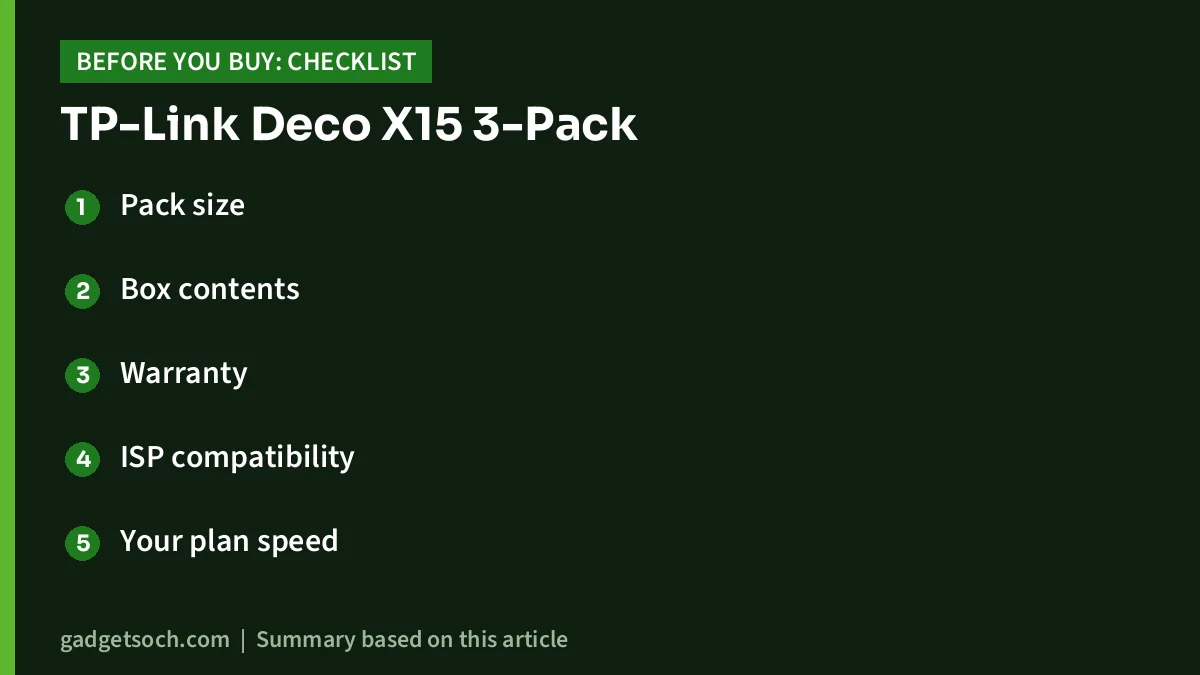
- Pack size: confirm the listing shows the 3-pack (model Deco X15(3-Pack)) and not a 1-pack or 2-pack.
- Box contents: expect three units, three power adapters, one Ethernet cable and a quick installation guide, as listed. Buy extra Ethernet cables if you plan wired backhaul.
- Warranty: the captured listing data does not state the warranty period. Check the listing and TP-Link India’s warranty page before buying, and keep the invoice.
- ISP compatibility: ask your ISP whether they can set their device to bridge mode, or plan to use the Deco behind the ISP router.
- Your plan speed: if your broadband plan is faster than what a dual-band wireless backhaul can carry, plan Ethernet between units.
- Mixing models: the listing says Deco products can work together in one mesh network, so you can add a different Deco unit later; confirm compatibility for the specific model you add.
See the Deco X15 3-pack listing on Amazon.in
Frequently asked questions
How much area does the TP-Link Deco X15 3-pack cover?
The listing claims up to 5,600 sq ft for three units. Concrete walls, floor slabs and placement reduce real coverage, so treat this as a best-case figure.
Does the Deco X15 support wired backhaul?
Yes. The listing states each unit has two Gigabit Ethernet ports and supports wired Ethernet backhaul, which improves speed and consistency between units.
Will the Deco X15 work with Jio, Airtel or other Indian broadband?
The listing says it works with any internet service provider, with a modem required for most. In India, your ISP’s ONT or router acts as that modem. You can use the Deco as the main router with the ISP device in bridge mode, or connect it behind the ISP router.
How many devices can it handle?
The listing claims up to 120 devices across the system. Actual performance with many active devices depends on what they are doing, such as streaming or video calls.
Is HomeShield free?
Basic HomeShield features are free according to the listing: security scan, IoT device identification, basic parental controls, QoS and basic reports. Advanced features require a paid plan.
Is the Deco X15 good for gaming?
It can work well for casual gaming, especially with a console wired to a unit’s Gigabit port. Competitive players who want the lowest latency should wire the gaming device and use wired backhaul.
Final thoughts
The TP-Link Deco X15 3-pack is a practical, entry-level Wi-Fi 6 mesh system for fixing dead zones across larger homes. Its listed strengths are wide coverage, two Gigabit ports per unit, wired backhaul support, WPA3 and an easy app. Its limits come from the dual-band AX1500 design, which caps speeds at satellite units unless you run Ethernet between them. If coverage is your problem rather than peak speed, it is worth shortlisting.
Check the current price and availability of the TP-Link Deco X15 3-pack on Amazon.in
Related reading on GadgetSoch: Resonate RouterUPS Pro Review: 10400mAh Router UPS, Real Backup and Limits and Resonate RouterUPS NxT Review: 7800mAh Router UPS, Compatibility and Backup Explained.
Sources
- Amazon.in listing for ASIN B0D7MKJ56S (sold via the TP-Link store): title, feature bullets and technical details (captured 17 October 2026)
- TP-Link India: Deco X15 V1 support and downloads page (checked 17 October 2026)
- TP-Link India: Deco X20 specifications (alternative; checked 17 October 2026)
- TP-Link India: Deco X50-PoE specifications (alternative; checked 17 October 2026)
- TP-Link India: Deco BE25 specifications (alternative; checked 17 October 2026)




