
The Crucial P510 1TB is one of the most affordable ways to put a PCIe 5.0 NVMe SSD in a desktop PC, and it is a good buy if your motherboard has a PCIe 5.0 M.2 slot and you want very fast sequential speeds without the heat of earlier Gen5 drives. Crucial rates it at up to 11,000 MB/s read and 9,500 MB/s write, with 600 TBW of endurance and a 5-year limited warranty. The trade-off is that it has no DRAM cache, so independent reviewers found small-file and everyday responsiveness roughly at PCIe 4.0 level rather than ahead of it.
This article covers the exact variant the Amazon.in link below opens: the Crucial P510 1TB PCIe Gen5 NVMe 2280 M.2 SSD (listed as in stock when we checked on 17 October 2026). It is aimed at desktop builders and upgraders on AMD AM5 or recent Intel platforms who want a Gen5 boot or game drive on a sensible budget.
How this review was put together: gadgetsoch did not test the P510 hands-on. Everything here is based on Crucial’s published specifications (as listed by retailers, because Crucial’s own product page could not be reached on 17 October 2026) and on published reviews from Guru3D, Galaxus, Real Hardware Reviews, APH Networks and Wccftech, each credited by name where its findings are used.
Quick verdict
- Best for: desktop PCs with a free PCIe 5.0 x4 M.2 slot, gamers and creators who move large files, builders who want Gen5 speed with low temperatures
- Skip if: your PC or laptop only has PCIe 4.0 or 3.0 M.2 slots, you write hundreds of gigabytes at a time, or you want the best small-file performance
- Key strengths: rated 11,000 MB/s read and 9,500 MB/s write, cool running for a Gen5 drive according to several reviews, single-sided M.2 2280 design, 600 TBW, 5-year limited warranty
- Key limitations: DRAM-less (uses Host Memory Buffer), weaker small-file and light-workload results in reviews, sustained-write speed drops after the cache fills, this variant has no heatsink
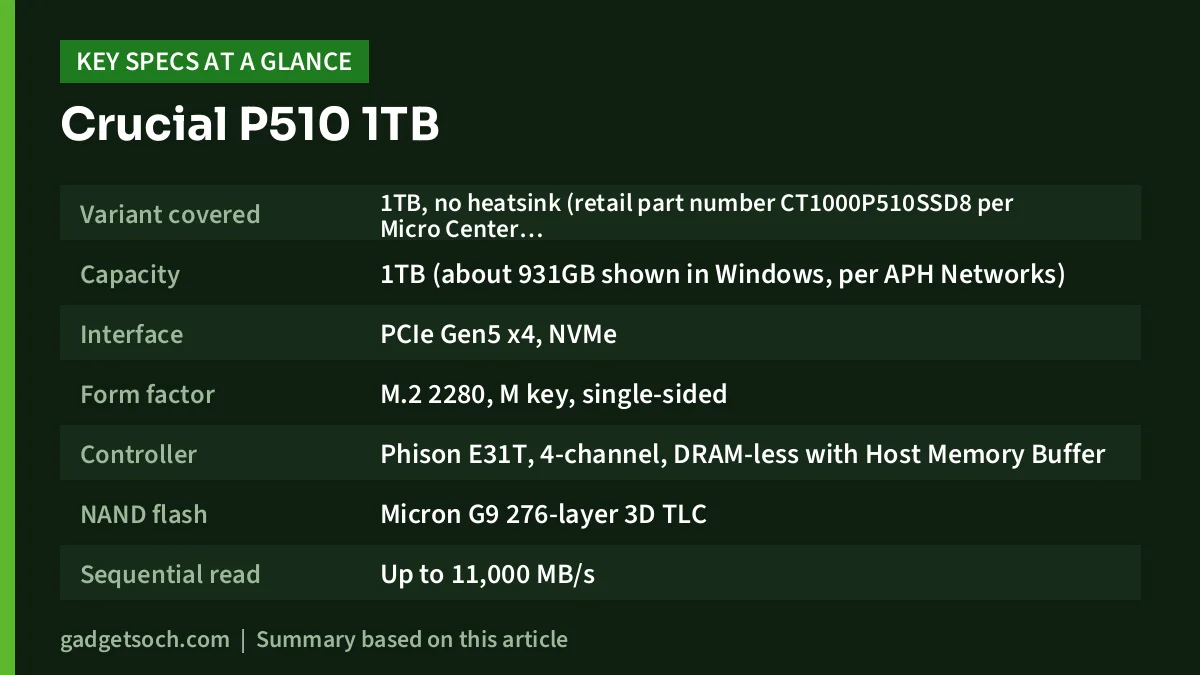
| Specification | Crucial P510 1TB |
|---|---|
| Variant covered | 1TB, no heatsink (retail part number CT1000P510SSD8 per Micro Center listing) |
| Capacity | 1TB (about 931GB shown in Windows, per APH Networks) |
| Interface | PCIe Gen5 x4, NVMe |
| Form factor | M.2 2280, M key, single-sided |
| Controller | Phison E31T, 4-channel, DRAM-less with Host Memory Buffer |
| NAND flash | Micron G9 276-layer 3D TLC |
| Sequential read | Up to 11,000 MB/s |
| Sequential write | Up to 9,500 MB/s |
| Random 4K write | Up to 1,500,000 IOPS |
| Endurance | 600 TBW |
| Warranty | 5-year limited |
Check the current price of the Crucial P510 1TB on Amazon.in
Gen5 speed only arrives in a Gen5 slot
This is the single most important thing to understand before buying the P510. The headline 11,000 MB/s figure needs a PCIe 5.0 x4 M.2 slot. A PCIe 5.0 x4 link offers roughly 16,000 MB/s of bandwidth in each direction (as APH Networks notes), which leaves headroom for the drive’s rated speeds.
The P510 is backward compatible, so it will work in a PCIe 4.0 M.2 slot, but there it runs at Gen4 speeds. A PCIe 4.0 x4 link has about half the bandwidth of Gen5, so the theoretical ceiling falls to just under 8,000 MB/s, and you end up with performance similar to a good Gen4 drive. Real Hardware Reviews summed up the compatibility side by saying the P510 should work in any build and M.2 port where Crucial’s Gen4 T500 would.
Many recent AMD AM5 and Intel desktop motherboards have at least one Gen5 M.2 slot, but not all do, and the Gen5 slot is often only one specific socket on the board. On some boards, using that slot also shares lanes with other devices. Check your motherboard manual for an M.2 slot labelled PCIe 5.0 x4 before paying extra for a Gen5 drive. Most laptops still use PCIe 4.0 slots, so laptop owners should usually look at Gen4 drives instead.
What is inside: E31T controller, G9 NAND and no DRAM
The P510 pairs a Phison E31T controller with Micron’s G9 276-layer TLC NAND. Guru3D describes the E31T as a 4-channel controller made on TSMC’s 7nm process, designed to use less power than Phison’s earlier E26 Gen5 controller (Guru3D cites up to 25% lower power).
The drive is DRAM-less. Instead of carrying its own DRAM chip for the mapping table, it borrows a small slice of your system memory through Host Memory Buffer (HMB), which helps keep cost, power and heat down. The downside showed up in reviews: Real Hardware Reviews pointed to the DRAM-less design as one reason smaller file transfers were held back, and APH Networks called small-file transfer results surprisingly low on its 1TB sample.
The 1TB model is single-sided, with all components on the label side. APH Networks found a single NAND package on its 1TB sample and noted the bare drive is under 11.25 mm thick. Single-sided drives are generally easier to fit under motherboard heatsinks and in slim systems.
Real-world performance according to reviewers
Independent tests largely confirmed the rated sequential numbers. Wccftech, testing the 1TB model on an Intel Core i9-13900K and MSI Z790 system, measured about 11,112 MB/s read and 9,442 MB/s write in CrystalDiskMark’s sequential test. Galaxus also reported read and write figures slightly above Crucial’s ratings in its review.
Everyday responsiveness is a different story. Wccftech’s PCMark 10 storage score for the P510 was the lowest in its comparison chart, and APH Networks concluded that real-world and medium workloads were no better than PCIe 4.0 drives. Galaxus put the P510 last in its office tests, while adding that the difference is hard to notice in daily use. For gaming, Galaxus placed it between Crucial’s flagship T705 and PCIe 4.0 rivals, and Wccftech recorded a 9.9-second load in Forspoken using DirectStorage.
In practical terms, the P510 makes the most sense when you regularly copy large files, such as game installs, video projects or disk images. For booting Windows, opening apps and browsing, a quality Gen4 drive will feel about the same.
Sustained writes and the cache limit
Like most consumer SSDs, the P510 writes fastest into a cache and slows once that fills. In Galaxus’s sustained-write test (the review’s linked sample was the 2TB model), speed dropped from about 4,800 MB/s to about 1,500 MB/s after roughly 70 GB, and stayed there until the drive was full. Galaxus listed this as the drive’s main weakness. Wccftech’s 100 GB file transfer test on the 1TB model averaged about 2,095 MB/s.
The 1TB model has less NAND than the 2TB version, so do not assume it behaves identically. If your work involves writing very large amounts of data in one go, such as long raw video captures, consider a higher capacity or a drive with stronger sustained-write behaviour.
Heat, power and whether you need a heatsink
Low temperature is where the P510 stands out among Gen5 drives. Galaxus recorded no more than 56 °C during continuous writes and called it the coolest SSD it had tested, about 30 °C cooler than the Crucial T705. Wccftech measured 60 °C with no heatsink and 51 °C under the motherboard’s own M.2 heatsink, compared with 82 °C for an uncovered Crucial T700.
The variant on this listing ships without a heatsink (Crucial sells a separate heatsink version). Most motherboards with a Gen5 M.2 slot include a heatsink cover for it, which is the best place to install the P510. If your slot has no cover, a basic M.2 heatsink is a sensible small addition.
Endurance and warranty
The 1TB P510 is rated for 600 TBW, which APH Networks works out to roughly 330 GB written per day for five years. That is far more than typical home, gaming or office use. Retail listings and Wccftech state a 5-year limited warranty. Warranty claims in India depend on the seller and Crucial’s local service process, so keep your invoice and check the terms shown on the listing.
Who should buy it, and who should skip it
Buy the Crucial P510 1TB if you are building or upgrading an AM5 or recent Intel desktop with a PCIe 5.0 M.2 slot, want strong sequential speeds for large game installs or media files, and value a drive that runs cool without an elaborate heatsink.
Skip it if your system only has PCIe 4.0 or 3.0 slots (a good Gen4 drive gives similar results there), if you need top-tier small-file and random performance, or if you often write very large files in one session. Laptop owners should check carefully, because most laptop M.2 slots are not Gen5.
Alternatives worth comparing
- Crucial T705: Crucial’s flagship Gen5 drive. Galaxus found it faster than the P510 in sequential reads, copying and gaming tests, but also much hotter, about 30 °C warmer in its write test.
- Crucial T500: a PCIe 4.0 drive that Real Hardware Reviews treats as the P510’s closest relative. It suits Gen4 systems, and the reviewer noted the T500 has an onboard DRAM cache, which the P510 lacks.
- Samsung 990 Pro: a well-known PCIe 4.0 drive. Galaxus measured the P510 ahead of it in sequential reads and in its 10 GB copy test, which matters only if you have a Gen5 slot.
- WD_BLACK SN850X: an NVMe drive rated at 7,300 MB/s read with a 5-year limited warranty, sold with or without a heatsink. Sandisk now lists it under the new name SANDISK Optimus GX PRO 850X.
If you need fast storage you can carry between computers rather than an internal drive, our SanDisk Extreme Portable SSD 1TB review covers a portable option.
What to check before you order

- Variant: the link below opens the 1TB PCIe Gen5 NVMe 2280 model. Confirm capacity and whether the listing is the standard or heatsink version before ordering.
- Slot type: confirm your motherboard has an M.2 2280 slot that supports PCIe 5.0 x4 NVMe. M.2 SATA-only slots will not work.
- Heatsink space: if your board has an M.2 cover, the standard version is the right choice. A heatsink version may not fit under a motherboard cover.
- Box contents: APH Networks found only the drive and a quick start guide in the box, so you need your own M.2 screw or latch from the motherboard.
- Warranty and seller: buy from a seller that provides a GST invoice and check the warranty details on the listing for service in India.
See the Crucial P510 1TB Gen5 NVMe SSD on Amazon.in
Frequently asked questions
Will the Crucial P510 work in a PCIe 4.0 slot?
Yes. PCIe is backward compatible, so the P510 runs in a PCIe 4.0 M.2 slot, but it is limited to Gen4 speeds there. The 11,000 MB/s rating is only reachable in a PCIe 5.0 x4 slot.
Is the Crucial P510 DRAM-less?
Yes. It uses the Phison E31T controller without a DRAM chip and relies on Host Memory Buffer, which borrows a small amount of system RAM. Reviewers linked this to weaker small-file performance.
Does the Crucial P510 need a heatsink?
Reviews found it runs cool for a Gen5 SSD. Wccftech measured 60 °C without a heatsink and 51 °C under a motherboard heatsink. Using the motherboard’s M.2 cover is still recommended where available.
What is the endurance of the 1TB P510?
The 1TB model is rated for 600 TBW and carries a 5-year limited warranty.
Is the P510 faster than a Gen4 SSD for gaming?
In large sequential transfers, yes, when installed in a Gen5 slot. For game loading and everyday use, reviewers such as APH Networks found the gains over good PCIe 4.0 drives were small.
Can I use the Crucial P510 in a PS5?
APH Networks notes the bare drive is under 11.25 mm thick, which fits the console’s size limit. The PS5’s M.2 slot is not Gen5, so the drive would run below its rated speeds, and you should follow Sony’s own guidance on drive and heatsink requirements.
Final thoughts
The Crucial P510 1TB is a sensible entry point to PCIe 5.0 storage. Reviewers agree it reaches its rated sequential speeds and runs much cooler than earlier Gen5 drives, while the DRAM-less design and early sustained-write slowdown keep everyday performance close to Gen4. If you have a Gen5 slot and move large files often, it is a strong choice. If not, a good Gen4 drive is the more practical buy.
Check the current price of the Crucial P510 1TB on Amazon.in
Related reading on GadgetSoch: Crucial P3 Plus 1TB Review: Fast Gen4 SSD With a QLC Catch and Laptop RAM and SSD Upgrade Guide: Which Crucial or SanDisk Part Fits?.
Sources
- Micro Center: Crucial P510 1TB listing with manufacturer specifications (checked 17 October 2026)
- Guru3D: Micron Crucial P510 review (Phison E31T)
- Galaxus: Crucial P510 review, PCIe 5.0 for a tight budget
- Real Hardware Reviews: Crucial P510 review, closing statement
- APH Networks: Crucial P510 1TB review
- Wccftech: Crucial P510 1TB review
- Sandisk: WD_BLACK SN850X product page (checked 17 October 2026)




